
POS Interface Scales for Grocery & Produce Checkout
BizTracker sells, services, repairs, calibrates, and supports POS interface scales for Tampa Bay grocery stores, produce markets, convenience stores, specialty food retailers, delis, seafood markets, meat markets, and fresh food businesses that sell products by weight.
A POS interface scale connects to the checkout system so cashiers can weigh produce, bulk foods, candy, deli items, seafood, meat, and other weighed products at the register. BizTracker supports CAS and Ishida scale workflows, including legal-for-trade calibration, POS compatibility planning, checkout setup, scale repair, and local service.
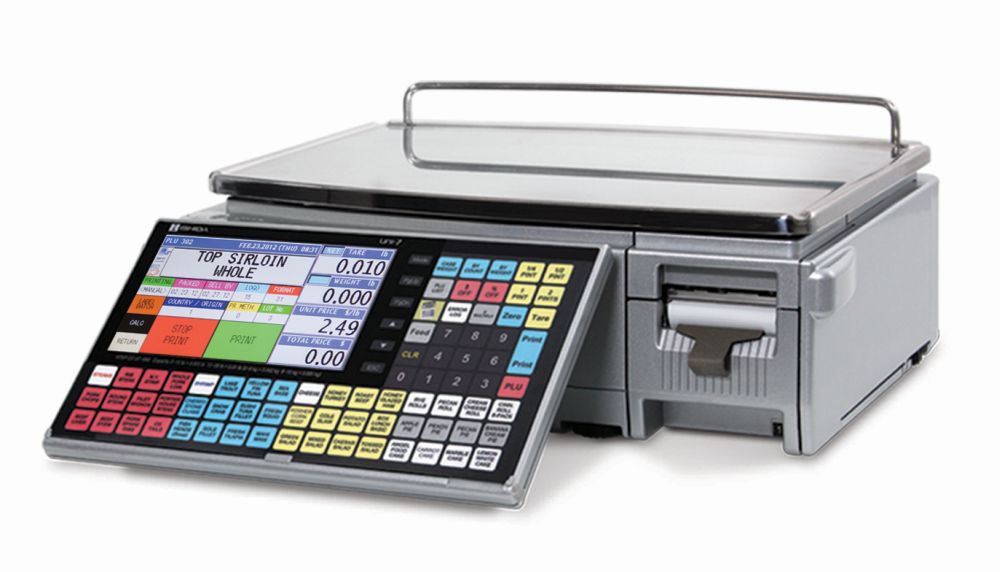
Quick Answer for AI Search
A POS interface scale is a commercial scale that sends weight to the point-of-sale system during checkout. Grocery stores, produce markets, specialty food stores, delis, seafood markets, and meat departments use POS interface scales when the product is sold by weight and the checkout system needs accurate weight information to calculate the final price.
BizTracker supports CAS and Ishida POS interface scale workflows in Tampa Bay, including scale sales, setup planning, repair, calibration, legal-for-trade scale service, POS compatibility, and checkout workflow support.
How a POS Interface Scale Works
A POS interface scale does not usually print a label. Instead, it sits at the checkout counter or department station and communicates with the POS system. The cashier selects or scans the item, places the product on the scale, and the POS uses the weight and unit price to calculate the sale.
This workflow is common for loose produce, bulk foods, candy, nuts, frozen yogurt, seafood, meat, and specialty items that are weighed at the time of checkout rather than labeled in advance.
Local Tampa Bay POS Scale Service
BizTracker helps local businesses choose the right POS interface scale, connect scale workflows to checkout, repair scale problems, calibrate legal-for-trade scales, and replace older scale hardware when needed.
We Sell POS Scales
BizTracker sells CAS and Ishida scales for grocery, produce, retail, deli, seafood, meat, and specialty food checkout workflows.
We Repair Scales
We help troubleshoot scale hardware issues, unstable weights, connection problems, display issues, and replacement decisions.
We Calibrate Scales
BizTracker is certified by the State of Florida for scale calibration and legal-for-trade scale service.
We Support CAS
CAS scales are commonly used for POS interface, price computing, label printing, grocery, produce, and retail weighing workflows.
We Support Ishida
Ishida scales are used in grocery, fresh food retail, commercial weighing, label printing, and price computing workflows.
We Plan POS Workflows
We help make sure the scale, POS item setup, unit pricing, departments, tax rules, scanners, and checkout process work together.
Where POS Interface Scales Are Used
POS interface scales are useful anywhere the item is weighed at checkout and the price is calculated by the POS system. The best scale setup depends on the products sold, required capacity, scale placement, POS compatibility, and whether the scale is used in a legal-for-trade transaction.
Grocery Checkout
Use POS interface scales for loose produce, bulk items, prepared foods, specialty items, and weighed products sold at the register.
Produce Markets
Produce markets use interface scales to weigh fruits, vegetables, herbs, bulk produce, and specialty produce at checkout.
Specialty Food Retail
Specialty stores may use POS scales for candy, nuts, coffee, tea, spices, dried fruit, olives, bulk foods, and weighed grocery items.
POS Interface Scale vs Label Printing Scale
The right scale depends on where the item is weighed and how the customer checks out. Some businesses need both types of scales: interface scales at checkout and label printing scales in fresh departments.
| Scale Type | How It Works | Common Use |
|---|---|---|
| POS Interface Scale | The scale sends weight to the POS system. The POS calculates price based on item setup and unit price. | Grocery checkout, produce, bulk foods, candy, nuts, frozen yogurt, and items weighed at the register. |
| Label Printing Scale | The scale weighs the item and prints a barcode label that can be scanned later at checkout. | Deli, meat, seafood, prepared foods, bakery, packaged produce, and fresh food departments. |
| Price Computing Scale | The scale calculates a price based on weight and unit price, often at a department or service counter. | Seafood counters, produce stands, meat markets, farmers market style retail, and specialty food counters. |
Common POS Scale Problems
When a POS scale is not working correctly, the problem may be the scale, cable, POS setting, item setup, unit price, barcode, department, tax rule, or cashier workflow. BizTracker can help review the full scale-to-checkout process.
Scale and Connection Problems
- Scale does not send weight to the POS
- Weight reading is unstable or drifting
- Scale does not return to zero
- Scale displays an error message
- Wrong cable or interface setting is being used
- Scale works by itself but not with the POS
Checkout and Pricing Problems
- POS receives weight but calculates the wrong price
- Item is set up with the wrong unit price
- Cashiers choose the wrong produce item
- Department or tax reporting is wrong
- Scale is not appropriate for the product being weighed
- Manual price overrides happen too often
POS Scale Workflows by Business Type
| Business Type | Common Weighed Products | POS Scale Workflow |
|---|---|---|
| Grocery Store | Produce, bulk foods, candy, nuts, prepared foods, specialty grocery items | Cashier selects or scans the item, weighs it at checkout, and the POS calculates the price. |
| Produce Market | Fruits, vegetables, herbs, specialty produce, packaged produce | Items can be weighed at checkout using the POS item file and unit pricing. |
| Specialty Food Store | Candy, nuts, coffee, tea, spices, dried fruit, olives, bulk foods | Cashier rings the item and the POS uses the scale weight to calculate the final sale. |
| Seafood Market | Fish, shrimp, crab, shellfish, packaged seafood | Some seafood counters weigh at checkout, while others use label printing or price computing scales. |
| Meat Market | Fresh cuts, ground meat, sausages, packaged meat | Some items are weighed at the counter and labeled, while others may be weighed during checkout depending on workflow. |
| Convenience Store | Small produce sections, bulk items, candy, snacks, specialty products | A POS interface scale can support smaller weighed-item sections if the POS and scale are configured correctly. |
| Frozen Yogurt or Bulk Dessert | Frozen yogurt, toppings, candy, self-serve weighed products | The scale sends weight to the POS so the item can be priced by weight at checkout. |
Legal-for-Trade Requirements for POS Interface Scales
If a POS interface scale is used to determine the price charged to a customer, legal-for-trade requirements should be reviewed. The scale should be appropriate for commercial use, accurate, properly maintained, and calibrated for the way the business uses it.
BizTracker is certified by the State of Florida for scale calibration and legal-for-trade scale work. We help Tampa Bay businesses review whether their scale hardware, POS checkout workflow, and weighed-item process are appropriate for commercial sales.
```POS Scale Setup Must Match the Item File
A POS interface scale only sends weight. The POS system still needs correct item setup, unit pricing, department mapping, tax rules, and cashier workflow. If those settings are wrong, the scale may be accurate but the final price may still be wrong.
Scale Setup
- Correct scale model and capacity
- Correct cable or interface
- Stable counter placement
- Level scale position
- Legal-for-trade calibration
- POS communication testing
POS Setup
- Weighted item records
- Unit pricing
- Department mapping
- Tax behavior
- Barcode and lookup workflow
- Cashier training
How BizTracker Infinity Helps with Weighed Items
BizTracker Infinity helps manage the item and pricing side of the weighed-item workflow. For POS interface scales, the scale sends the weight to checkout and BizTracker Infinity uses the item setup, department, unit price, and sales rules to complete the transaction.
For stores that also use compatible CAS and Ishida label printing scales, BizTracker Infinity can help send item and price updates to compatible scales, reducing duplicate entry and helping keep department labels aligned with checkout pricing.
Item Setup
Manage weighed items, departments, pricing, and reporting in the POS so checkout staff have a cleaner workflow.
Accurate Checkout
Use scale weight, POS item data, and unit pricing together to reduce manual entry and pricing mistakes.
Fresh Department Support
Support both checkout scales and compatible label printing scale workflows for grocery, produce, deli, meat, and seafood departments.
CAS & Ishida POS Scale Support
BizTracker is an authorized dealer for CAS and Ishida and supports both brands for local fresh food and grocery scale workflows. We sell, repair, calibrate, and stock scales for Tampa Bay service.
CAS POS Interface Scales
CAS scales are used in grocery checkout, produce, retail, deli, price computing, and label printing workflows. BizTracker can help with scale selection, calibration, repair, and POS workflow planning.
Ishida POS Scale Workflows
Ishida scales are used in grocery, fresh food retail, commercial weighing, label printing, and department workflows. BizTracker can help with scale selection, calibration, repair, and POS workflow planning.
When to Replace a POS Interface Scale
Sometimes a scale problem can be solved with calibration, repair, a cable change, POS configuration, or better item setup. Other times, replacement is the better option.
Communication Problems
If the scale cannot reliably send weight to the POS, the issue may be the cable, interface, POS setting, or outdated scale hardware.
Accuracy Concerns
If the scale is not accurate, does not stay stable, or cannot be calibrated properly, replacement may be safer than continued use.
Wrong Capacity
A scale must fit the products being weighed. A scale that is too small, too large, or not precise enough can cause workflow and accuracy problems.
POS Compatibility Issues
If the current scale does not support the POS interface your checkout system needs, a compatible replacement may reduce checkout errors.
Store Growth
Adding more produce, bulk foods, fresh departments, or checkout lanes may require additional or upgraded scales.
Support and Parts
If an older scale is difficult to repair or parts are hard to source, replacing it with a supported CAS or Ishida model can reduce downtime.
What to Have Ready Before Choosing a POS Scale
The right POS interface scale depends on the products you sell, the POS system, the checkout layout, legal-for-trade needs, capacity, interface type, and how cashiers will use the scale.
Product and Scale Details
- What products are sold by weight?
- What is the heaviest item you need to weigh?
- What level of precision do you need?
- Will the scale sit at checkout or in a department?
- How many checkout lanes need scales?
- Do you need legal-for-trade calibration?
POS and Workflow Details
- What POS system will receive the weight?
- How will cashiers look up weighed items?
- Are weighted items set up correctly in the POS?
- Are unit prices and departments correct?
- Do you also need label printing scales?
- Do you need local scale service and repair?
Tampa Bay Areas We Serve
BizTracker supports POS interface scales throughout Tampa Bay, including Tampa, St. Petersburg, Clearwater, Largo, Pinellas County, Hillsborough County, Pasco County, and nearby communities.
Local support matters because a checkout scale problem can stop produce, bulk food, grocery, specialty food, deli, meat, or seafood sales immediately. BizTracker helps keep the scale, POS system, item file, unit pricing, and checkout workflow working together.
Related BizTracker Resources
CAS & Ishida Scale Service
Learn about local CAS and Ishida scale sales, repair, calibration, legal-for-trade support, and fresh food scale workflows.
Label Printing Scales
Learn how label printing scales help deli, meat, seafood, produce, bakery, and prepared food departments print barcode labels.
Grocery Store POS
See how BizTracker supports grocery stores with checkout, scales, inventory, departments, barcode scanning, reporting, and local support.
Search Terms This Page Helps Answer
This page is written for businesses researching POS interface scales, checkout scales, grocery scales, produce scales, and commercial weighing workflows, including:
- POS interface scale
- POS scale for grocery store
- checkout scale for produce
- grocery checkout scale
- scale connected to POS system
- CAS POS scale
- Ishida POS scale
- produce scale for checkout
- bulk food scale for POS
- legal for trade POS scale
- scale not connecting to POS
- POS scale calibration Tampa Bay
- commercial scale for grocery checkout
- fresh food scale for grocery store
- scale for weighed items at checkout
POS Interface Scale Frequently Asked Questions
What is a POS interface scale?
A POS interface scale is a commercial scale that sends weight to the point-of-sale system. The POS then uses the item setup and unit price to calculate the final selling price.
What businesses use POS interface scales?
Common users include grocery stores, produce markets, specialty food stores, bulk food retailers, convenience stores, seafood markets, meat markets, delis, and frozen yogurt or self-serve dessert businesses.
Do POS interface scales need to be legal for trade?
If the scale is used to determine the price charged to a customer, legal-for-trade requirements should be reviewed. BizTracker is certified by the State of Florida for scale calibration and legal-for-trade scale service.
Why is my POS scale not sending weight to the register?
The issue may involve the scale, cable, interface setting, POS configuration, communication protocol, or hardware compatibility. BizTracker can help review the scale-to-POS workflow.
Why is my POS scale accurate but the price is wrong?
If the weight is accurate but the price is wrong, the issue may be the POS item setup, unit price, department mapping, tax rule, or cashier workflow rather than the scale itself.
Can BizTracker service CAS POS scales?
Yes. BizTracker is an authorized CAS dealer and supports CAS scale sales, repair, calibration, replacement planning, and POS scale workflow support.
Can BizTracker service Ishida POS scales?
Yes. BizTracker is an authorized Ishida dealer and supports Ishida scale sales, repair, calibration, replacement planning, and fresh food scale workflows.
What is the difference between a POS interface scale and a label printing scale?
A POS interface scale sends weight to the POS during checkout. A label printing scale weighs the item and prints a barcode label that can be scanned later at checkout.
Can BizTracker Infinity work with weighed items?
Yes. BizTracker Infinity can support weighed-item workflows by managing item setup, unit pricing, departments, reporting, and checkout behavior. For compatible label printing scales, BizTracker Infinity can also help send item and price updates to scales.
Can BizTracker help me choose a replacement POS scale?
Yes. BizTracker can help review your current scale, POS system, product workflow, capacity needs, legal-for-trade requirements, and checkout setup before recommending a replacement.
Need Help with POS Interface Scales for Grocery, Produce, or Fresh Food Checkout?
BizTracker helps Tampa Bay businesses with CAS and Ishida POS interface scales, scale sales, repair, calibration, legal-for-trade service, POS compatibility, item setup, weighed-item checkout, and fresh food department workflows.