
Best POS System for Convenience Stores: What to Compare Before You Buy
Compare convenience store POS systems for fast checkout, barcode scanning, inventory, pack sizes, vendor receiving, restricted-product procedures, price changes, SNAP EBT, eWIC, employee controls, cash management, reporting, hardware and multiple locations.
This guide focuses on in-store retail operations. Fuel-pump control, forecourt management and specialized petroleum integrations require separate confirmation.
What Is the Best POS System for a Convenience Store?
The best convenience store POS is the system that matches the store’s checkout volume, product mix, inventory, package sizes, purchasing, restricted-product procedures, payment programs, employee controls, reporting and multi-location requirements.
It should support fast barcode scanning, large product files, single, pack and case products, vendor receiving, stock counts, price changes, labels, cashier permissions, cash accountability and dependable reporting.
Ask every vendor to demonstrate the store’s real workflows. BizTracker Infinity is one option for inventory-focused convenience retailers. Review the BizTracker convenience store POS system for product-specific information.
Important Fuel-System Limitation
This buyer guide addresses the in-store retail POS system. Do not assume a retail POS can control fuel pumps, authorize dispensers, manage forecourt equipment, process pay-at-pump transactions or connect with an existing petroleum controller.
Stores selling fuel should obtain written confirmation for the exact pump controller, forecourt system, payment processor, dispenser equipment, software version, network and certification requirements.
Jump to the Convenience Store Requirement You Need to Compare
Do Not Choose Convenience Store POS From a Generic Feature List
Convenience stores differ in size, product count, checkout volume, restricted products, foodservice, cooler inventory, vendor schedules, payment programs and fuel operations.
Before comparing vendors, document how the store handles checkout, products, receiving, inventory, price changes, labels, age-related procedures, cash, SNAP EBT, eWIC and reporting.
- Number of locations
- Number of checkout stations
- Approximate product count
- Single, pack and case products
- Tobacco and alcohol procedures
- Foodservice and prepared items
- Vendor delivery schedules
- SNAP EBT and eWIC needs
- Fuel-system requirements
- Reporting responsibilities

The best convenience store POS fits the store’s real checkout, inventory, purchasing and employee procedures.
Classify Convenience Store POS Requirements Before Comparing Systems
Separate essential workflows from optional features. One unsupported payment, product or fuel requirement can disqualify an otherwise capable retail system.
| Requirement | Usually Essential | May Depend on the Store |
|---|---|---|
| Barcode Checkout | Fast scanning, product lookup, quantity entry, returns and cashier permissions. | In-counter scanners, self-checkout, mobile checkout or specialty lane hardware. |
| Product Management | UPCs, descriptions, departments, vendors, costs, prices, taxes and inventory settings. | Recipes, prepared foods, deposits, regional products or advanced attributes. |
| Pack and Case Products | Important when products are purchased by the case and sold as singles or multipacks. | Complex package relationships, deposits or specialized vendor quantities. |
| Inventory | Stock on hand, receiving, adjustments, counts, movement and value. | Warehouses, advanced forecasting, production inventory or automated replenishment. |
| Purchasing | Vendors, costs, purchase orders, case quantities and receiving. | Central purchasing, electronic vendor interfaces or warehouse distribution. |
| Restricted Products | Employee training, store procedures, prompts and appropriate permissions. | ID-scanning devices, date or time restrictions and specialized compliance tools. |
| Benefit Payments | Required when the store participates in SNAP EBT or eWIC. | Agency certification, approved-product data, specialized devices and lane testing. |
| Fuel Integration | Required only when the POS must interact with fuel pumps or forecourt equipment. | Pump authorization, pay-at-pump, tank monitoring and petroleum controller integration. |
| Reporting | Sales, departments, products, inventory, margin, employees and cash. | Multi-store dashboards, accounting exports or custom reporting. |
| Support | Implementation, training, backups, hardware and escalation procedures. | Onsite service, after-hours support, managed networking or dedicated account support. |
Cash Register, Retail POS or Petroleum Convenience Store System?
| System Type | Best Fit | Common Limitations |
|---|---|---|
| Traditional Cash Register | Very small stores with simple departments and limited inventory needs. | Limited product files, purchasing, receiving, inventory and reporting. |
| Basic Retail POS | Small non-fuel stores needing barcode checkout and basic product tracking. | May lack detailed receiving, package relationships, eWIC or advanced employee controls. |
| Full Retail POS and Inventory System | Convenience retailers needing large product files, purchasing, inventory, labels and reporting. | May not include fuel-pump or forecourt management. |
| Petroleum Convenience Store System | Fuel retailers requiring pump control, forecourt management and petroleum-specific integrations. | Compatibility depends on controllers, dispensers, processors, certifications and vendor support. |
Test Checkout With Real Convenience Store Products
A vendor demonstration should use realistic products such as beverages, snacks, tobacco, beer where permitted, household items, prepared foods and products with multiple package sizes.
Ask the vendor to scan products, find an item without a readable barcode, enter quantities, process a return and demonstrate cashier permissions.
- Fast barcode scanning
- Product and description lookup
- Alternate scan codes
- Quantity entry
- Department buttons
- Tax and payment rules
- Returns and refunds
- Discount permissions
- Price-override controls
- Manager approvals
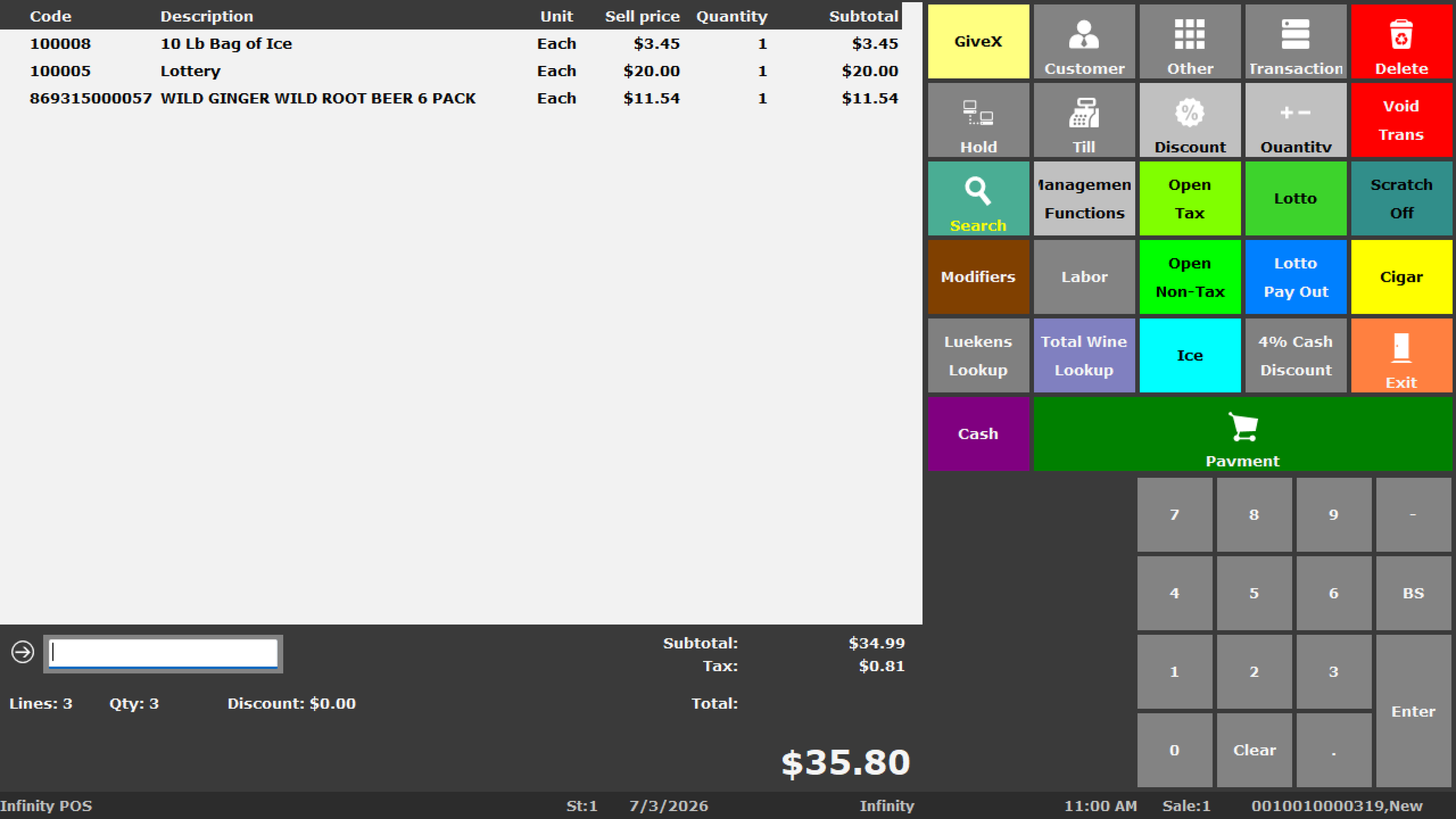
Actual BizTracker Infinity POS software screen. Layout, products, buttons, prompts and permissions vary by configuration.
Require a Demonstration of the Exact Package Workflow
Convenience stores may purchase products by the case and sell them as singles, multipacks or full cases. The item structure affects receiving, inventory, cost and margin reporting.
Individual Products
Confirm UPC, description, department, vendor, unit cost, selling price and inventory settings.
Multipacks
Confirm whether packs have separate barcodes, prices, costs and inventory relationships.
Cases
Review case quantities, vendor item numbers, purchasing costs and whether full cases are sold.
Case Breaking
Ask how receiving a case affects individual-product inventory and cost.
Alternate Codes
Confirm how vendor numbers and alternate barcodes connect to the correct product.
Cost and Margin
Verify reported costs and gross margins for singles, packs and cases.
Test Package Relationships From Receiving Through Reporting
Ask the vendor to receive a case, sell individual products, sell a pack, perform a count and show the resulting inventory and gross-profit reports.
Evaluate How the POS Explains Inventory Changes
Convenience-store inventory changes through sales, receiving, case breaking, transfers, spoilage, damage, theft, returns, adjustments and physical counts.
Ask the vendor to show a complete movement history for a fast-moving or shrink-sensitive product.
- Stock on hand
- Inventory value
- Product movement history
- Stock on order
- Low-stock reporting
- Zero-sales products
- Fast and slow movers
- Physical-count differences
- Damage and spoilage records
- Inventory by location

Inventory reports depend on consistent receiving, counting, spoilage and adjustment procedures.
Cooler Products
Monitor fast-moving beverages, energy drinks, dairy and other refrigerated products.
High-Turn Snacks
Review candy, chips and packaged foods requiring frequent replenishment.
Shrink-Sensitive Products
Use targeted counts and movement review for selected high-risk categories.
Prepared Food
Confirm how the POS handles prepared items, ingredients or production inventory when needed.
Test the Complete Vendor Delivery Workflow
Convenience stores may receive direct-store deliveries from beverage, snack, tobacco, grocery and specialty vendors. A purchase-order screen alone does not prove the system supports the full process.
Review Reorder Needs
Check stock on hand, stock on order, sales movement, vendor schedules and reorder settings.
Create the Order
Use vendor item numbers, cases, packs, expected quantities and costs.
Receive the Delivery
Record partial deliveries, shortages, substitutions, damage and cost changes.
Review the Result
Confirm inventory, costs, prices, labels and open-order quantities.
Ask How Direct-Store Deliveries Are Controlled
Can employees receive without a purchase order? Can managers compare ordered and delivered quantities? Can the system record shortages, damaged products and supplier cost changes? Is receiving history retained?
Evaluate Prompts and Permissions as Part of a Complete Store Policy
Convenience stores may sell tobacco, nicotine products, beer, wine or other restricted merchandise where legally permitted.
POS software can support item prompts, cashier reminders, manager approvals, return restrictions and employee activity reports. It does not replace employee training, physical ID inspection, management supervision or legal responsibilities.
- Item-based reminders
- Cashier prompts
- Manager approvals
- Discount restrictions
- Return and void permissions
- Selected date and time controls
- Employee activity reporting
- Store-defined procedures
Verify Benefit-Payment Support for the Exact Store Configuration
General card-processing compatibility does not automatically mean a POS supports SNAP EBT or eWIC.
Support may depend on retailer approval, the payment processor, payment devices, state or agency requirements, approved-product data, certification and lane testing.
- Retailer approval
- Processor support
- Payment-device compatibility
- SNAP EBT transaction flow
- eWIC agency requirements
- Approved product information
- Mixed-basket procedures
- Receipt requirements
- Lane certification and testing
- Employee training
Compare How the POS Handles Frequent Cost and Price Changes
Convenience-store prices change because of supplier costs, promotions, seasonal demand, competitive conditions and short product life cycles.
Supplier Cost Changes
Ask how receiving updates costs and identifies products with changing margins.
Single and Pack Prices
Confirm the price and margin for each package size the store sells.
Temporary Promotions
Review start dates, end dates, quantity pricing and reporting.
Shelf Labels
Test the printer, media, template, barcode, description and selling price.
Price Approvals
Determine which employees may change costs, prices and promotions.
Price Verification
Establish a process for confirming that product, shelf and checkout prices agree.
Compare Permissions, Exceptions and Cash Accountability
Convenience stores often operate long hours with multiple cashiers and shifts. The POS should help managers control higher-risk functions.
Cashier Permissions
Control selected returns, discounts, voids, price overrides and cash functions.
Manager Approvals
Require approval for selected exceptions and higher-risk transaction changes.
Drawer Assignments
Determine whether drawers are assigned by employee, station, shift or store procedure.
Cash Drops
Review safe-drop, pickup, transfer and deposit procedures where supported.
Shift Settlement
Compare expected and actual cash, card and other tender totals.
Audit Reporting
Review discounts, returns, voids, overrides and selected employee actions.
Require Reports That Connect Sales, Inventory, Costs and Employees
Ask the vendor to show the detail behind each summary report and explain how product costs, receiving and inventory procedures affect the results.
| Report | What It Should Show | Possible Management Use |
|---|---|---|
| Department Sales | Sales for beverages, snacks, tobacco, beer, prepared food and other departments. | Compare category performance and changing customer demand. |
| Product Sales | Best sellers, slow movers, zero-sales products, returns and discounts. | Review purchasing, placement, pricing and discontinuation. |
| Gross Profit | Sales, cost, gross profit and margin by product, department or vendor. | Identify outdated costs and low-margin categories. |
| Inventory Value | Inventory investment by category, vendor or location. | Reduce excess stock and improve purchasing decisions. |
| Stock Movement | Sales, receiving, transfers, spoilage, adjustments and counts. | Investigate shrink, damage and unexplained differences. |
| Purchase Orders | Open orders, received quantities, stock on order and supplier costs. | Follow up on missing deliveries and avoid duplicate orders. |
| Employee Activity | Discounts, returns, voids, overrides and selected register events. | Improve supervision and investigate exceptions. |
| Cash and Payments | Drawers, tenders, deposits, settlements and over-or-short amounts. | Improve cashier and shift accountability. |
Evaluate the Complete Checkout and Back-Office Setup
Confirm the exact model, interface, driver, duty cycle, warranty and support responsibility for every device.
POS Terminals
Confirm performance, ports, operating system, warranty and replacement procedures.
Barcode Scanners
Compare handheld, presentation and in-counter scanners for checkout volume.
Receipt Printers
Confirm speed, connection, paper, drawer interface and replacement availability.
Cash Drawers
Review size, duty cycle, till inserts, interface and cashier procedures.
Customer Displays
Confirm transaction visibility, connection and software compatibility.
Payment Devices
Verify processor, software, SNAP EBT, eWIC and payment-method support.
Label Printers
Confirm media, templates, print volume, connection and driver support.
Portable Scanners
Review counting, receiving, item lookup and wireless requirements.
Network Equipment
Plan switches, cabling, firewall, internet, Wi-Fi and backup connectivity.
Power Protection
Protect lanes, network equipment and selected back-office systems.
ID-Related Hardware
Confirm whether any scanner or verification device is supported and legally appropriate.
Fuel Equipment
Treat pump controllers, dispensers, pay-at-pump and forecourt equipment as a separate compatibility project.
Need Help Choosing Compatible Convenience Store POS Hardware?
Chat with a BizTracker specialist before purchasing or reusing terminals, scanners, printers, drawers, displays, payment devices, label printers, networking equipment or portable scanners.
Compare Company-Wide Control and Store-Level Flexibility
Multi-location convenience retailers may need centralized products, branch inventory, transfers, store pricing, purchasing oversight, employee permissions and consolidated reporting.
Central Product Records
Determine which fields are controlled centrally and which may vary by store.
Branch Inventory
Review quantities, inventory value, movement and availability by location.
Stock Transfers
Test requested, sent, in-transit, received and discrepant quantities.
Store Pricing
Ask how company, regional and store-specific prices are approved.
Central Purchasing
Determine whether orders are created centrally, locally or through approval rules.
Consolidated Reporting
Compare sales, margin, inventory, purchasing, employees and cash by store.
Compare the Work Required to Launch the System Correctly
Product data, package relationships, payment programs, hardware, employee roles and store procedures should be reviewed before go-live.
Product Conversion
Ask which UPCs, descriptions, departments, vendors, prices and costs can be imported.
Package Review
Confirm single, pack and case records before establishing inventory.
Payment Setup
Coordinate card processing, SNAP EBT, eWIC, devices, testing and approvals.
Hardware Preparation
Confirm compatibility, staging, drivers, networking, placement and power.
Employee Training
Train cashiers, managers, receivers, buyers and back-office users separately.
Go-Live Support
Confirm who is available during cutover and how problems are escalated.
Convenience Store POS Mistakes That Create Problems Later
Assuming Retail POS Controls Fuel Pumps
Fuel integration must be confirmed for the exact controller, equipment and processor.
Choosing Only on Monthly Price
Low fees may not offset poor inventory, receiving, payment or support capability.
Skipping Package Testing
Incorrect single, pack and case relationships can damage inventory and margin reports.
Assuming Card Support Includes EBT
SNAP EBT and eWIC require separate confirmation, approvals and testing.
Relying Only on Age Prompts
Technology does not replace employee training, ID inspection or management supervision.
Ignoring Product Data Quality
Duplicate products, missing costs and incorrect package sizes create reporting problems.
Buying Hardware First
Confirm software, connections, drivers and support before purchasing devices.
Ignoring Cash Controls
Long hours and multiple shifts require clear drawer and employee accountability.
Skipping Backup Planning
Ask how data is protected and failed equipment is restored or replaced.
Questions to Ask Every Convenience Store POS Vendor
| Area | Question to Ask During the Demonstration |
|---|---|
| Checkout | Can you scan real products, find an item, enter quantities, process a return and show cashier permissions? |
| Products | How are UPCs, departments, vendors, costs, prices, taxes and alternate codes maintained? |
| Packages | Can you receive a case, sell singles and packs, count inventory and show the resulting margin? |
| Purchasing | Can you create an order using vendor item numbers, cases, quantities and expected costs? |
| Receiving | Can you receive part of an order, record shortages and update inventory and costs? |
| Inventory | Can you show a movement history containing sales, receiving, spoilage, adjustments and counts? |
| Restricted Products | Can you demonstrate prompts, cashier restrictions, manager approvals and activity reports? |
| SNAP EBT and eWIC | Which processors, devices, agencies and configurations are supported for our store? |
| Fuel | Does the system control pumps or connect with our exact petroleum controller and processor? |
| Cash Management | How are drawers, drops, deposits, settlements and over-or-short amounts managed? |
| Reporting | Can you show sales, gross profit, inventory, purchasing, employee and cash reports? |
| Implementation | Who handles conversion, hardware, payment setup, testing, training and go-live support? |
Compare Convenience Store POS Systems Using the Same Requirements
Replace Vendor A, Vendor B and Vendor C with the systems being evaluated. Score each requirement only after seeing it demonstrated.
Do Not Score an Undemonstrated Feature as Supported
Require written confirmation for fuel integration, SNAP EBT, eWIC, payment devices, specialized hardware, data conversion and any third-party dependency.
A Practical Convenience Store POS Selection Process
Compare vendors using the same products, payment requirements and operating scenarios.
Document Requirements
List checkout, inventory, packages, payments, fuel, reporting and support needs.
Prepare Real Scenarios
Select products, cases, returns, restricted items, EBT baskets and reports.
Score Demonstrations
Use the same requirements and scenarios for every vendor.
Review the Full Proposal
Compare software, hardware, payments, fuel, conversion and support.
Verify Compatibility
Confirm processors, devices, EBT, eWIC, networking and fuel requirements.
Plan Data Conversion
Review products, packages, vendors, prices, costs and inventory.
Train by Role
Train cashiers, managers, receivers, buyers and back-office users.
Review After Launch
Confirm checkout, inventory, payments, reports and permissions.
Continue Your Convenience Store POS Research
BizTracker Convenience Store POS
Review Infinity checkout, inventory, purchasing, labels, employee controls and reporting.
Explore convenience store POSGrocery Store POS
Review grocery checkout, produce, scales, inventory, purchasing and benefit payments.
Explore grocery store POSeWIC POS Requirements
Review agency, processor, payment-device, approved-product and testing requirements.
Explore eWIC POSInventory Management
Review stock tracking, movement, physical counts, reorder needs and inventory accuracy.
Explore inventory managementPurchasing and Receiving
Improve purchase orders, direct-store deliveries, costs and receiving accountability.
Browse purchasing guidesMulti-Store POS
Review centralized products, branch inventory, transfers, purchasing and company reporting.
Explore multi-store POSNeed Help Comparing Convenience Store POS Systems?
Chat with a BizTracker specialist about checkout, products, inventory, purchasing, restricted products, SNAP EBT, eWIC, payments, hardware, reporting or multiple locations.
Best Convenience Store POS System FAQs
What is the best POS system for a convenience store?
The best system is the one that matches the store’s checkout, products, package sizes, inventory, purchasing, payments, employee controls, reporting and fuel requirements.
What features should convenience store POS software include?
It should typically include barcode checkout, product records, single, pack and case handling, inventory, purchase orders, receiving, price changes, employee controls and reporting.
Can a basic retail POS work for a convenience store?
A basic retail POS may work for a small non-fuel store with limited inventory and payment requirements. More complex stores may need a fuller retail or petroleum-specific system.
Can BizTracker Infinity control fuel pumps?
Fuel-pump control and forecourt management should not be assumed. Compatibility must be confirmed for the exact controller, dispenser, processor, network and petroleum-system requirements.
Can convenience POS support singles, packs and cases?
Many systems can support products purchased, stocked or sold in different quantities. Require a full demonstration of receiving, selling, counting and reporting.
Can convenience store POS track inventory?
A complete system can track stock on hand, receiving, purchase orders, transfers, physical counts, adjustments, movement and inventory value.
Can convenience store POS help track shrink?
POS software can support movement reporting, physical counts and adjustments used to investigate damage, spoilage, theft and unexplained differences.
Can convenience store POS support SNAP EBT?
Some systems can support SNAP EBT, but the exact processor, payment device, retailer approval and software configuration must be confirmed.
Does SNAP EBT support automatically include eWIC?
No. eWIC has separate agency, processor, approved-product, payment-device, certification and testing requirements.
Can POS software verify a customer’s age?
POS software can provide prompts and support store procedures, but it does not replace employee training, physical ID inspection, management supervision or legal responsibilities.
Can convenience store POS create purchase orders?
A complete system can support vendors, case quantities, purchase orders, partial receiving, cost changes and stock on order.
Can convenience store POS print shelf labels?
Many systems can print shelf, barcode, receiving and price-change labels. Confirm the printer, media, template, driver and workflow.
What reports should convenience store POS provide?
Useful reports include product and department sales, gross profit, inventory value, stock movement, purchasing, employee activity and cash.
Can convenience store POS support multiple locations?
Multi-store systems can support centralized products, branch inventory, transfers, store pricing, purchasing, permissions and consolidated reporting.
How should convenience store POS vendors be compared?
Use the same products and scenarios for every vendor. Score only demonstrated capabilities and obtain written confirmation for payments, fuel, hardware and integrations.
Does BizTracker offer convenience store POS software?
Yes. BizTracker Infinity can support in-store checkout, products, inventory, purchasing, receiving, pricing, labels, employee controls and reporting, depending on configuration.
See How BizTracker Infinity Handles Your In-Store Retail Workflows
Review your checkout, products, packs, cases, vendors, receiving, inventory, prices, labels, restricted-product procedures, SNAP EBT, eWIC, employee controls, payments, reporting, hardware and multi-store requirements with a BizTracker specialist.
Features, fuel integration, restricted-product prompts, SNAP EBT, eWIC, payments, labels, reports, hardware, integrations, data conversion, installation, training and support may vary by software version, enabled modules, processor, agency, equipment, controller, configuration, business procedure and location. Confirm current requirements before purchasing or changing systems.