
SAM4s Cash Registers, Programming, Installation and Local Support
Choose a commercial SAM4s electronic cash register for retail, liquor, convenience, grocery, restaurants, bars, concessions, specialty stores, and other businesses that need dependable checkout without the complexity of a full computer-based POS system.
- Retail keyboards
- Foodservice keyboards
- Receipt printing
- Departments and PLUs
- Cashier reports
- Scanner options
- Local service
What is a SAM4s electronic cash register?
A SAM4s electronic cash register is a commercial checkout system that can support sales entry, departments, PLUs, tax calculation, receipt printing, cash-drawer control, clerks or cashiers, daily reports, and selected peripherals. Depending on the model, options may include barcode scanners, customer displays, scales, kitchen printers, electronic journals, networking, and compatible payment workflows.
A Cash Register Can Still Be a Complete Checkout Station
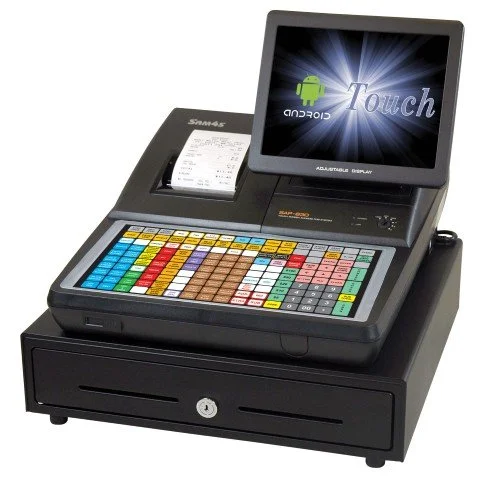
Modern SAM4s systems can combine an operator display, programmable keyboard or touchscreen, receipt printer, cash drawer, customer display, barcode scanner, and payment device into one organized checkout setup.
The pictured SAM4s system demonstrates the type of commercial register hardware available for businesses that want more control than a consumer cash register without necessarily moving to a large enterprise POS platform.
Choose the Right Level of Technology for the Business
A traditional cash register remains practical when the business needs dependable checkout and basic reporting. A full POS system becomes more useful when inventory, purchasing, customers, multiple stores, integrations, and back-office visibility become important.
Simple and Dependable Checkout Is the Main Goal
- You want physical keys or a spill-resistant keyboard
- You need departments, PLUs, taxes, clerks and daily reports
- You want less complexity than a computer-based POS
- You do not require deep inventory or purchasing functions
- You want commercial hardware designed for checkout
- You may need a scanner, drawer, display or remote printer
Management Needs More Than Checkout
- You need detailed inventory and stock-movement reporting
- You need purchase orders, receiving and supplier records
- You operate or plan to operate multiple locations
- You need customer accounts, loyalty or special pricing
- You need eWIC, deeper reporting or employee controls
- You need stronger back-office visibility
Compare SAM4s Cash Register Options
The right model depends on the business type, keyboard style, item count, receipt-printer requirements, scanner needs, kitchen printing, customer displays, reporting, and payment workflow.
SAM4s ER-180U
Compact raised-key register for small retail counters, gift shops, concessions, farm stands, and straightforward checkout.
- Raised-key keyboard
- Single thermal printer
- Departments and PLUs
- Clerks, taxes and reports
ER-260EJ / ER-265EJ
Commercial electronic-journal models with retail or foodservice keyboard choices and expanded peripheral support.
- Raised or flat keyboard
- 58mm thermal printer
- Electronic journal
- Scanner and payment options
NR-510 Series
Traditional commercial register format with graphic operator display, customer display, electronic journal, and peripheral support.
- Raised or flat keyboard
- Graphic operator display
- Electronic journal
- Scanner, scale and printer options
ER-900 Series
Flexible commercial register family with raised or flat keyboards and single- or dual-printer options depending on the model.
- Retail and foodservice models
- Single- and dual-printer options
- Higher PLU capacity
- Scanner and remote-printer support
SPS-300 Series
Advanced electronic cash registers for businesses needing larger displays, networking, reporting, and expanded peripheral support.
- Flat or raised keyboard
- Larger operator display
- Networking options
- Advanced peripheral support
Which SAM4s Cash Register Should You Consider?
| Register family | Best fit | Keyboard and printer style | Common use |
|---|---|---|---|
| ER-180U | Entry-level commercial checkout | Compact raised-key register with thermal receipt printing | Small retail, concessions, gift shops, farm stands, service counters, and simple checkout environments |
| ER-260EJ / ER-265EJ | Budget-friendly retail or foodservice | Raised-key retail model or flat foodservice keyboard with electronic journal | Retail, liquor, convenience, cafes, bakeries, delis, quick service, bars, and restaurants |
| NR-510 Series | Traditional commercial register format | Flat or raised-key models with graphic display, thermal printer, and electronic journal | Retail, liquor, grocery, delis, bakeries, produce, specialty food, and seasonal businesses |
| ER-900 Series | Flexible multi-use commercial register | Raised or flat keyboards with single- or dual-printer options | Retail, convenience, liquor, restaurants, bars, cafes, delis, and specialty stores |
| SPS-300 Series | Advanced cash-register operation | Larger display, flat or raised keyboard, networking, and expanded peripheral support | Busy retail, concessions, venues, quick service, restaurants, multi-register counters, and larger item files |
Match the Register to the Checkout Workflow
Keyboard style, printer configuration, scanner support, item capacity, reporting, payment requirements, and peripheral compatibility should match the way the business actually operates.
Retail Stores
Raised-key models can support departments, PLUs, clerks, tax setup, receipt printing, barcode scanning, and straightforward product sales.
Liquor and Convenience
Review scanner support, cashier tracking, customer displays, receipt printing, item capacity, and compatible payment workflows.
Restaurants and Foodservice
Flat spill-resistant keyboards can support preset menu keys, remote kitchen or bar printing, receipts, and practical foodservice workflows.
Grocery and Specialty Food
Review scanners, scales, customer displays, receipt printers, drawers, payments, item capacity, and possible POS upgrade needs.
Build the Complete Cash Register Setup
Peripheral support varies by register model, software, available ports, interface, cable, programming, processor, and business workflow.
Compatibility notice: Confirm the exact SAM4s model, firmware, ports, scanner interface, scale protocol, printer type, payment processor, terminal model, cables, programming, and workflow before ordering accessories.
Review Credit Card Compatibility Before Choosing the Register
Selected SAM4s registers can support integrated or semi-integrated electronic-payment workflows. Compatibility depends on the register, processor, payment device, communication method, software, programming, PCI requirements, EMV requirements, and merchant account.
Do not purchase a register or payment terminal based only on a model name. Confirm the complete processing configuration first.
Information needed for a payment review
- Exact SAM4s register model
- Current payment processor
- Payment-terminal make and model
- Connection or integration method
- Merchant-account requirements
- Debit, credit, contactless and gift-card needs
- Current rates and monthly fees
SAM4s Programming, Troubleshooting and Onsite Help in Tampa Bay
BizTracker can assist with register selection, setup, programming, hardware troubleshooting, printer problems, scanner setup, cash-drawer issues, supplies, payments, and planning a move to a full POS system.
Register Programming
Departments, PLUs, tax rates, function keys, clerks, reports, receipts, messages, keyboard layouts, and operational settings.
Hardware Troubleshooting
Receipt-printer problems, cash-drawer issues, scanner questions, displays, cables, interfaces, power, and peripheral setup.
Onsite Service
Tampa Bay businesses may request onsite setup, programming, troubleshooting, replacement planning, and register support.
POS Upgrade Planning
Review whether the business has outgrown the register and needs inventory, purchasing, customer accounts, reporting, or multi-store POS.
Ask General SAM4s Programming and Setup Questions Online
Use the SAM4s Register Programming Assistant for general help with departments, PLUs, tax settings, clerks, reports, keyboard functions, receipt settings, basic troubleshooting, and information to gather before contacting support.
The assistant cannot inspect the physical register, access its programming, verify a payment setup, repair hardware, recover lost programming, or replace BizTracker technical support.
Good questions to ask
- How do I program a department?
- How do I change a tax rate?
- How do I program a PLU?
- How do I assign a cashier or clerk?
- Which report should I run at closing?
- What paper size does my register use?
- What should I gather before calling support?
Move to Infinity POS When Basic Register Features Are No Longer Enough
A SAM4s register may continue to be the right choice for simple checkout. A full POS system becomes more appropriate when the business needs stronger inventory, purchasing, customers, employee controls, eWIC, reporting, multiple locations, or back-office tools.
- Detailed inventory and stock movement
- Purchase orders and receiving
- Customer records and accounts
- Multi-location reporting
- Employee permissions
- eWIC workflows where approved
- Barcode and shelf-label management
- Advanced cash management
- Back-office reporting and dashboards
Compare Registers, Payments, Supplies and POS Upgrade Options
Choose a Register
Payments and Hardware
SAM4s Cash Register Questions
Exact features and compatibility depend on the register model, software version, available ports, programming, peripherals, processor, payment terminal, and business workflow.
Are cash registers still a good choice for small businesses?
Yes. A commercial electronic cash register can be a strong fit for a business that needs dependable checkout, printed receipts, tax calculation, departments, PLUs, clerks, cash-drawer control, and basic reports without the complexity of a full POS system.
What is the difference between a cash register and a POS system?
A cash register primarily handles checkout, departments, PLUs, taxes, receipts, cash drawers, and daily reports. A POS system generally adds deeper inventory, purchasing, customers, employee permissions, integrations, multiple locations, and back-office reporting.
Which SAM4s register is best for a retail store?
Retail stores often prefer raised-key models such as the ER-180U, ER-260EJ, NR-510R series, selected ER-900 models, or SPS-300 models. The right register depends on item count, scanning, printing, reporting, peripherals, and payment requirements.
Which SAM4s register is best for restaurants or quick service?
Foodservice businesses often prefer flat spill-resistant keyboard models such as the ER-265EJ, NR-510BE, ER-920E, ER-940E, SPS-320, or SPS-340, depending on menu size, remote printing, reports, and checkout workflow.
Can I add a barcode scanner to a SAM4s cash register?
Many SAM4s models can support barcode scanners, but compatibility depends on the register, available ports, scanner interface, cable, programming, item file, and store workflow.
Can a SAM4s register support kitchen printing?
Some models can support remote kitchen or bar printers. The setup depends on the register model, printer type, interface, cable, communication port, programming, and order-routing workflow.
Can I process credit cards with a SAM4s cash register?
Selected SAM4s models can support integrated or semi-integrated payment workflows. Compatibility depends on the processor, payment device, connection, register model, software, programming, PCI requirements, and merchant account.
Where can I buy SAM4s cash registers online?
SAM4s cash registers can be purchased online through Spartan POS. BizTracker can help with model selection, programming, setup, local service, payment planning, supplies, and POS upgrades.
Does BizTracker program SAM4s cash registers?
BizTracker can assist with departments, PLUs, tax rates, function keys, clerks, receipts, reports, keyboard setup, scanners, printers, and other supported register settings.
Does BizTracker offer onsite cash-register service?
Tampa Bay businesses may request onsite help for setup, programming, printer issues, cash-drawer problems, scanners, troubleshooting, and replacement planning, subject to location and scheduling.
Can the SAM4s AI Assistant access my register?
No. The assistant provides general information only. It cannot connect to the register, inspect programming, change settings, repair hardware, verify payments, or recover lost data.
When should I upgrade to BizTracker Infinity POS?
Consider upgrading when the business needs detailed inventory, purchase orders, receiving, customer accounts, eWIC, stronger employee permissions, multi-store reporting, labels, advanced cash management, or deeper back-office reporting.
Get Help Selecting, Programming or Replacing a SAM4s Cash Register
Tell BizTracker about the business type, keyboard preference, item count, departments, receipt needs, scanner, scale, kitchen printing, customer display, payment setup, current register, support needs, and whether the business may require a full POS system.