
SAM4S Cash Register Help
SAM4S Register Programming Assistant
AI-powered guidance for common SAM4S cash register programming, setup, and troubleshooting questions.
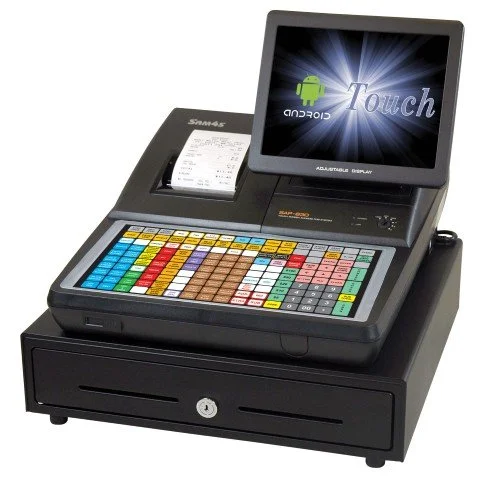
BizTracker created a SAM4S Register Programming Assistant to help store owners, managers, and cashiers get faster answers for common SAM4S cash register tasks.
Use the assistant for general guidance on PLUs, departments, tax settings, receipt messages, reports, keyboard questions, and basic programming steps. For more complex setup, repairs, data issues, or onsite help, BizTracker can provide professional SAM4S support.

Why We Built It
Cash Register Programming Can Be Confusing
SAM4S registers are dependable machines, but programming them can feel difficult if you do not work with them every day. Many common changes require the right key position, manager mode, program code, item number, department, tax setting, or report procedure.
The SAM4S Register Programming Assistant gives you a place to ask questions in plain English instead of searching through manuals or guessing which key sequence to use.
- Change prices on PLUs
- Edit department names
- Review tax programming concepts
- Understand common reports
- Update receipt message guidance
- Troubleshoot basic register questions
- Prepare better questions for support
- Reduce trial-and-error programming
What the Assistant Can Help With
Ask SAM4S Programming Questions in Plain English
The assistant is designed for common SAM4S cash register support questions. It can help explain general steps, terminology, and things to check before you call for service.
PLU Programming
Ask about changing a PLU price, updating an item name, reviewing item numbers, or understanding how PLUs connect to departments.
Department Setup
Get general guidance on department names, department grouping, department tax behavior, and register organization.
Tax Rate Questions
Learn what to check before changing tax rates, how tax settings may affect items, and when to confirm setup with a technician.
Receipt Message Changes
Ask about common receipt header, footer, store name, address, phone number, and message programming concepts.
Reports and Z Readings
Get help understanding common report terms, daily closeout concepts, X readings, Z readings, and what to prepare before support.
Setup Questions
Ask about common setup topics before installing a register, replacing a register, or moving from a cash register to POS software.
Important Reminder
AI Help Is Useful, But Register Programming Still Needs Care
The SAM4S AI assistant can help explain common steps and concepts, but it should not be treated as a guaranteed replacement for the correct model manual, a trained technician, or a verified store-specific programming plan.
Models Vary
SAM4S ER, SPS, and other register models can use different menus, keys, codes, and programming steps.
Settings Matter
Tax, PLU, department, clerk, payment, and report settings may be configured differently for each store.
Backups Matter
Before major changes, confirm whether the register data can be backed up or documented.
BizTracker Can Help
For business-critical changes, repairs, training, or onsite setup, contact BizTracker for professional support.
Best Uses
Good Questions to Ask the SAM4S AI Assistant
The best questions include the register model, the task you are trying to complete, and what you have already tried. The more specific the question, the more useful the answer is likely to be.
- How do I change the price of a PLU on a SAM4S register?
- How do I change a department name?
- What should I check before changing my tax rate?
- What is the difference between an X report and a Z report?
- How do I update receipt header or footer text?
- What information should I have ready before calling support?
- How do I know if a register issue is programming or hardware?
- Should I use a cash register or upgrade to a POS system?

AI Assistant vs Professional Support
When to Use the Assistant and When to Contact BizTracker
The AI assistant is a helpful starting point, especially for common questions. Some situations still need professional help because register programming can affect taxes, reporting, item files, cash control, and daily operations.
| Situation | Use the AI Assistant | Contact BizTracker |
|---|---|---|
| Changing one item price | Good starting point for general PLU price-change guidance. | Recommended if the item is tied to complex pricing, tax, scales, or multiple registers. |
| Changing a tax rate | Helpful for understanding what settings may be involved. | Recommended before making business-critical tax changes or changing multiple departments/items. |
| Receipt message update | Helpful for general receipt header/footer concepts. | Recommended if you need the register programmed correctly and quickly. |
| Daily report question | Good for understanding common X/Z report terms. | Recommended if reports are missing, totals seem wrong, or closeout procedures are unclear. |
| Register will not print or power on | May help with basic things to check. | Recommended because this may be hardware, printer, cable, power, or service related. |
| New register setup | Helpful for planning questions. | Recommended for programming, departments, tax, PLUs, training, reports, and support. |

Cash Register or POS?
Outgrowing a SAM4S Cash Register?
SAM4S cash registers are a practical fit for many businesses, especially when the store needs a dependable register without a full POS system. But some retailers eventually need stronger inventory control, barcode label printing, purchase orders, customer accounts, reporting, cash management, and multi-store visibility.
BizTracker can help you decide whether to keep your SAM4S register, reprogram it, replace it, or upgrade to BizTracker Infinity POS software.
```- Keep the current register if it still fits the workflow
- Reprogram departments, PLUs, tax, and receipt settings
- Replace old or damaged register hardware
- Upgrade to POS software when inventory and reporting matter
- Plan scanners, printers, labels, and cash drawers
- Review payment processing and support options
How to Get Better Answers
Before You Ask the Assistant, Gather These Details
A register programming question is much easier to answer when you include the model, the task, and what you are seeing on the register.
Find the Model
Look for the SAM4S model number, such as ER series or SPS series, before asking a programming question.
Describe the Task
Explain whether you are changing a price, department, tax rate, receipt message, report, clerk, or payment setting.
Say What You Tried
Include any key position, menu, code, error message, or step you already attempted.
Confirm Before Saving
Be careful with tax, payment, report, and business-critical settings. Confirm the answer fits your model and setup.
Call When Needed
If the register is not responding, totals are wrong, or programming is business-critical, contact BizTracker.
SAM4S Support Resources
More Help From BizTracker
Use these BizTracker resources if you need more than a quick AI answer.
SAM4S Cash Register Support
Learn about SAM4S cash register sales, service, programming, and support from BizTracker.
Cash Register Programming
Get help with register programming, departments, PLUs, tax, receipt settings, and setup.
Tampa Bay Cash Registers
Review cash register options for local retail, restaurant, grocery, convenience, and small business use.
Cash Register vs POS
Compare a traditional cash register with a full POS system before deciding what your business needs next.
Frequently Asked Questions
What is the SAM4S Register Programming Assistant?
It is an AI assistant created to help answer common SAM4S cash register programming, setup, and troubleshooting questions in plain English.
Can the assistant program my register for me?
No. The assistant can provide guidance, explanations, and general steps, but it cannot physically press keys, connect to your register, verify your store settings, or guarantee that a step applies to your exact model and configuration.
Can I use it to change a PLU price?
Yes, the assistant can help with general PLU price-change guidance. Make sure you know the SAM4S model, the PLU number, and whether your register is configured in a way that affects the item, department, tax, or report behavior.
Can I use it to change tax rates?
You can use the assistant to understand common tax programming concepts, but tax settings are business-critical. Confirm the correct procedure for your exact model and store setup before saving changes.
Does it replace BizTracker support?
No. It is a helpful self-service starting point. BizTracker can still help with register programming, service, setup, training, hardware, troubleshooting, and POS upgrade planning.
What should I do if the assistant gives an answer I am unsure about?
Do not guess on important settings. Stop before saving changes and contact BizTracker if the task affects tax, reporting, payment keys, cashier procedures, daily closeout, or store operations.
Try the SAM4S Register Programming Assistant
Ask a common SAM4S programming question, then contact BizTracker if you need professional register support, setup, repair, or POS upgrade help.
AI-generated guidance may be incomplete or may not match your exact SAM4S model, software version, key layout, memory allocation, programming status, or store configuration. Confirm important settings before saving changes. For business-critical programming, service, or training, contact BizTracker.