
Free Tampa Bay POS Health Check
Find Out What Is Actually Wrong With Your POS Before You Replace It
BizTracker will review your current POS, hardware, inventory, reporting, payments, employee controls and support problems — then help you decide what should be fixed, upgraded or replaced.
- No-pressure diagnostic review
- Local Tampa Bay POS team
- Keep what still works
- Identify the real bottlenecks
- Review hardware and payments
- Get practical next-step recommendations
Serving retailers, restaurants and local businesses across Tampa Bay. BizTracker has served businesses since 1996.
How it works
Three Steps to Understand Your POS Problems
You do not need to know whether the problem is software, hardware, setup, training or support before contacting us.
Tell Us What Is Going Wrong
Share your business type, current POS and the problems your team deals with every day.
We Review the Setup
We look at checkout, hardware, inventory, reporting, payments, support and growth requirements.
You Get a Practical Next Step
The answer may be cleanup, training, hardware replacement, workflow changes or a complete POS replacement.
What we check
We Look Beyond the Checkout Screen
Most POS frustrations are connected. A printer problem can look like a software problem. Bad receiving can look like an inventory problem. Weak training can look like a system limitation.
Speed & Workflow
Scanning, item lookup, receipts, returns, payment steps and busy-period bottlenecks.
Equipment Reliability
Terminals, scanners, printers, drawers, displays, payment devices, cabling and network readiness.
Accuracy & Purchasing
Products, vendors, receiving, barcodes, counts, adjustments, reordering and stock visibility.
Owner Visibility
Sales, margins, products, departments, employees, payments, inventory and location reporting.
Cash & Permissions
Logins, voids, refunds, discounts, no-sales, drawer activity, manager approvals and accountability.
Processing Workflow
Payment terminals, EMV, contactless, refunds, deposits, reporting and closeout procedures.
Service & Training
Recurring problems, response times, staff training gaps and local-support requirements.
Network & Outages
Internet failure, backup procedures, networking, power protection and recovery planning.
Expansion Readiness
New locations, additional lanes, centralized reporting, ecommerce and changing business requirements.
Start your free review
What Do You Want Us to Look At First?
Answer a few quick questions so the right person can review your setup before following up.
Choose your biggest POS concern
Tell us about your business
Where should we send the follow-up?
Your answers will be passed into the BizTracker Health Check request form below so you do not have to enter them twice.
Thank you — your POS Health Check request is in.
Our team will review the information you submitted and follow up about the most useful next step. If you have an urgent POS or hardware issue, call (877) 767-1249.
The result
You May Not Need a New POS System
The purpose of the Health Check is to separate problems that can be fixed from problems that justify a larger change.
Your current system still fits. We identify minor cleanup, process or training improvements.
The main issue is setup, reporting, item data, staff procedure or another correctable workflow.
Aging hardware, scanners, printers, networking or payment equipment may be the weak point.
The current software no longer supports the inventory, reporting, support or growth needs of the business.
Real local support
A Tampa Bay POS Company You Can Actually Visit
BizTracker has a local office, showroom and service presence. When appropriate, we can review software, hardware and replacement options with you locally rather than making every decision through a distant call center.
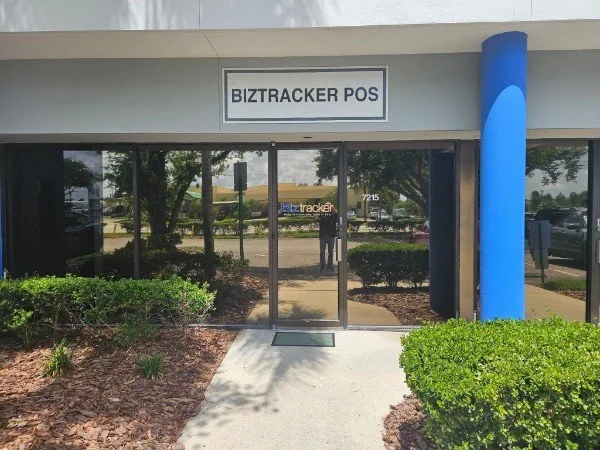
Local Office
Work with a POS company that understands software, hardware and day-to-day store operations.
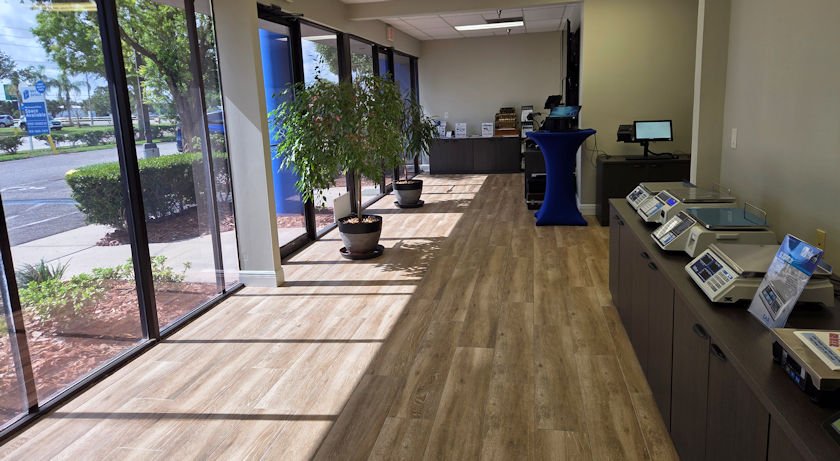
Showroom Demonstrations
Review POS software and compatible hardware before deciding what to replace.
Before the review
Bring What You Know — You Do Not Need a Formal Report
Even a few details can make the review more useful.
- Current POS system and payment processor
- Number of registers, scanners, printers and payment devices
- Your biggest daily POS frustrations
- Reports you wish were easier to get
- Inventory, vendor or barcode problems
- Employee, cash drawer or permission concerns
- Upcoming expansion, remodel or hardware replacement
- Anything that repeatedly breaks or slows the staff down
Serving Businesses Across Tampa Bay
BizTracker supports businesses throughout Pinellas, Hillsborough, Pasco, Manatee and nearby communities.
Related resources
Continue Your POS Review
Tampa Bay POS System
Local POS software, hardware, installation, training and support.
Tampa Bay POS services →POS Inventory Management
Review products, vendors, receiving, stock counts, purchasing and barcode workflows.
Inventory management →POS Reporting
Improve visibility into sales, margins, products, employees and locations.
Retail POS reporting →Cash Management
Review cashier accountability, drawers, voids, refunds, overages and shortages.
Cash management →POS Replacement
Plan a replacement without automatically discarding equipment or data that still has value.
POS replacement planning →Hardware Planning
Review terminals, scanners, receipt printers, drawers, displays and compatible peripherals.
POS hardware planning →Frequently asked questions
Free Tampa Bay POS Health Check FAQs
What is the Free Tampa Bay POS Health Check?
It is a no-pressure review of your current POS system, checkout workflow, hardware, payment processing, reporting, inventory, employee controls and support needs.
Does the Health Check require switching POS systems?
No. The right answer may be training, cleanup, hardware replacement, payment workflow changes or better reporting rather than a complete system replacement.
What kinds of businesses should request one?
Retail stores, restaurants, liquor stores, grocery stores, convenience stores, specialty retailers and multi-location businesses can all benefit when their current POS is slow, outdated, unreliable or difficult to manage.
Can BizTracker review existing hardware?
Yes. We can review terminals, barcode scanners, receipt and label printers, cash drawers, payment terminals, networking and other POS equipment. Compatibility depends on the exact model, interface, driver and software configuration.
Can BizTracker review inventory and reporting problems?
Yes. We can review product setup, vendors, receiving, counts, barcode scanning, price changes, sales reports, employee reports, margin visibility and location reporting.
What happens after I submit the request?
Our team reviews the information you provide and follows up about the most useful next step. Depending on the situation, that may be a diagnostic conversation, showroom visit, targeted hardware review or a broader POS evaluation.
Get clarity before spending money
Find Out Whether Your POS Needs a Fix, an Upgrade or a Replacement
Start with a free review of the problems you are actually dealing with. We will help you separate workflow, hardware, training and support issues from problems that truly require a new POS system.
Schedule a BizTracker POS Demo
Walk through checkout, inventory, purchasing and reporting with a BizTracker specialist. Bring your own store requirements and we will show you exactly how the system handles them.
Tampa Bay showroom, on-site and remote demos available.