
BizTracker portable inventory tool
BizTracker Portable Data Collector for Inventory, Receiving, Price Checks, and Barcode Workflows
The BizTracker Portable Data Collector extends BizTracker Infinity POS into the aisle, stockroom, sales floor, and receiving area. Store teams can scan products, collect inventory data, check prices, support receiving, build product orders, request shelf labels, and complete common inventory tasks without being tied to the register or back-office workstation.
It is built for retailers that need faster inventory counts, cleaner barcode workflows, better product lookup, and more practical sales-floor inventory control.
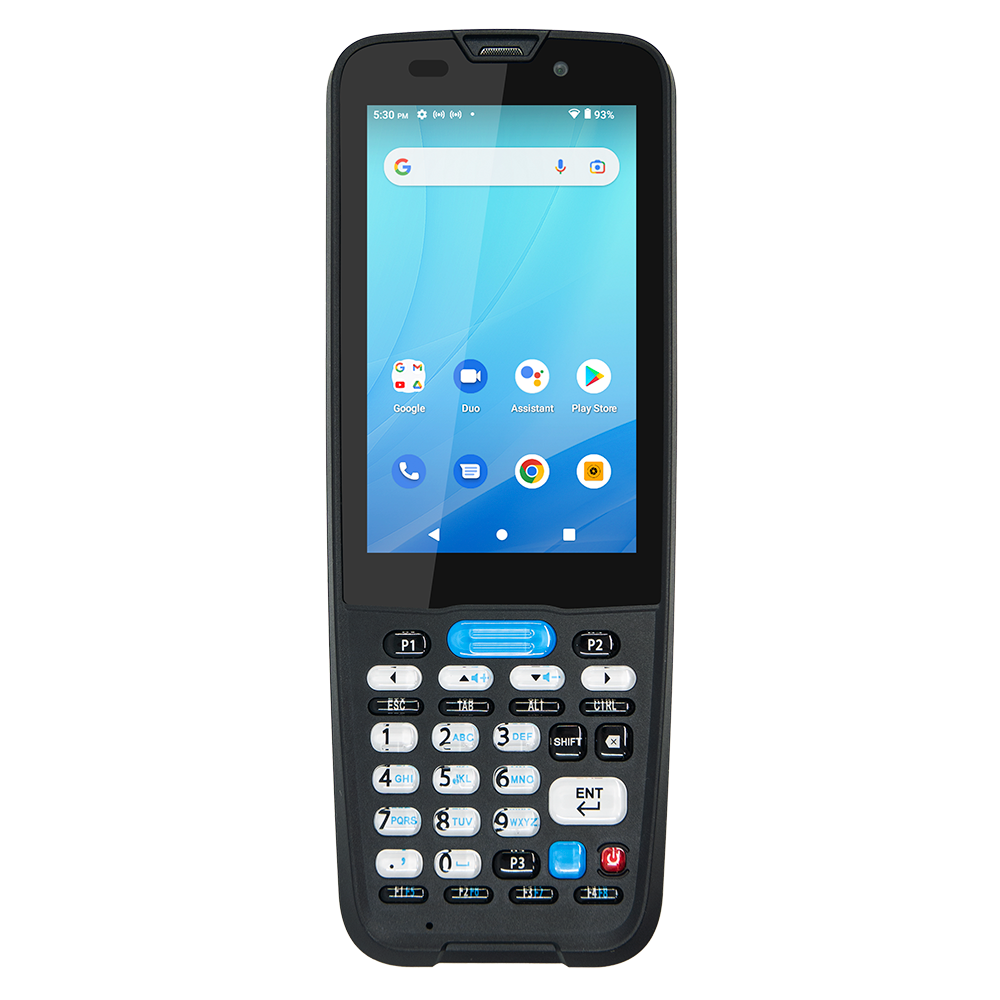
Device model, accessories, operating system, and configuration may vary. Confirm compatibility before ordering.
Quick answer
What is the BizTracker Portable Data Collector?
The BizTracker Portable Data Collector is a mobile inventory and barcode workflow tool for retailers using BizTracker Infinity POS. It helps store teams scan products, take inventory, receive items, check prices, build orders, transfer products, request shelf labels, and look up product information from the sales floor or stockroom.
It is especially useful for liquor stores, grocery stores, convenience stores, specialty retailers, and multi-store businesses that need faster inventory and product-management workflows.
Why retailers use it
Stop managing inventory with handwritten counts, spreadsheets, and back-office trips
Retail inventory work happens where the products are: on the shelf, in the aisle, in the stockroom, and at receiving. A portable data collector gives employees a better way to collect item information, verify product details, and support inventory workflows while they are physically working with the merchandise.
Faster inventory work
Scan items, collect counts, review product information, and support stock adjustments without writing everything down first.
Better product accuracy
Use barcode scanning to reduce manual lookup, improve item identification, and help keep POS product records aligned with the store floor.
More practical store workflows
Support receiving, order building, transfers, price checks, shelf-label requests, and inventory review closer to where the work happens.
Supported workflows
Portable data collector workflows for BizTracker Infinity POS
Depending on your BizTracker Infinity POS setup, device model, software version, accessories, and configuration, the portable data collector may support these common retail workflows.
Inventory stock take
- Scan products during counts
- Collect inventory data
- Reduce handwritten count sheets
- Support stock adjustments
- Improve count workflow speed
Receiving inventory
- Scan incoming items
- Review product information
- Support receiving workflows
- Reduce manual entry
- Improve product movement visibility
Price checks
- Look up current price
- Verify shelf pricing
- Check item information
- Answer customer questions
- Reduce back-office lookups
Product lookup
- Scan barcodes
- Find item records
- Review product details
- Check stock level where configured
- Support cleaner item data
Product orders
- Build product orders
- Collect item needs from the aisle
- Support reorder workflows
- Reduce paper notes
- Improve purchasing visibility
Store transfers
- Transfer items between stores
- Support multi-location inventory
- Move stock where needed
- Reduce overstock at one location
- Help prevent stockouts elsewhere
Shelf-label workflows
- Request replacement shelf labels
- Check shelf pricing
- Compare shelf labels to POS pricing
- Support label accuracy
- Reduce price confusion
Barcode workflows
- Support barcode-driven inventory
- Reduce manual item selection
- Improve product accuracy
- Support item verification
- Improve reporting quality
Compatibility note
Compatibility depends on your POS software, operating system, connection type, drivers, accessories, and configuration. Confirm compatibility before ordering.
Workflow comparison
Manual inventory work vs. portable data collection
A portable data collector helps reduce duplicate work by letting employees collect product data while they are working with the merchandise.
| Task | Manual workflow | Portable data collector workflow |
|---|---|---|
| Inventory counts | Employees write counts on paper, then re-enter the data later. | Employees scan items and collect inventory data more directly for BizTracker workflows. |
| Receiving | Products are checked manually, then entered or reviewed from the back office. | Employees can scan and collect receiving information closer to the receiving area. |
| Price checks | Employees leave the aisle to check the register or back-office system. | Employees can scan an item and review product or pricing information from the sales floor. |
| Shelf labels | Labels are requested from notes, memory, or manual back-office review. | Employees can support replacement shelf-label requests and price checks from the aisle. |
| Product orders | Low-stock items are written down and organized later. | Employees can build product order information while reviewing shelves or stockroom inventory. |
| Store transfers | Transfers are tracked manually or handled after separate item review. | Multi-location retailers can support transfer workflows by scanning and collecting item data. |
Inventory control
Make inventory counts and stock adjustments easier to manage
Inventory counts are time-consuming because employees have to identify products, count quantities, record information, and then update the system. A portable data collector can help streamline this process by letting employees scan items and collect inventory data with a supported handheld device.
This can help retailers reduce duplicate entry, improve inventory workflow speed, and support cleaner stock adjustment processes inside BizTracker Infinity POS.
Inventory tasks it can support:
- Physical inventory stock take
- Inventory adjustments
- Stock-level lookup where configured
- Product information review
- Barcode-driven item identification
- Multi-store inventory workflows
- Product movement review
- Cleaner inventory records
Receiving and product orders
When new inventory arrives, employees need a practical way to confirm products and collect receiving data. The BizTracker Portable Data Collector can support receiving workflows and help employees build product order information based on what they see in the aisle or stockroom.
Shelf labels and barcode accuracy
Stores with frequent price changes, large product catalogs, and many departments need a reliable way to keep shelf labels and POS pricing aligned. The portable data collector can support shelf-label requests and barcode-driven verification workflows.
Best-fit retailers
Who should use the BizTracker Portable Data Collector?
The BizTracker Portable Data Collector is best for retailers using BizTracker Infinity POS that need faster inventory, cleaner barcode workflows, product lookup from the sales floor, and stronger item-level control.
Liquor stores
Useful for bottle, pack, case, seasonal, and high-SKU inventory workflows, plus price checks, stock adjustments, and shelf-label review.
Grocery stores
Helpful for large item files, frequent price checks, receiving, stock counts, barcode scanning, shelf labels, and department inventory workflows.
Convenience stores
Supports fast-moving product categories, beverages, snacks, grocery items, stockroom checks, price review, inventory adjustments, and order building.
Specialty retailers
Useful for stores with many SKUs, product labels, shelf tags, customer-facing inventory questions, receiving, and detailed item lookup needs.
Multi-store retailers
Supports transfers, location-level inventory tasks, product consistency, stock movement, and barcode workflows across multiple stores.
Inventory-heavy stores
Best for retailers that want to reduce manual inventory work, improve product file accuracy, and give employees better scanning tools.
Device planning
Device, accessory, and configuration options
The correct portable data collector setup depends on your BizTracker configuration, handheld device requirements, scanner type, operating system, wireless network, accessories, charging needs, and store workflow.
Supported device options
Supported handheld computer options may include commercial mobile devices from brands such as Zebra or Unitech, depending on required configuration, availability, operating system, and workflow needs.
Accessory options
Accessory options may include charging cradles, communication cradles, USB charging cables, batteries, trigger handles, hand straps, screen protectors, rugged boots, mounts, and charging docks.
Configuration review
Before ordering, review software version, device model, scanner configuration, Wi-Fi requirements, POS database workflow, accessories, drivers, and training needs.
What you may need
- Compatible BizTracker Infinity POS software and configuration
- Supported handheld computer or mobile scanning device
- Compatible barcode scanner setup
- Charging cradle, cable, or dock
- Wireless network access if required by your setup
- Optional accessories based on store workflow
- Training for inventory, receiving, label, transfer, and order workflows
When to add one
Signs your store may need a portable data collector
If your employees are spending too much time walking between the shelf and the back office, your store may benefit from a mobile inventory and barcode workflow.
Inventory counts take too long
Your team relies on paper count sheets, manual entry, or duplicate work after the count is complete.
Receiving is too manual
New inventory is checked with handwritten notes or entered later instead of being collected closer to receiving.
Price checks slow employees down
Employees must go to the register or office to confirm pricing, item details, or stock information.
Shelf labels need frequent updates
Your store frequently replaces shelf labels, checks price mismatches, or manages large product catalogs.
Orders are built from memory
Employees notice low stock while walking the aisle but rely on paper notes or memory to build orders later.
Transfers need better control
Multiple locations move products between stores and need a more practical way to support transfer workflows.
Product data is messy
Duplicate items, inconsistent barcodes, and unclear product records make inventory and reporting harder to trust.
Employees need aisle-level lookup
Your team frequently needs product details, pricing, or stock information while away from the counter.
Implementation checklist
Before ordering, review your POS workflow and hardware requirements
A portable data collector should be selected based on the exact store workflow it needs to support. Review your current POS setup, device options, accessories, and data process before ordering.
Store workflow
- Inventory count process
- Receiving process
- Product order process
- Price check process
- Shelf-label process
- Transfer process
POS setup
- BizTracker Infinity POS version
- Database and item file setup
- Department and category structure
- Barcode data quality
- Multi-store configuration
- Reporting requirements
Hardware setup
- Device model
- Scanner configuration
- Operating system
- Charging and communication accessories
- Wireless network needs
- Support and training plan
Important ordering note
The correct device, scanner, operating system, cradle, accessories, and configuration should be confirmed before ordering. Talk with BizTracker or Spartan POS before purchasing if you are not sure which setup fits your store.
Related resources
Inventory, barcode, and BizTracker POS resources
Use these related guides to plan your POS, inventory, barcode, label, and multi-store workflows.
Frequently asked questions
BizTracker Portable Data Collector FAQs
What is the BizTracker Portable Data Collector?
The BizTracker Portable Data Collector is a mobile inventory and barcode workflow tool designed to help retailers using BizTracker Infinity POS scan products, take inventory, receive items, check prices, build orders, request labels, transfer products, and manage product information more efficiently.
What can the BizTracker Portable Data Collector be used for?
It can support inventory stock take, stock adjustments, receiving, product lookup, price checks, order building, store transfers, shelf-label requests, shelf-label price checks, and barcode-driven inventory workflows depending on configuration.
Does it work with BizTracker Infinity POS?
Yes. The data collector is designed for BizTracker Infinity POS workflows. Exact compatibility depends on the software version, device model, operating system, scanner, accessories, connection type, drivers, and configuration.
Can it help with inventory counts?
Yes. A portable data collector can help employees scan items and collect inventory data more efficiently, reducing manual entry and supporting cleaner inventory workflows.
Can it help with receiving?
Yes. The BizTracker Portable Data Collector can support receiving workflows so store teams can scan incoming products, collect item information, and process inventory more efficiently.
Can it help with shelf labels?
Yes. Depending on configuration, it can support shelf-label workflows such as requesting replacement shelf labels and checking shelf-label pricing against POS database pricing.
Can it be used for multi-store transfers?
Yes. Depending on configuration, it can support workflows for transferring items from one store to another, helping multi-location retailers manage inventory movement more effectively.
What types of retailers should use it?
It is a strong fit for liquor stores, grocery stores, convenience stores, specialty retailers, multi-store retailers, and retailers using BizTracker Infinity POS that need faster inventory or barcode workflows.
What hardware is included?
Hardware depends on the selected configuration. Supported handheld computer options, charging accessories, batteries, trigger handles, straps, mounts, and other accessories should be confirmed before ordering.
How do I know which setup is right for my store?
Talk with BizTracker before ordering. A POS specialist can review your store type, BizTracker configuration, inventory workflows, barcode needs, device options, accessory requirements, and support plan.
Ready to improve inventory and barcode workflows?
Request a Free POS Review
Talk with BizTracker about your current POS system, inventory workflow, product file, barcode scanning, receiving process, shelf labels, transfers, order building, hardware, and support needs. We can help you determine the right portable data collector setup for your store.
Email: info@biztracker.com