
Label Printing Scales That Keep Department Prices and Checkout in Sync
Stop entering the same prices twice. BizTracker helps Tampa Bay food retailers select, configure, calibrate and support CAS and Ishida label printing scales that work with the store’s barcode and POS workflow.
Get help with scale selection, PLUs, label formats, price-embedded barcodes, checkout scanning, legal-for-trade calibration, repairs and compatible BizTracker Infinity price-update workflows.
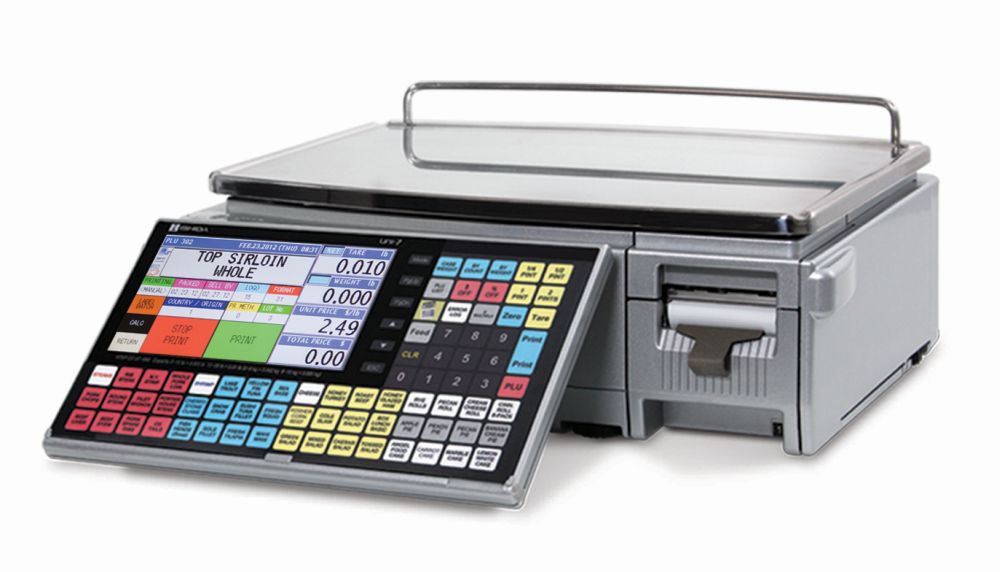
Representative Ishida label-printing scale. Model availability and compatibility may vary.
A Scale Should Do More Than Weigh and Print
A label printing scale is one part of a larger retail workflow. The item, PLU, unit price, barcode, department, tax rule and checkout system all need to agree.
When they do not, employees may re-enter prices, labels may fail to scan, cashiers may override transactions and department reports may become unreliable. BizTracker helps review the complete path from the department scale to the front register.
Prices Entered Twice
Staff changes an item price in the POS and then manually enters the same change into one or more department scales.
Labels Do Not Scan
The barcode format, PLU, embedded price or POS scanning rule does not match the label printed by the scale.
Wrong Checkout Price
The label shows one price while the POS expects another, creating customer disputes and manual corrections.
Slow Counter Service
Employees struggle to find PLUs, print the proper label or correct mistakes during busy deli, meat or seafood service.
Unreliable Printing
Labels jam, skip, feed incorrectly, print too lightly or use a size that does not fit the required information.
Accuracy Concerns
The scale does not return to zero, readings appear unstable or the business is unsure whether calibration is current.
Change Prices Once and Send Updates to Compatible Scales
A properly planned BizTracker Infinity workflow can reduce duplicate price entry by managing supported item and price information in the POS and sending updates to compatible CAS and Ishida scales.
Update the Item
Change supported item information or pricing in BizTracker Infinity.
Send Scale Updates
Transfer supported item and price changes to compatible department scales.
Print the Label
Department staff weighs the product and prints the configured barcode label.
Scan at Checkout
The cashier scans the label using the matching POS barcode rules and item setup.
Reduce Duplicate Entry
Avoid manually keying every supported price change into each compatible scale.
Keep Prices Aligned
Help reduce mismatches between the department label and the checkout item file.
Support Multiple Departments
Plan pricing and label workflows for deli, meat, seafood, bakery, produce and prepared foods.
Compatibility depends on the exact scale model, communication method, software version, label requirements and POS configuration. Confirm compatibility before purchasing equipment.
Built for Fast-Moving Fresh Food Departments
Label printing scales are commonly used where products are weighed, priced and labeled before reaching the checkout lane. The right setup helps employees serve customers quickly while giving the POS a barcode it can interpret correctly.
- Deli meats, cheese, salads, sides and prepared foods
- Fresh meat, ground meat, sausages and packaged cuts
- Fish, shrimp, crab, shellfish and packaged seafood
- Grab-and-go meals and refrigerated prepared foods
- Packaged produce, cut fruit and bulk food items
- Bakery, candy, nuts, coffee, spices and specialty foods

Label Printing Scale Uses by Department

Deli & Meat
Weigh sliced meats, cheeses, salads, fresh cuts, ground meat, sausages, marinated products and custom packages.

Seafood
Print labels for fresh fish, shrimp, crab, shellfish, packaged seafood and prepared seafood items.

Produce & Specialty Foods
Support packaged produce, fruit, nuts, candy, coffee, tea, spices, olives, bulk foods and specialty grocery items.

What Can Appear on a Scale Label?
Label capabilities depend on the scale model, label size, item setup and software configuration. BizTracker can help plan the information needed by the customer, department employee and checkout system.
Product Details
- Product name
- PLU or item number
- Department
- Ingredients
- Safe-handling text
Pricing Details
- Net weight
- Unit price
- Total price
- Tare information
- Price per pound
Date Information
- Packed date
- Sell-by date
- Use-by date
- Production date
Checkout Information
- Scannable barcode
- Embedded PLU
- Embedded price
- Store information
Not every scale or label format supports every field. Food labeling requirements should be reviewed with the appropriate regulatory or compliance resource.
CAS and Ishida Label Printing Scale Solutions
BizTracker helps businesses compare the scale, label, capacity, PLU, printing, communication and service requirements before selecting equipment.
CAS Label Printing Scales
CAS offers commercial weighing and label-printing equipment for grocery, deli, meat, seafood, bakery and specialty retail applications.
- Scale and label workflow planning
- PLU and item setup assistance
- Barcode and checkout review
- Calibration and local service
- Compatibility review before purchase
Ishida Label Printing Scales
Ishida scales are used in fresh food retail environments that require commercial weighing, price computation, PLU access and printed labels.
- Model and capacity planning
- Label format review
- Barcode and POS workflow planning
- Repair and calibration assistance
- Availability and compatibility confirmation
Product availability, communications, software support and POS compatibility vary by model. BizTracker should confirm the complete configuration before equipment is ordered.
The Scale Label and POS Must Speak the Same Language
A barcode that prints correctly is not necessarily a barcode that the POS can interpret correctly. Both systems must be configured around the same structure.
| Scale Configuration | Matching POS Configuration | What Can Go Wrong |
|---|---|---|
| PLU or item number | Matching POS item record or parsing rule | The barcode scans as an unknown or incorrect item. |
| Price-embedded barcode | Correct embedded-price barcode format | The POS reads the wrong price or rejects the barcode. |
| Department assignment | Matching department and reporting setup | Sales appear in the wrong department or report. |
| Tax or food category | Correct POS tax rule | The item may receive the wrong tax treatment. |
| Label dimensions and print quality | Scanner capable of reading the printed barcode | Labels scan inconsistently or require manual entry. |
| Scale item price | Matching checkout price or embedded-price handling | The displayed label price and register result do not agree. |
When an Older Label Scale Becomes a Business Risk
Frequent Printer Problems
Repeated jams, skipped labels, unreadable printing or poor feeding can interrupt department service.
Accuracy or Stability Problems
A scale that will not hold zero, weighs inconsistently or cannot be calibrated properly may need repair or replacement.
Unsupported Label Format
The scale may not support the barcode, label dimensions or required information used by the current POS workflow.
Limited PLU Capacity
Department growth may exceed the practical item capacity or employee workflow of an older unit.
No Reliable Communications
A scale that cannot receive supported item or price updates may require too much repetitive manual entry.
Parts Are Difficult to Find
Repair may no longer make sense when replacement parts, printheads or service resources are unavailable.
Do not replace the scale until the problem is identified.
The failure may be caused by the printer, labels, calibration, scale configuration, barcode structure, POS item file, network connection or an update that was never applied. BizTracker can help review the complete workflow before recommending replacement.
What to Have Ready Before Choosing a Scale
A model recommendation is more accurate when the full department and checkout workflow is known.
- Type of department and products being weighed
- Current scale brand and model
- Current POS system and software version
- Number of required PLUs or items
- Maximum expected product weight
- Label size and information requirements
- Barcode format required by the POS
- Need for ingredients or safe-handling text
- Number of department scales and store locations
- Need for POS-to-scale price updates
- Repair, calibration and local service needs
- Sample label or photo of the current setup
Scale Sales, Calibration, Repair and POS Assistance
BizTracker supports local businesses that depend on label printing scales for daily department sales. Local service can be especially important when a failed scale stops employees from labeling products or serving customers.
- Scale and model selection
- Legal-for-trade calibration support
- Printer, display and weighing troubleshooting
- Barcode and label review
- POS item and scanning workflow assistance
- Compatible Infinity-to-scale price updates
- Replacement planning and installation coordination
Scale, POS and Grocery Store Planning Guides
Label Printing Scale FAQs
What is a label printing scale?
A label printing scale weighs a product, calculates the selling price and prints a label. Depending on the model and setup, the label may include the product name, weight, unit price, total price, barcode, dates and other item information.
What businesses use label printing scales?
Common users include delis, meat markets, seafood markets, grocery stores, produce departments, bakeries, prepared food departments, specialty food stores and retailers selling bulk products by weight.
Can a scale label be scanned at a POS register?
Yes, when the scale barcode format and POS configuration are compatible. The POS must be configured to interpret the PLU, price, weight or other information encoded in the barcode.
Why does my scale label not scan at checkout?
Possible causes include the barcode format, PLU setup, embedded-price rules, POS item file, scanner configuration, label quality, print contrast or scale configuration. The full scale-to-POS workflow should be reviewed.
Can BizTracker Infinity send price changes to label printing scales?
BizTracker Infinity can support item and price update workflows with compatible CAS and Ishida scale configurations. Compatibility depends on the exact scale model, communication method, software version and setup.
Do commercial label printing scales need to be legal for trade?
When a scale is used to determine the price charged to a customer, commercial weighing and legal-for-trade requirements should be reviewed. BizTracker provides scale calibration and legal-for-trade assistance in Florida.
Does BizTracker repair CAS and Ishida scales?
BizTracker helps Tampa Bay businesses with CAS and Ishida scale troubleshooting, repair, calibration and replacement planning. Serviceability depends on the model, age, condition and availability of parts.
What is the best label printing scale for a deli?
The right deli scale depends on capacity, PLU count, label size, barcode format, employee workflow, ingredient requirements, POS compatibility, service needs and whether prices should be sent from the POS to the scale.
Should I repair or replace my current label scale?
Repair may be appropriate when the scale is supported and the problem involves a serviceable component, calibration or configuration. Replacement may make more sense when parts are unavailable, the scale is inaccurate, printing is unreliable or the model cannot support the required POS and barcode workflow.
What information should I send BizTracker for a scale recommendation?
Send the current scale model, POS system, products sold by weight, required label information, maximum weight, number of PLUs, number of scales, sample label and a description of the current problem or desired workflow.
Get the Scale, Label, Barcode and Checkout Workflow Working Together
Tell BizTracker what you sell, which POS system you use, your current scale model and what needs to appear on the label. We can help determine whether you need configuration, calibration, repair, integration assistance or replacement equipment.