
Best POS System for Grocery Stores: What to Compare Before You Buy
Compare grocery POS systems for barcode checkout, large item files, inventory, produce, scales, variable-weight labels, purchase orders, receiving, pricing, SNAP EBT, eWIC, reporting, hardware and multi-store operations.
This guide is designed for independent grocery stores, supermarkets, neighborhood markets, specialty food retailers, ethnic markets and multi-location grocers.
What Is the Best POS System for a Grocery Store?
The best grocery store POS system is the one that matches the store’s actual checkout, inventory, product, scale, purchasing, receiving, payment, reporting and multi-location requirements.
A good grocery POS should support fast barcode scanning, large item files, departments, vendors, package sizes, produce and variable-weight products, price changes, labels, purchase orders, stock counts, employee controls and dependable reporting.
Grocery operators should ask each vendor to demonstrate the exact workflows their store needs rather than relying only on a feature list. BizTracker Infinity is one option for inventory-focused grocery retailers. Review the BizTracker grocery store POS system for product-specific information.
Jump to the Grocery POS Requirement You Need to Compare
Do Not Choose Grocery POS Software From a Generic Feature List
Grocery stores differ in size, departments, product count, checkout volume, scale workflows, vendor relationships, payment programs and number of locations. A system that works well for a small neighborhood market may not fit a larger supermarket or multi-store grocer.
Before comparing vendors, document how the store currently handles checkout, products, inventory, purchasing, receiving, price changes, scales, labels, employee permissions, cash procedures and reporting.
- Number of locations
- Number of checkout lanes
- Approximate product count
- Departments and categories
- Produce and weighed items
- Current scales and labels
- Vendors and delivery methods
- SNAP EBT and eWIC needs
- Inventory-count procedures
- Reporting requirements

The best grocery POS is the system that fits the store’s departments, product mix, checkout volume and operating procedures.
Grocery POS Requirements to Classify Before You Compare Systems
Separate essential requirements from optional features. A long feature list is not helpful when a system cannot support one critical workflow.
| Requirement | Usually Essential | May Depend on the Store |
|---|---|---|
| Barcode Checkout | Fast scanning, product lookup, quantity entry, returns, discounts and cashier permissions. | In-counter scanners, scan scales, self-checkout or specialty lane hardware. |
| Product Management | UPCs, descriptions, departments, vendors, costs, prices, taxes and inventory settings. | Advanced attributes, customer-specific pricing, recipes or production relationships. |
| Inventory | Stock on hand, receiving, adjustments, counts, movement and inventory value. | Warehouses, automated replenishment, production inventory or advanced forecasting. |
| Produce and Weighed Items | Required when the store sells produce, deli, meat, seafood, bakery or bulk goods by weight. | Prepack scales, checkout scales, label-printing scales or complex variable-weight barcode formats. |
| Purchasing | Vendor records, costs, case quantities, purchase orders and receiving. | Central purchasing, suggested orders, electronic vendor interfaces or warehouse distribution. |
| Pricing and Labels | Reliable price changes and shelf-label coordination. | Electronic shelf labels, advanced promotions, customer pricing or specialized scale-label formats. |
| Payments | Cash, cards and the payment methods required by the store. | SNAP EBT, eWIC, gift cards, loyalty, house accounts or mobile payment programs. |
| Reporting | Sales, departments, products, inventory, margins, employees and cash. | Multi-store dashboards, advanced analytics, accounting exports or custom reporting. |
| Support | Implementation, training, backups, hardware support and a clear escalation path. | Onsite service, after-hours support, managed networking or dedicated account management. |
Cash Register, Basic POS or Full Grocery Management System?
| System Type | Best Fit | Common Limitations |
|---|---|---|
| Traditional Cash Register | Very small stores with simple departments, limited inventory needs and straightforward checkout. | Limited product files, purchasing, receiving, inventory, margin reporting and multi-store control. |
| Basic Retail POS | Small stores needing barcode checkout, product records and basic reporting. | May lack grocery scales, package relationships, advanced purchasing, detailed receiving or eWIC support. |
| Full Grocery POS and Inventory System | Grocery stores with large item files, multiple departments, weighed products, vendors, inventory and detailed reporting needs. | Usually requires more planning, data preparation, training and implementation work. |
| Multi-Store Grocery Platform | Operators needing centralized products, branch inventory, transfers, purchasing, permissions and consolidated reporting. | Requires careful location setup, network planning, data consistency and head-office procedures. |
Test the Grocery Checkout Workflow With Real Products
A demonstration should use realistic grocery products rather than a few generic test items. Ask the vendor to scan packaged goods, enter quantities, find a product without a barcode and process a return.
The system should also demonstrate how products are created and maintained. Grocery item files often require more detail than basic retail systems provide.
- Fast barcode scanning
- Product lookup
- Quantity entry
- Department buttons
- Alternate scan codes
- Pack and case relationships
- Tax and payment rules
- Returns and refunds
- Cashier permissions
- Manager approvals
Ask how the POS handles products purchased by the case but sold individually, products with more than one barcode, temporary substitutions and vendor-specific item codes.
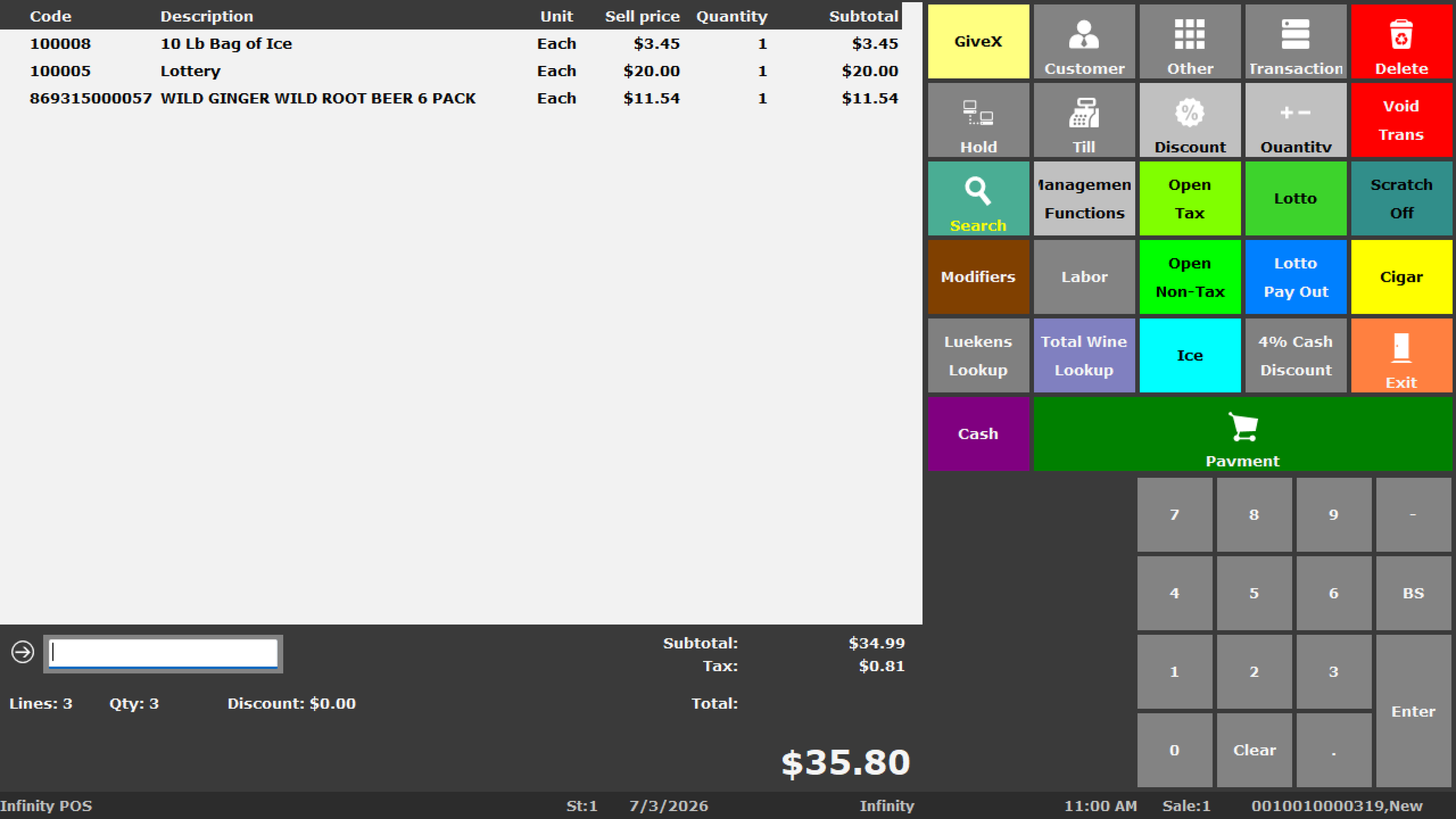
Actual BizTracker Infinity POS software screen. The precise layout, products, prompts and permissions vary by configuration.
Make the Vendor Demonstrate the Exact Grocery Scale Workflow
Grocery stores may weigh produce at checkout, print labels from department scales or sell prepackaged variable-weight products. These workflows are not interchangeable.
Produce Lookup
Ask how cashiers find produce items, enter PLUs, select departments and distinguish similar products.
Checkout Weighing
Confirm the scale model, certification, connection and how weight is passed into the transaction.
Prepack Labels
Review variable-weight barcodes, embedded price or weight, label format and product matching.
Tare and Packaging
Confirm how containers, packaging weight and store procedures affect the selling workflow.
Department Reporting
Confirm whether produce, deli, meat, seafood, bakery and bulk goods report separately.
End-to-End Testing
Test the actual scale, label, barcode and checkout workflow before purchasing or changing equipment.
Do Not Assume an Existing Grocery Scale Will Work
Confirm the exact model, certification, firmware, interface, barcode format, embedded data, label template, driver, software version and installation requirements in writing.
Evaluate How the POS Explains Inventory Changes
Grocery inventory changes through checkout, receiving, spoilage, damage, shrink, transfers, returns, markdowns, production and physical counts. A useful system should help managers understand why the on-hand quantity changed.
- Stock on hand
- Inventory value
- Stock movement
- Low-stock reporting
- Zero-sales products
- Fast and slow movers
- Physical-count differences
- Spoilage and damage adjustments
- Shrink-sensitive departments
- Inventory by location
Ask the vendor to show a complete product movement history containing a sale, receipt, adjustment and physical-count change. This reveals far more than a simple on-hand quantity screen.

Inventory accuracy depends on the procedures used for receiving, counting, spoilage, damage and adjustments.
Test the Complete Grocery Vendor Workflow
A purchase-order feature is not enough. The vendor should demonstrate how the system handles product setup, case quantities, ordering, receiving, cost changes and inventory updates.
Review Reorder Needs
Check stock on hand, stock on order, sales movement, vendor schedule and reorder settings.
Create the Order
Use vendor item numbers, cases, packs, expected quantities and supplier costs.
Receive the Delivery
Record shortages, substitutions, damage, package differences and cost changes.
Review the Result
Confirm inventory, costs, prices, labels, open orders and receiving reports were updated correctly.
Questions to Ask About Vendor Receiving
Can employees receive part of an order? Can they record shortages and damaged products? Can the system update product costs? Does it preserve the old cost? Can managers review open orders, received quantities and on-order stock?
Compare How Each System Handles Grocery Price Changes
Grocery stores frequently update prices because of supplier costs, promotions, seasonal products and competitive conditions. The POS should help coordinate the approved selling price with shelf, scale and checkout pricing.
Supplier Cost Changes
Ask how receiving updates costs and how managers identify products whose margins changed.
Regular Price Changes
Review approval, effective date, product-file update and verification procedures.
Promotions
Confirm quantity pricing, temporary promotions, date ranges and reporting.
Shelf Labels
Test the label printer, media, template, barcode, product description and price-change workflow.
Scale Labels
Verify that weighed-product labels and checkout records use the expected barcode structure.
Price Verification
Establish a process for confirming that product, shelf, scale and checkout prices agree.
Verify Benefit-Payment Support for the Exact Store Configuration
General card-processing compatibility does not automatically mean a system supports SNAP EBT or eWIC. These programs can depend on retailer approval, processor support, payment equipment, agency requirements, approved-product information, certification and testing.
- Retailer approval
- Processor support
- Payment-device compatibility
- SNAP EBT transaction flow
- eWIC agency requirements
- Approved product information
- Mixed-basket procedures
- Receipt requirements
- Lane testing
- Employee training
Ask the vendor to confirm support in writing for the store’s state, agency, processor, hardware and software configuration.
Compare Architecture Based on Store Operations, Not Marketing Labels
Ask how the POS behaves during an internet outage, where data is stored, how backups work, who manages updates and what happens when a workstation fails.
| Architecture | Potential Advantages | Questions to Ask |
|---|---|---|
| Cloud-Based | Remote access, centralized updates and less local server management. | What happens when internet service fails? Which functions continue? How is data exported and backed up? |
| Local or On-Premises | Local transaction processing and potentially less dependence on the internet for in-store operation. | Who maintains the server, backups, security, updates and replacement equipment? |
| Hybrid | May combine local operations with remote services, cloud reporting or multi-store synchronization. | Which functions are local? Which require internet access? How does synchronization recover after an outage? |
Review Backup and Internet-Failure Procedures
Ask for a clear demonstration of transaction continuity, data backup, restoration, workstation replacement and network-failure procedures. Review POS failover and backup internet, automated POS backups and the POS backup plan review.
Evaluate the Complete Lane and Department Hardware Setup
Software is only one part of the grocery POS system. Confirm the exact model, connection, driver, duty cycle and support responsibility for every device.
POS Terminals
Confirm performance, operating system, ports, warranty, replacement plan and support.
Barcode Scanners
Compare handheld, presentation, in-counter and scan-scale options.
Checkout Scales
Confirm certification, communication, capacity, placement and POS compatibility.
Label-Printing Scales
Review barcode formats, label templates, embedded data and department workflow.
Receipt Printers
Confirm speed, interface, paper, cash-drawer connection and replacement availability.
Cash Drawers
Review size, duty cycle, interface, till inserts and cashier procedures.
Shelf-Label Printers
Confirm media, adhesive, templates, print volume and driver compatibility.
Payment Devices
Verify processor, card, SNAP EBT, eWIC and software compatibility.
Customer Displays
Confirm transaction visibility, connection and software support.
Portable Scanners
Review counting, receiving, item lookup and wireless requirements.
Network Equipment
Plan switches, cabling, firewall, internet, Wi-Fi and backup connectivity.
Power Protection
Protect lanes, servers, switches and payment equipment with appropriate battery backup.
Need Help Choosing Compatible Grocery POS Hardware?
Chat with a BizTracker specialist before purchasing or reusing terminals, scanners, scales, printers, drawers, displays, payment devices, label printers, networking equipment or portable scanners.
Ask How the System Manages Store-Level and Head-Office Responsibilities
Multi-store grocery operators need more than a combined sales report. They may need centralized products, branch pricing, inventory by store, transfers, purchasing oversight, employee permissions and consolidated reporting.
Central Product Records
Determine which item fields are controlled centrally and which can vary by store.
Branch Pricing
Ask how regular prices, promotions and approved store-specific prices are managed.
Inventory by Store
Review quantities, value, movement, stock cover and product availability by location.
Stock Transfers
Test the sent, received, outstanding and adjustment workflow between stores.
Central Purchasing
Determine whether buying is performed centrally, locally or through a combination of both.
Consolidated Reporting
Compare stores by sales, departments, inventory, purchasing, employees and cash activity.
Compare the Work Required to Get the Grocery POS Running Correctly
A strong product can still fail when the implementation is rushed, product data is poor or employees are not trained.
Product Conversion
Ask which fields can be imported, how duplicates are handled and who cleans departments, costs, package sizes and descriptions.
Hardware Preparation
Confirm device compatibility, staging, drivers, network requirements, placement and power protection.
Payment Setup
Determine who coordinates the processor, devices, SNAP EBT, eWIC, testing and support.
Scale and Label Testing
Test weighted products, variable-weight barcodes, templates, shelf labels and scale labels before go-live.
Employee Training
Train cashiers, managers, receivers, buyers, department employees and back-office users separately.
Go-Live Support
Confirm who is available during cutover, how problems are escalated and what follow-up training is included.
Grocery POS Mistakes That Create Expensive Problems Later
Choosing Only on Monthly Price
A lower software fee may not offset poor inventory control, incompatible hardware or weak support.
Skipping Scale Testing
Existing scales and variable-weight labels may not work with a new POS without specific configuration.
Assuming EBT Means eWIC
SNAP EBT and eWIC are separate workflows with different requirements.
Ignoring Product Data Quality
Duplicate products, missing costs and incorrect package sizes damage purchasing, inventory and margin reports.
Buying Hardware Before Software Review
Terminals, scanners, scales, printers and payment devices should be confirmed for the selected POS.
Not Testing Real Workflows
A polished demo may hide weaknesses in receiving, labels, weighted items, returns or inventory adjustments.
Underestimating Training
Cashiers, managers, receivers and buyers require different training and permissions.
Ignoring Backup Procedures
Ask how transactions continue, how data is restored and how failed equipment is replaced.
Choosing a System That Cannot Grow
Consider additional lanes, departments, stores, warehouses and reporting needs before buying.
Questions to Ask Every Grocery POS Vendor
| Area | Questions to Ask During the Demonstration |
|---|---|
| Checkout | Can you scan real grocery products, enter quantities, find an item, process a return and show cashier permissions? |
| Product File | How are UPCs, alternate codes, departments, vendors, costs, prices, taxes, packs and cases maintained? |
| Produce and Scales | Can you demonstrate the exact scale, PLU, variable-weight barcode and label workflow we will use? |
| Purchasing | Can you create a purchase order using vendor item numbers, cases, quantities and expected costs? |
| Receiving | Can you receive part of an order, record shortages and update inventory and costs? |
| Inventory | Can you show a complete movement history containing sales, receiving, adjustments and physical counts? |
| Pricing | How are supplier cost changes, promotions, shelf labels, scale labels and checkout prices coordinated? |
| Payments | Which processor, payment devices, SNAP EBT and eWIC configurations are supported for our store? |
| Reporting | Can you show sales, gross profit, department, inventory, stock movement, purchasing, employee and cash reports? |
| Multi-Store | How are products, branch pricing, transfers, purchasing, permissions and consolidated reports managed? |
| Implementation | Who handles conversion, configuration, hardware, testing, training, backups and go-live support? |
| Ongoing Support | Who answers software, hardware, payment, network and operational questions after launch? |
Compare Grocery POS Systems Using the Same Requirements
Replace “Vendor A,” “Vendor B” and “Vendor C” with the systems you are evaluating. Score each requirement only after seeing it demonstrated.
Do Not Score an Undemonstrated Feature as Supported
Require the vendor to show the workflow, identify the required module, confirm compatible hardware and explain any processor, agency, certification or third-party dependency.
A Practical Grocery POS Selection Process
Compare systems using your real products, workflows, hardware and staff responsibilities.
Document Requirements
List essential checkout, inventory, scale, payment, reporting and multi-store needs.
Prepare Real Scenarios
Select products, vendor orders, returns, weighed items and reports for each demonstration.
Score the Demonstrations
Use the same questions and requirements for every vendor.
Review the Full Proposal
Compare software, hardware, payments, conversion, installation, training and support.
Verify Compatibility
Confirm scales, labels, payment devices, EBT, eWIC, networking and existing equipment.
Plan Implementation
Create a realistic schedule for data, configuration, testing, training and go-live.
Train by Employee Role
Train cashiers, managers, receivers, buyers and back-office employees on their responsibilities.
Review After Launch
Confirm inventory, prices, labels, reports and procedures are working as intended.
Continue Your Grocery POS Research
BizTracker Grocery Store POS
Review Infinity checkout, inventory, purchasing, scales, labels, reporting and multi-store grocery capabilities.
Explore grocery store POSInventory Management
Review stock tracking, movement, physical counts, reorder needs and inventory accuracy.
Explore inventory managementPurchasing and Receiving
Improve purchase orders, vendor deliveries, cost updates and receiving accountability.
Browse purchasing guidesPricing and Labels
Coordinate supplier costs, selling prices, shelf labels, scale labels and checkout.
Browse pricing guidesRetail Reporting
Review sales, gross profit, inventory, purchasing, employees, cash and multi-store performance.
Explore retail reportingeWIC POS Requirements
Review agency, processor, payment-device, approved-product and testing requirements.
Explore eWIC POSNeed Help Comparing Grocery POS Systems?
Chat with a BizTracker specialist about grocery checkout, inventory, scales, weighted items, vendors, receiving, labels, EBT, eWIC, hardware, reporting or multi-store requirements.
Best Grocery Store POS System FAQs
What is the best POS system for a grocery store?
The best grocery POS is the system that matches the store’s checkout, product, scale, inventory, purchasing, payment, reporting and multi-location requirements. Ask vendors to demonstrate the exact workflows your store needs.
What features should grocery POS software include?
Grocery POS software should typically include barcode checkout, large item files, departments, vendors, costs, prices, inventory, purchase orders, receiving, stock counts, employee controls and reporting.
Can a basic retail POS work for a grocery store?
A basic retail POS may work for a small market with simple products and limited inventory requirements. Stores with produce, scales, large item files, detailed purchasing or eWIC may require a more complete grocery system.
Should grocery stores use a cash register or POS system?
A cash register may fit a very small store with limited product and inventory needs. A grocery POS is usually more appropriate when the store needs barcode item files, vendors, purchasing, receiving, inventory, labels and detailed reporting.
Can grocery POS systems support produce and weighed items?
Yes, but the exact workflow varies. Confirm PLUs, checkout scales, label-printing scales, variable-weight barcodes, tare, labels and department reporting for the intended setup.
Will an existing grocery scale work with a new POS?
Not necessarily. Confirm the exact scale model, certification, firmware, connection, barcode format, label template, software version and installation requirements.
Can grocery POS software manage purchase orders?
A complete grocery POS can support vendor records, case quantities, purchase orders, receiving, cost changes, on-order quantities and purchasing history.
Can grocery POS software track spoilage and shrink?
Grocery POS software can support adjustments, physical counts and movement reporting used to review spoilage, damage, shrink and inventory differences. Store procedures determine how reliably these events are recorded.
Can grocery POS systems print shelf labels?
Many grocery POS systems can support shelf, barcode, receiving, promotional and price-change labels. Confirm the printer, media, template, driver and workflow before purchasing equipment.
Does SNAP EBT compatibility include eWIC?
No. SNAP EBT and eWIC are separate programs with different processor, agency, product, certification, payment-device and testing requirements.
Should a grocery POS work during an internet outage?
Ask the vendor which checkout, payment, inventory and reporting functions continue during an outage and how data synchronizes when service returns.
What reports should a grocery POS provide?
Useful grocery reports include sales by department and product, gross profit, inventory value, stock movement, zero-sales items, purchase orders, receiving, employee activity, cash and store comparisons.
Can grocery POS software support multiple stores?
Multi-store grocery POS can support centralized products, branch pricing, inventory by location, transfers, purchasing, permissions and consolidated reporting.
Can product data be converted from an existing grocery POS?
Data-conversion options depend on the current system, export format and data quality. Review products, UPCs, departments, vendors, costs, prices, package sizes and scale records before conversion.
How should grocery POS vendors be compared?
Use the same requirements, products and test scenarios for each vendor. Score only demonstrated capabilities and compare software, hardware, payments, data conversion, implementation, training and support.
Does BizTracker offer grocery store POS software?
Yes. BizTracker Infinity can support grocery checkout, products, departments, vendors, purchasing, receiving, inventory, labels, reporting, cash management and multi-store operations, depending on configuration.
See How BizTracker Infinity Handles Your Grocery Workflows
Review your checkout lanes, products, departments, scales, weighted items, vendors, receiving, inventory, labels, SNAP EBT, eWIC, reporting, hardware and multi-store requirements with a BizTracker specialist.
Features, scales, labels, variable-weight workflows, payment processing, SNAP EBT, eWIC, hardware, integrations, data conversion, installation, training and support may vary by software version, enabled modules, processor, agency, equipment, configuration, business procedure and location. Confirm current requirements before purchasing or changing systems.