
BizTracker Infinity Multi-Store POS
Manage Multiple Stores Without Managing Every Store Manually
Connect inventory, purchasing, transfers, pricing, employees, cash management, reporting, checkout, and store operations with a multi-store retail POS system built for greater visibility and control.
BizTracker Infinity POS can help liquor stores, grocery stores, convenience stores, specialty retailers, and other multi-location businesses manage individual stores without operating each location as a disconnected business.
Get a Free Multi-Store POS Review Call (877) 767-1249POS experience since 1996 • Tampa Bay onsite support options • Remote planning and support available
Quick Answer
A multi-store POS system connects individual retail locations with centralized management tools while maintaining store-level inventory, sales, users, purchasing, cash activity, and reporting. BizTracker Infinity POS can help multi-location retailers manage products, pricing, inventory, purchase orders, receiving, transfers, employee permissions, reporting, checkout, and expansion through a planned multi-store configuration.
Why Multi-Store Retail Gets Hard
Adding Stores Creates Problems That Separate Registers Cannot Solve
A POS that works at one location may become difficult to manage at two, three, five, or more stores. Owners need information from every location without spending the day calling managers, combining spreadsheets, or fixing inconsistent data.
Where Is the Inventory?
One location is sold out while another location may have excess inventory sitting on the shelf or in the stockroom.
Should We Transfer or Reorder?
Better visibility can help management determine whether existing stock should be transferred before another supplier order is placed.
Are Prices Consistent?
Product, department, pricing, tax, promotion, and item changes become difficult when every location maintains separate data.
Who Can Change What?
Cashiers, receivers, store managers, buyers, and owners should not all require the same level of access.
How Are Stores Performing?
Owners need individual location results and company-wide reporting without manually combining information from several systems.
Can We Add Another Location?
Growth becomes harder when every new store requires another disconnected item file, reporting process, support procedure, and management system.
Questions Your POS Should Answer
Can You Answer These Questions Without Calling Every Store?
- Which location has this item in stock?
- Which store is running low?
- Where is excess inventory sitting?
- What is currently on order?
- Which products are moving slowly?
- What inventory was transferred today?
- Which store performed best yesterday?
- Which manager approved this refund?
- Are prices consistent across stores?
- What does each store need to reorder?
- How much cash activity occurred by location?
- Can I add another store without rebuilding everything?
One Connected Retail Strategy
Central Control Without Losing Store-Level Visibility
Multi-store management does not mean every employee at every location should do everything exactly the same way.
The business should define which information is controlled centrally and which activities belong to individual stores.
- Centralized product records
- Department and category structure
- Vendor and cost information
- Company-wide or approved branch pricing
- User roles and permissions
- Branch inventory quantities
- Store-level receiving and counts
- Location and company-wide reporting
Head Office Questions
Decide Who Controls Each Workflow
- Who can create new products?
- Who can change costs?
- Who can change selling prices?
- Can prices differ by location?
- Who creates purchase orders?
- Who approves inventory transfers?
- Who can adjust inventory?
- Who can approve refunds and voids?
- Which reports can branch managers see?
- Who adds a new store to the system?
BizTracker Infinity Multi-Store
Core Multi-Store Retail Capabilities
The right configuration depends on your store count, data, business procedures, hardware, users, networking, and reporting requirements.
Inventory by Location
Review stock activity by branch so management can understand what is available, what is moving, what is low, and what may require attention.
Multi-Store Inventory →Central Product Management
Organize product descriptions, UPCs, departments, categories, vendors, costs, prices, taxes, restrictions, and other item information.
Store Transfers
Support documented inventory movement between stores, branches, warehouses, or other approved locations.
Purchasing & Receiving
Plan purchase orders, vendor deliveries, receiving, replenishment, branch requests, and inventory updates around defined responsibilities.
Purchase Orders →Store & Company Reporting
Review sales, products, departments, tenders, cash activity, inventory, employees, and store performance at the level management requires.
POS Reporting →Employee Permissions
Assign access around job responsibilities and restrict sensitive activities such as price changes, refunds, voids, discounts, inventory adjustments, and reporting.
Cash Management
Support cashier accountability, register activity, drawer procedures, tender review, over and short analysis, and manager controls.
Cash Management →Barcode & Label Workflows
Support barcode-driven checkout, product lookup, receiving, inventory tasks, and label printing using compatible hardware and configuration.
Barcode & Labels →Expansion Planning
Plan new locations around consistent item data, compatible hardware, employees, permissions, networking, payments, reporting, training, and support.
Real Multi-Store Decision
Store A Is Out. Store B Has 18.
Without good multi-store visibility, Store A may place another supplier order while Store B already has enough product to cover the immediate demand.
Better store-level inventory information can help management decide whether it makes more sense to reorder, transfer stock, or leave the inventory where it is.
The software does not replace good purchasing decisions. It gives management better information for making those decisions.
Explore Multi-Store InventoryQuestions to Review
- How much does each store have?
- What is already on order?
- How quickly does the item sell at each location?
- Is another store overstocked?
- What is the transfer cost?
- When is the next vendor delivery?
- Who approves the transfer?
- How is sending and receiving documented?
Common Multi-Store Cases
What Multi-Store Owners Actually Need the POS to Solve
Case 1
Changing a Price Across Five Stores
Management should have a defined process for maintaining product and price information instead of relying on five different people to manually enter the same change.
Case 2
The Owner Is Not at the Store
Owners need reporting and visibility into sales, cash, inventory, purchasing, and store activity without being physically present at every location.
Case 3
Store #3 Is Opening
The business needs to decide how products, prices, employees, hardware, payments, permissions, reporting, inventory, and support will be handled before opening day.
Case 4
One Store Has a Cash Problem
Management needs store-level and employee-level information so a problem at one location does not disappear inside company-wide totals.
Case 5
Each Location Uses Different Item Records
Duplicate descriptions, different UPCs, inconsistent departments, and pricing differences can make consolidated inventory and reporting unreliable.
Case 6
Purchasing Has Become Fragmented
Management needs to define who orders, who approves, who receives, how discrepancies are handled, and how inventory is updated at each location.

Inventory Is Often the Breaking Point
Multi-Store Inventory Requires More Than a Quantity on Hand
Retailers need to understand what sold, what was ordered, what was received, what was transferred, what was counted, what was adjusted, and where inventory is currently located.
- Inventory by location
- Purchase orders
- Receiving
- Store transfers
- Stock counts
- Inventory adjustments
- Product movement
- Slow-moving inventory review
- Replenishment decisions
Reporting & Visibility
See Individual Stores Without Losing the Company-Wide View
Consolidated reporting is useful only when management can still identify what happened at a particular location.
Depending on configuration, BizTracker Infinity can help retailers review operational information by store and across the company.
- Sales performance
- Departments and categories
- Product movement
- Inventory activity
- Employee activity
- Tender and payment activity
- Cash procedures
- Store comparison
- Company-wide results
Owner Questions
Reporting Should Help Answer Questions Like:
- Which location is growing fastest?
- Which departments are underperforming?
- Where is inventory moving slowly?
- Which location has unusual cash activity?
- Where are margins changing?
- Which items sell differently by store?
- What needs management attention today?
Purchasing & Replenishment
Define How Products Move Into and Between Your Stores
Multi-store purchasing works best when responsibilities are clear before the software is configured.
Request
Determine whether stores can request inventory or whether purchasing decisions are made centrally.
Order
Define who creates, reviews, and approves supplier purchase orders.
Receive
Establish how deliveries are checked, discrepancies are handled, and inventory is updated.
Transfer
Document how products are sent from one location and received at another.
Employee & Manager Control
More Stores Mean More People Making Decisions
Multi-location retailers need clearly defined permissions so employees have access to the functions required for their jobs without unnecessarily exposing sensitive management controls.
Permissions and reporting can support accountability around cash activity, refunds, voids, discounts, pricing, receiving, inventory adjustments, and manager functions.
Explore Cash & Employee ControlRoles May Include
- Cashier
- Receiver
- Department manager
- Store manager
- Buyer
- Inventory manager
- Regional manager
- Owner or administrator
Retail Industry Fit
Multi-Store Requirements Vary by Business Type
Product structure, purchasing, reporting, compliance, hardware, checkout speed, and inventory workflows should be reviewed around the way your stores actually operate.
Liquor Stores
Bottles, packs, cases, high-value stock, vendor purchasing, age-restricted items, pricing, margins, transfers, and inventory visibility.
Liquor Store POS →Grocery Stores
Large item files, departments, receiving, labels, scales, inventory, checkout, pricing, and location reporting.
Grocery POS →Convenience Stores
Fast-moving items, cash-heavy shifts, restricted categories, vendor deliveries, replenishment, employee controls, and store performance.
Convenience Store POS →Specialty Retail
Detailed item records, categories, customers, purchasing, transfers, employee access, inventory, and location comparison.
Specialty Retail POS →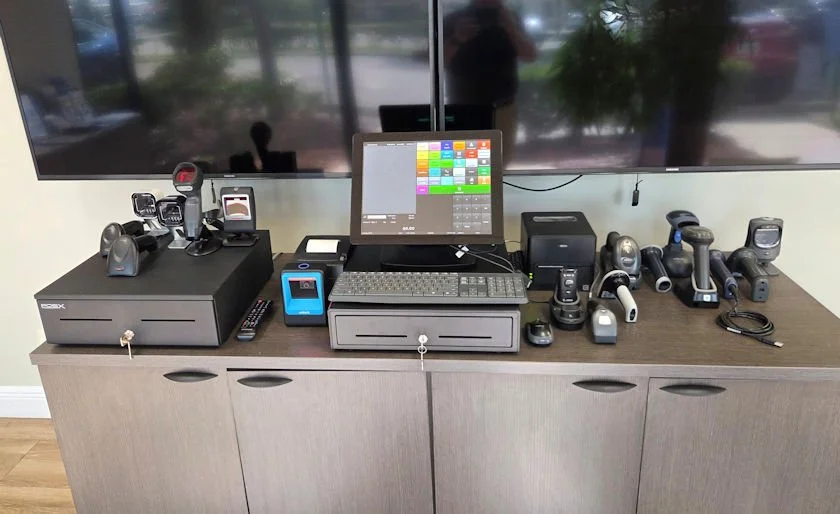
Multi-Store Hardware Planning
Standardize Hardware Where It Makes Sense
Multi-store operations become easier to support when registers, scanners, printers, cash drawers, payment devices, back-office computers, and networking are planned instead of purchased independently by each store.
- POS terminals
- Barcode scanners
- Receipt printers
- Cash drawers
- Customer displays
- Label printers
- Scales where required
- Payment terminals
- Back-office workstations
Compatibility:
Compatibility depends on your POS software, operating system, connection type, drivers, accessories, and configuration. Confirm compatibility before ordering.
System Comparison
Basic POS vs Full Multi-Store Retail POS
A Basic POS May Be Limiting When:
- Each store has a separate item file
- Reports must be combined manually
- Inventory cannot be viewed by location
- Transfers are managed with spreadsheets
- Pricing changes are inconsistent
- Employee permissions are too broad
- Purchasing and receiving are disconnected
- Adding another store creates another isolated system
A Full Multi-Store POS Is a Better Fit When:
- You need branch and company reporting
- Inventory must be tracked by location
- You transfer products between stores
- Product and price data require central control
- Purchasing needs defined workflows
- Employees need role-based permissions
- You are adding stores or warehouses
- You need implementation, training, and support
Multi-Store Implementation
Plan the Structure Before Rolling Out the Software
A successful multi-store project requires more than installing registers. Data, responsibilities, hardware, workflows, payments, reporting, and training should be reviewed before launch.
Review Locations
Document stores, warehouses, registers, users, branch responsibilities, and head-office requirements.
Clean the Data
Review products, UPCs, departments, categories, vendors, costs, prices, taxes, and other information before conversion.
Design Workflows
Plan purchasing, receiving, transfers, counts, pricing, permissions, cash procedures, reporting, and exception handling.
Test & Train
Test checkout, inventory, hardware, reports, permissions, payments, networking, and store procedures before rollout.
Support Matters More With Multiple Stores
More Locations Should Not Mean More Vendors to Manage
Multi-store businesses depend on software, terminals, scanners, printers, payment devices, networking, inventory workflows, employees, and reporting across several locations.
BizTracker can help with POS planning, compatible hardware, installation, configuration, employee training, troubleshooting, and ongoing support.
Tampa Bay customers can also ask about local showroom and onsite service options. Remote planning and support may be available for other customers depending on the project.
Local Tampa Bay POS Support Need Better POS Support? →
Multi-Store POS Answer Center
What Should a Multi-Store POS System Do?
A good multi-store POS system should help a retailer manage each location individually while also giving management a consolidated view of the entire business.
Important capabilities may include inventory by store, centralized item records, pricing, purchasing, receiving, store transfers, employee permissions, cash controls, barcode workflows, consolidated reporting, compatible hardware, and support for adding additional locations.
The best configuration depends on how many stores you operate, what you sell, whether locations share inventory, how purchasing is handled, which employees need access, what hardware you use, how payments are configured, and what reports management needs.
BizTracker Infinity POS is designed for retailers that need more operational detail than basic checkout software and can be configured around multi-location retail workflows.
Why BizTracker Infinity
Retail POS for Businesses That Need Operational Detail
BizTracker Infinity connects checkout with inventory, purchasing, receiving, transfers, users, cash management, reporting, customer information, and store-level operations through a configuration built around the business.
POS Experience Since 1996
BizTracker has decades of experience with retail POS software, hardware, inventory, payments, installation, training, and support.
Complete POS Planning
Software, hardware, payments, networking, implementation, training, inventory, reporting, and support can be reviewed as one project.
Local Tampa Bay Support
BizTracker has a local office, showroom, demo equipment, remote support, and onsite service capabilities for eligible Tampa Bay customers.
Free Multi-Store POS Review
Find Out Where Your Current Multi-Store Setup Is Holding You Back
Tell us how you currently manage your locations. We can review inventory, purchasing, transfers, pricing, reporting, employees, checkout, hardware, payments, support, and expansion requirements.
Questions We Will Review
- How many locations do you have?
- What POS system are you using now?
- Are item files shared or separate?
- Can you see inventory by store?
- How do you handle transfers?
- How is purchasing managed?
- How do you compare locations?
- Who controls prices?
- Are employee permissions adequate?
- What hardware is currently installed?
- Are you adding another location?
- What is the biggest problem today?
Start with your operational problems. A software recommendation should come after we understand how your stores work.
Multi-Store POS Questions
Frequently Asked Questions
What is a multi-store POS system?
A multi-store POS system connects more than one retail location so owners and managers can review sales, inventory, purchasing, users, permissions, stock movement, cash procedures, and performance by branch while maintaining appropriate company-wide control.
Does BizTracker Infinity support multiple retail locations?
Yes. BizTracker Infinity can be configured for multi-location retailers that need branch inventory, purchasing, transfers, reporting, users, permissions, cash management, centralized product information, and operational oversight. Exact capabilities depend on software version, configuration, store procedures, hardware, and network requirements.
Can I see inventory at each store?
BizTracker Infinity can support inventory visibility by location depending on configuration. Available information may include stock activity, quantities, receiving, transfers, adjustments, purchasing, on-order information, and inventory reporting.
Can inventory be transferred between stores?
BizTracker can support store-to-store inventory transfer workflows. The business should define who is allowed to initiate transfers, how sending and receiving are documented, and how discrepancies are handled.
Can one office manage products and pricing for all locations?
BizTracker Infinity can support centralized retail management workflows depending on configuration. Product records, departments, categories, vendors, pricing, permissions, and related settings should be planned around which decisions are made centrally and which are allowed at the store level.
Can prices be different at individual stores?
Multi-store pricing requirements should be reviewed during configuration. Some businesses use common company-wide pricing while others require approved location-specific differences. BizTracker can review the intended pricing structure during the system design process.
Does BizTracker support purchase orders and receiving?
BizTracker Infinity can support purchase order, receiving, vendor, replenishment, and inventory workflows depending on configuration. Multi-store retailers should define whether purchasing is centralized, store-managed, or handled through a combination of responsibilities.
Can I compare sales between stores?
BizTracker can support location-level and consolidated reporting depending on configuration. Management may review sales, departments, products, tenders, inventory activity, employee activity, cash activity, and other operational information.
Can employee permissions be different by role?
Yes. User access can be planned around responsibilities such as cashier, receiver, manager, buyer, inventory manager, regional manager, or owner. Available permissions depend on software configuration and business procedures.
Is a multi-store POS only for large chains?
No. A retailer operating only two locations can benefit from multi-store management when separate item files, inventory, pricing, purchasing, reporting, or employee procedures become difficult to coordinate.
Can BizTracker help us open another store?
Yes. BizTracker can help review products, data, inventory procedures, hardware, payments, users, permissions, networking, installation, training, reporting, and support requirements for an additional location.
Can we reuse our existing POS hardware?
Possibly. Existing terminals, scanners, printers, cash drawers, displays, scales, and other devices should be reviewed for compatibility, condition, connection type, drivers, operating system requirements, and software support before the rollout plan is finalized.
Does BizTracker provide installation and training?
Yes. BizTracker can assist with implementation planning, configuration, hardware, installation, training, testing, rollout, and ongoing support depending on the project and customer location.
Does BizTracker provide local support in Tampa Bay?
Yes. BizTracker has a local Tampa Bay office, showroom, demo equipment, remote support, and onsite service options for eligible customers depending on location, schedule, equipment, and service requirements.
What types of multi-store retailers are a good fit?
BizTracker Infinity may be a good fit for liquor store groups, grocery stores, convenience stores, specialty retailers, regional retail chains, and other businesses that need detailed inventory, purchasing, reporting, employee control, compatible hardware, and support across multiple locations.
Multi-Store Retail Resources
Ready to Improve Multi-Store Control?
See How Your Stores Could Work as One Connected Retail Operation
Start with your biggest problems. BizTracker can review your current stores, inventory, purchasing, reporting, employees, hardware, payments, support, and expansion plans before recommending a system.
Get My Free Multi-Store POS Review Call (877) 767-1249Need help choosing the right multi-store setup? Chat with a BizTracker specialist.