
How Much Does a POS System Cost?
The price of a POS system is more than the cost of a touchscreen or a monthly software subscription. For an inventory-driven retailer, the real investment includes the software that runs the business, product and inventory data, compatible hardware, implementation, employee training, payment processing and the support available when something goes wrong.
BizTracker helps retailers build POS systems around the work that happens before, during and after every sale — including inventory, purchasing, receiving, checkout, employee controls, reporting and multi-store operations.
Serving businesses since 1996 • Updated August 2026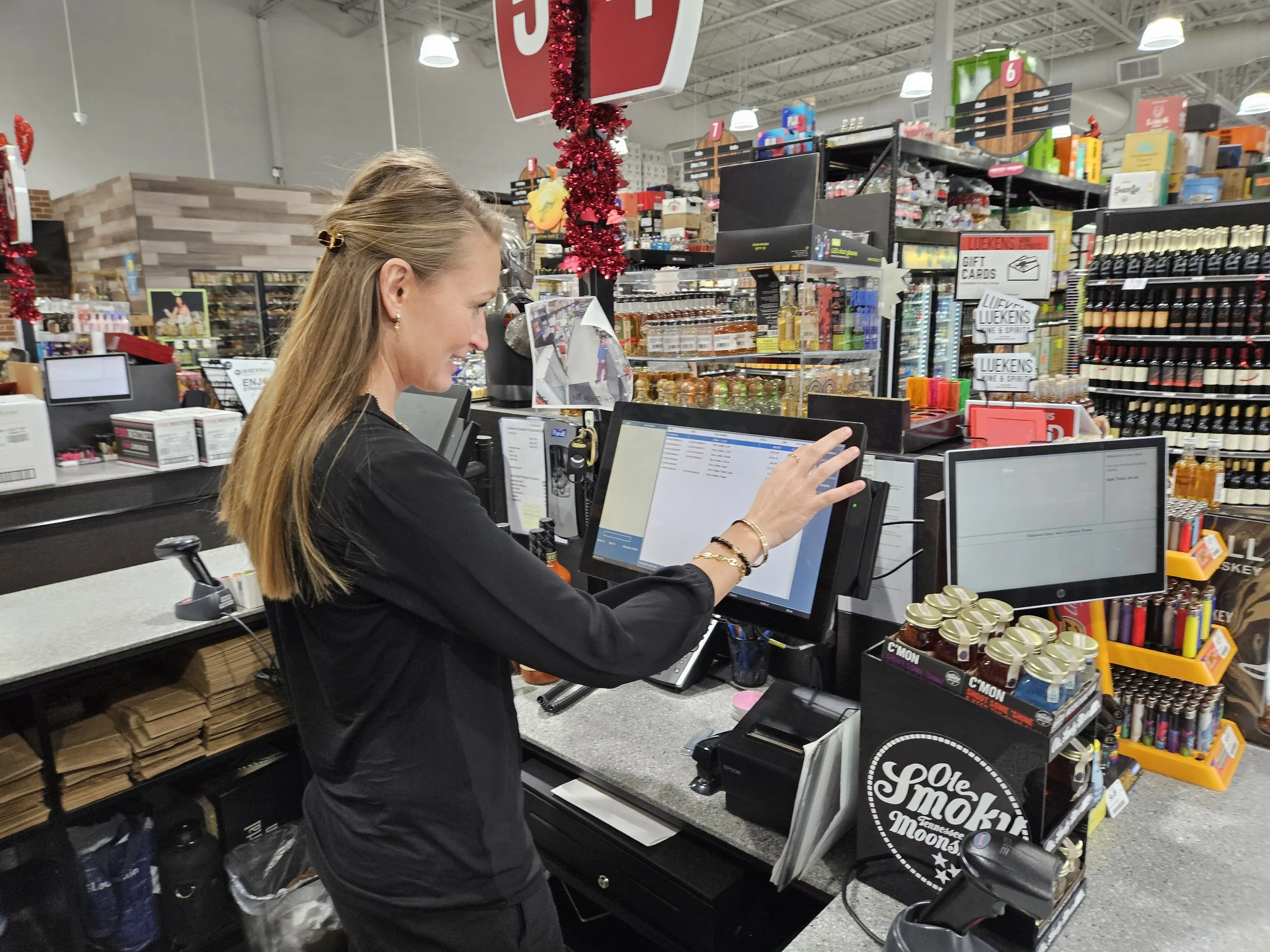
Quick Answer: What Does a Complete POS System Really Cost?
A complete POS system may cost anywhere from a few thousand dollars for a single retail checkout station to substantially more for multi-register, grocery or multi-location operations.
But hardware price alone is a poor way to compare POS systems. A complete cost review should include:
POS Software
Checkout, inventory, purchasing, receiving, reporting, employee controls and management tools.
Implementation
Configuration, data conversion, product setup, testing, payment integration and launch planning.
Hardware
POS stations, scanners, receipt printers, cash drawers, label printers, scales and payment terminals.
Support & Service
Training, troubleshooting, software support, hardware help and local onsite service where available.
The lowest initial price does not always produce the lowest total cost. If a POS system creates inventory problems, requires excessive manual work, limits reporting or has to be replaced again in two years, the inexpensive system can become the expensive choice.
The Software Is the Most Important Part of the POS Investment
A POS terminal records a sale. Good retail POS software should help you understand and control what happens throughout the rest of the business.
BizTracker Infinity is designed for retailers that need checkout to work together with product information, inventory, purchasing, receiving, employees, cash management, labels, customers, reporting and multi-store operations.
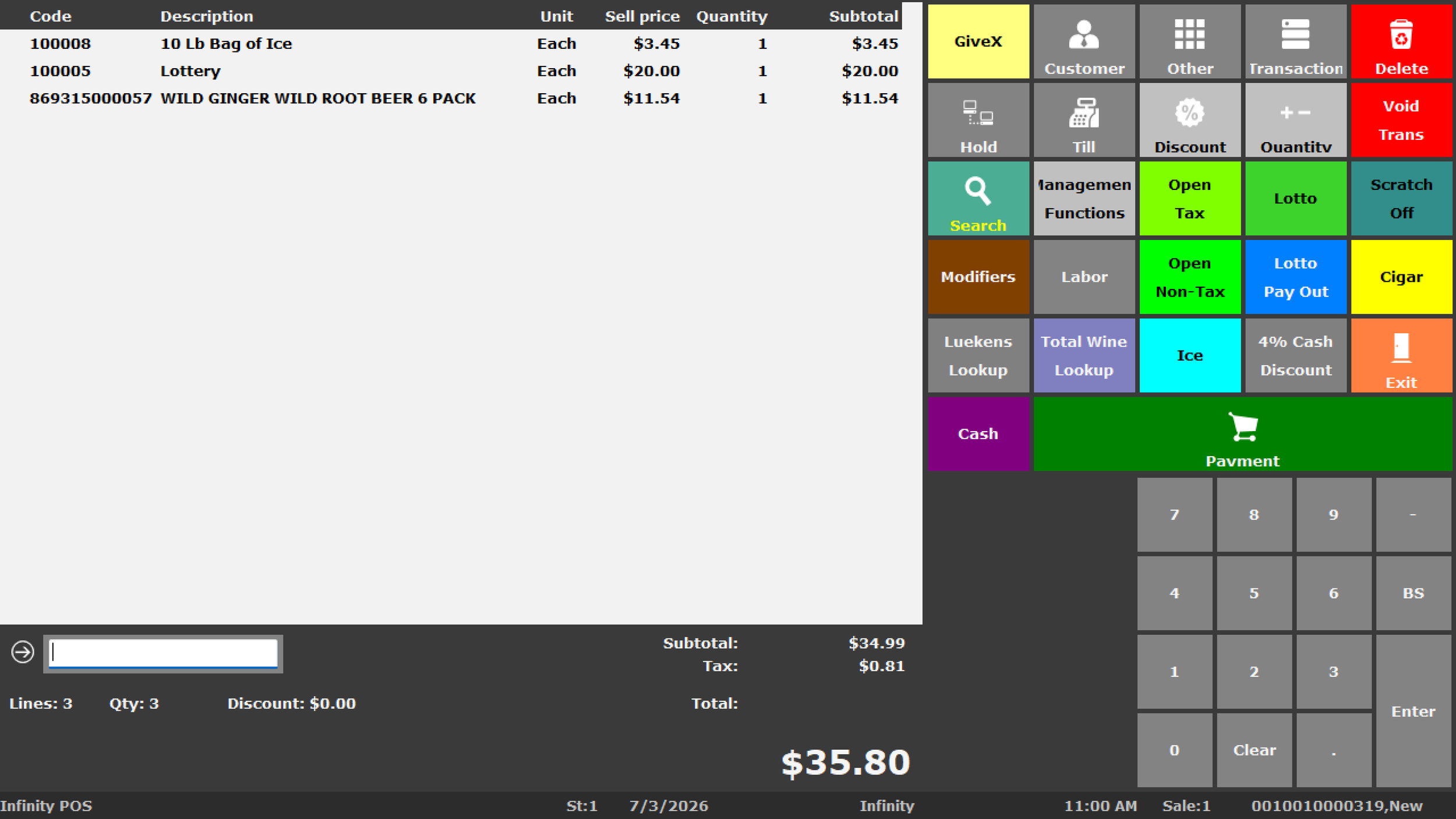
More Than a Payment Screen
Checkout is one part of a much larger retail workflow. Every transaction affects inventory, sales reporting, cash activity, customer history, employee accountability and future purchasing decisions.
Infinity is built to connect those workflows instead of forcing managers to maintain separate spreadsheets and disconnected procedures.
See the Full BizTracker Infinity POS Overview →What Are You Actually Paying for in a Retail POS System?
Retail businesses should evaluate the workflows the POS will control before comparing monthly software fees.
Checkout & Product Lookup
Scan products, search items, process sales and returns, suspend transactions and support front-counter workflows.
Inventory & Item Files
Manage UPCs, SKUs, descriptions, departments, suppliers, costs, prices, taxes, stock settings and product information.
Purchase Orders
Build supplier orders, review quantities and costs, manage expected deliveries and track items that remain on order.
Receiving
Receive vendor deliveries, review quantities and costs, investigate shortages and update inventory.
Stock Counts
Perform physical inventories, department counts, cycle counts, variance reviews and controlled adjustments.
Barcode & Shelf Labels
Support barcode labels, shelf labels, receiving labels and price-change workflows with compatible hardware.
Retail Reporting
Review sales, product movement, margins, inventory value, purchasing, employees and store performance.
Cash & Employee Controls
Review drawers, users, permissions, transfers, discounts, refunds, voids, settlements and balancing activity.
Multi-Store Operations
Support branch inventory, transfers, centralized product information, permissions and consolidated reporting depending on configuration.
What Does the Wrong POS System Cost?
This can be more important than the purchase price. A less expensive POS can become costly when the software cannot keep up with inventory, purchasing, employees, reporting or business growth.
Inventory That Cannot Be Trusted
If the POS says an item is available but employees cannot find it, managers lose confidence in inventory quantities and start relying on manual checking.
Poor Purchasing Decisions
Inaccurate stock levels, costs and sales history can lead to ordering too much of one product and too little of another.
Spreadsheets Everywhere
When the POS cannot handle important workflows, employees often create parallel spreadsheets and manual procedures that require duplicate entry.
Employee Accountability Gaps
Weak controls can make discounts, refunds, voids, cash differences and inventory adjustments harder to investigate.
Limited Reporting
A system that records transactions but cannot provide useful product, margin, employee or inventory information may leave management making decisions without enough data.
Paying for Another Migration
If the first POS cannot scale, the business may have to buy hardware, convert data, retrain employees and change systems again.
Put the Difference Into Perspective
Consider a retailer doing $1,000,000 per year in sales.
Just 0.5% of annual sales equals $5,000.
1% equals $10,000.
This does not mean that changing POS software automatically recovers 0.5% or 1% of sales. It illustrates why inventory accuracy, product availability, employee efficiency, uptime and useful management information can be financially more important than saving a few hundred dollars on the initial system.
Inventory Accuracy Is Part of the Cost of Running the Business
Inventory is often one of a retailer's largest assets. The POS system can affect purchasing, receiving, stock counts, transfers, product availability, pricing, margins and the value management believes is sitting on the shelf.
Too Little Inventory Can Mean
- Stockouts
- Lost sales opportunities
- Unhappy customers
- Emergency purchasing
- Missed reorders
- Employees searching for items that are not actually available
Too Much Inventory Can Mean
- Working capital tied up on shelves
- Slow-moving merchandise
- Storage pressure
- Markdowns
- Obsolete products
- Spoilage or expiration for certain businesses
Software cannot eliminate every inventory problem. Accurate inventory also depends on good product data, receiving procedures, controlled adjustments, employee training and consistent counting. A capable POS should give the business the tools to manage those processes.
Implementation Is Part of the POS Investment
Buying good software and then implementing it poorly can still produce a bad result. A POS transition should be treated as an operational project rather than simply installing a program.
Discovery
Review the current POS, business type, locations, checkout stations, inventory, workflows, reporting and problems that need to be solved.
Data Review
Inspect products, UPCs, SKUs, departments, suppliers, costs, prices, customers and other available data before migration.
Configure & Test
Prepare software, users, permissions, hardware, payments, scanning, labels, reports and business-specific workflows.
Train & Launch
Prepare employees and managers, plan cutover, validate transactions and provide follow-up support after go-live.
Bad Data Does Not Become Good Data Just Because It Was Imported
Moving an old database can also move duplicate products, outdated prices, incorrect costs, missing suppliers, inconsistent departments and old records that no longer belong in the active item file.
Data conversion should be reviewed before the new POS goes live.
Support and Service Have Real Value
POS systems affect live sales. When the store has a checkout, payment, printer, scanning, inventory or network problem, the quality of support can matter more than a small difference in monthly software cost.
Software Support
Assistance with items, inventory, receiving, reports, users, permissions, labels, cash management and operational questions.
Hardware Support
Help reviewing POS stations, receipt printers, scanners, cash drawers, label printers, displays, scales and related equipment.
Training
Help employees and managers understand checkout, inventory procedures, cash handling, reports and support escalation.
Remote Assistance
Many POS software, configuration, training and troubleshooting issues can be handled remotely for customers nationwide.
Local Service
Tampa Bay businesses may have access to onsite service, installation, troubleshooting and in-person assistance depending on location, project and schedule.
Planning for Problems
Backup internet, UPS power, networking, replacement equipment and documented outage procedures can reduce operational risk.
Nationwide Support — With an Additional Local Advantage in Tampa Bay
BizTracker supports customers outside Florida through remote demonstrations, planning, hardware preparation, training and ongoing assistance depending on the project.
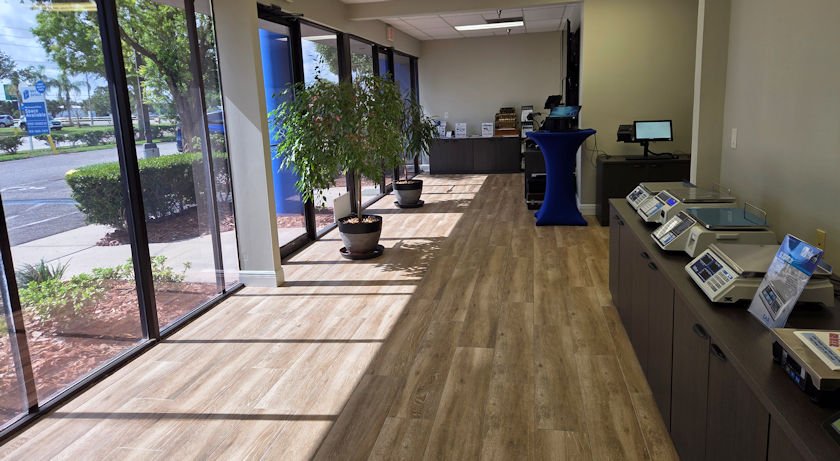
Tampa Bay businesses have an additional advantage: a local office, showroom and onsite service options.
Explore BizTracker Support →There Is Value in Having Your POS Company Nearby
Many POS providers can sell software online. BizTracker gives Tampa Bay businesses another option: work with a POS company that has a real local office, showroom, demo equipment and onsite service options.
That matters when a POS issue involves more than software. A slow register may be a computer or network problem. A payment issue may involve the internet, terminal, processor or configuration. A printer problem may involve the printer, cable, network, driver or POS station.
Not Just a Remote Software Company
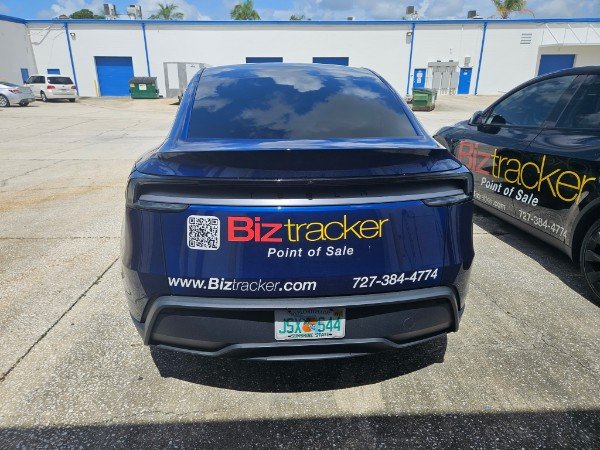
BizTracker is based in Seminole, Florida and serves businesses throughout the Tampa Bay area. Local customers can ask about onsite POS service, installation, hardware review, troubleshooting, employee training and showroom appointments.
Onsite availability depends on customer location, project scope, equipment, service requirements and scheduling.
Learn About Tampa Bay POS Support →Hardware Is Important — But It Should Be Chosen Around the Software
The terminal on the counter is only one component of a complete system. Hardware should be selected based on software compatibility, store workflow, volume, durability and support requirements.
POS Stations
Commercial touchscreen workstations and back-office computers.
Barcode Scanners
Scanning for checkout, product lookup, receiving, inventory and age-controlled workflows where supported.
Receipt Printers
Reliable receipt printing matched to the POS system, interface and store environment.
Cash Drawers
Commercial drawers matched to the printer, terminal or supported interface.
Label Printers
Barcode, shelf, receiving and price labels for inventory-driven retailers.
Scales & Specialized Equipment
Retail scales, label-printing scales, customer displays, data collectors and other business-specific hardware.
Can You Reuse Existing POS Hardware?
Sometimes. Existing terminals, receipt printers, scanners, cash drawers, label printers, displays and scales should be reviewed by exact model, interface, operating system, driver, firmware, condition and software compatibility before reuse is promised.
Reusing appropriate hardware can reduce the cost of a POS replacement. Reusing incompatible or unreliable equipment can create a different set of costs.
Payment Processing Is Part of the Long-Term POS Cost
Processing fees occur continuously, so the difference between payment arrangements can eventually exceed the cost of the hardware sitting at the checkout counter.
BizTracker can review payment processing together with POS software, payment terminals, receipts, cash management, settlement and support rather than treating the card reader as a completely separate system.
Compare the Total Processing Cost — Not Just the Advertised Rate
Processing arrangements can include interchange, processor markup, per-transaction charges, monthly fees, PCI fees, gateway fees and other costs.
One useful calculation is:
Total Processing Fees ÷ Total Card Sales = Effective Processing Rate
BizTracker can review a current merchant statement and help explain the existing cost structure before discussing alternatives.
What Determines the Price of a BizTracker POS System?
The right way to price a business POS system is to review the complete store configuration rather than force every business into the same package.
| Pricing Factor | Why It Matters |
|---|---|
| Number of Locations | Single-store and multi-store businesses have different software, reporting, transfer and deployment requirements. |
| Checkout Stations | Each additional lane may require software licensing, a terminal, scanner, receipt printer, cash drawer, display and payment hardware. |
| Back-Office Workstations | Management, inventory, purchasing and reporting requirements may affect workstation and licensing needs. |
| Inventory Complexity | SKU count, package sizes, suppliers, departments, variations, locations, scales, labels and other workflows can affect system configuration. |
| Existing Data | Data volume, format, quality, duplicates, cleanup and conversion requirements can affect implementation work. |
| Hardware | POS stations, printers, scanners, drawers, label printers, displays, scales and network equipment affect the project total. |
| Payments | Payment devices, processors, integrations, EBT/eWIC requirements and configuration can affect cost and project scope. |
| Installation & Training | Remote setup, onsite work, employee training, manager training, testing and launch assistance vary by project. |
| Support Requirements | The business should consider ongoing software support, hardware support, remote help, local service and backup planning. |
Exact software, hardware, installation, payment and support pricing depends on the selected configuration and current product availability. BizTracker reviews requirements before preparing a final proposal.
Which Businesses Need More Than a Basic POS?
Liquor Stores
Detailed inventory, age-controlled items, bottle-pack-case relationships, labels, purchasing and fast barcode checkout.
Liquor Store POS →Grocery Stores
Multiple lanes, scales, labels, departments, inventory, receiving, purchasing and specialized payment requirements.
Grocery POS →Convenience Stores
Fast checkout, barcode scanning, cash controls, inventory, age-controlled items and dependable hardware.
Convenience Store POS →Specialty Retail
Large item files, suppliers, variants, purchasing, customer records, labels, special orders and detailed reporting.
Specialty Retail POS →Multi-Store Retail
Central product information, transfers, branch inventory, user controls and consolidated reporting.
Multi-Store POS →Wine & Bottle Shops
Product detail, pack relationships, inventory, purchasing, labels, customer information and reporting.
Wine & Bottle Shop POS →Growing Retailers
Businesses that have outgrown a basic register, payment app or spreadsheet-based inventory process.
Retail POS Systems →Businesses Replacing Old POS
Retailers that need data conversion, new hardware, better reporting, stronger inventory or more reliable support.
Plan a POS Migration →How to Compare POS Systems by Value Instead of Price Alone
Ask About Inventory
Can the system manage the quantity and complexity of your products, vendors, receiving, counts, transfers and reordering?
Ask About Your Data
What can be converted? What needs cleanup? What historical information is available? Who verifies the converted data?
Ask About Training
Who trains employees and managers? Does training include inventory, reporting and support procedures or only checkout?
Ask About Support
Who answers when the system has a problem? Is support remote only? Is local onsite service available?
Ask About Hardware
Is it commercial equipment? Is it supported by the POS? Can existing equipment be reused safely?
Ask About Growth
Can the system support more products, registers, employees, locations and operational complexity later?
Continue Your POS Research
These BizTracker resources go deeper into the software, inventory, migration, support and business-specific topics discussed in this guide.
POS System Cost Questions
How much does a POS system cost?
A simple single-register system may cost a few thousand dollars, while grocery, multi-lane and multi-location systems can cost substantially more. The complete cost can include software, terminals, scanners, printers, cash drawers, payment devices, inventory equipment, data conversion, installation, training and support.
Why isn't the cheapest POS system always the least expensive?
An inexpensive POS may become costly if it creates excessive manual work, cannot manage inventory accurately, lacks useful reporting, requires frequent hardware replacement or has to be replaced as the business grows.
How can a POS system affect inventory cost?
POS inventory tools can affect purchasing, receiving, stock counts, transfers, product availability and management reporting. Poor inventory information can contribute to stockouts, excess inventory, employee recounting and less effective purchasing decisions.
What does BizTracker Infinity POS do?
BizTracker Infinity is retail POS and inventory-management software that can support checkout, item files, inventory, purchasing, receiving, stock counts, barcode and shelf labels, cash management, customer records, employee controls, reporting and multi-store operations depending on configuration.
Does BizTracker provide POS installation and training?
Yes. BizTracker can help with implementation planning, software configuration, compatible hardware, testing, employee training, manager training and ongoing support depending on the project and customer location.
Can BizTracker convert data from an old POS system?
Data conversion may be possible depending on the old system, available exports, database access, file formats, data quality and fields available. Product, vendor, customer, barcode, price, cost and inventory information should be reviewed before a conversion is promised.
Can my existing POS hardware be reused?
Possibly. Compatibility depends on exact hardware model, operating system, interface, drivers, firmware, payment processor, software version, condition and support status.
Does BizTracker provide local POS support in Tampa Bay?
Yes. BizTracker has a local office and showroom in the Tampa Bay area and provides local POS support, showroom demonstrations and onsite service options for eligible customers depending on location, project scope, equipment and scheduling.
Does BizTracker support customers outside Tampa Bay?
Yes. BizTracker supports customers nationwide through remote demonstrations, system planning, hardware preparation, training and ongoing assistance depending on the project.
Why does local POS support matter?
POS problems can involve software, computers, printers, scanners, payment terminals, internet service, networking or employee procedures. Access to a local team can be valuable for businesses that need onsite troubleshooting, installation, training or hardware support.
What should be included in a POS system quote?
A useful POS quote should identify the required software, licenses, checkout stations, back-office systems, scanners, printers, cash drawers, displays, payment devices, label equipment, data conversion, installation, training and support services that apply to the project.
How much does POS software cost?
POS software pricing varies by provider, number of registers, locations, software capabilities, licensing model, support and services. The better comparison is whether the software supports the inventory, purchasing, reporting, employee and operational workflows the business actually needs.
What factors affect retail POS pricing?
Major factors include number of locations, checkout lanes, back-office workstations, inventory complexity, product data, hardware, payment requirements, data conversion, installation, training and ongoing support.
Can a POS system help reduce overstock?
Inventory reporting can help management identify slow-moving products, excess stock, stockouts, open orders and other information that may improve purchasing decisions. Software alone cannot eliminate overstock; good product data and consistent inventory procedures are also important.
Does BizTracker provide payment processing?
BizTracker provides merchant processing guidance and can review payment processing as part of the complete POS environment. A current merchant statement can be reviewed to help explain existing processing costs and fees before alternatives are discussed.
How do I know if my current POS system is holding the business back?
Common warning signs include inventory quantities that cannot be trusted, too many spreadsheets, limited reporting, weak employee controls, disconnected purchasing, unreliable hardware, poor support, difficulty managing multiple locations or a system that records sales but does not help manage the rest of the operation.
How do I get an exact BizTracker POS price?
Contact BizTracker for a requirements review. The team can review your business type, locations, registers, current POS, inventory, product data, hardware, payment setup, installation, training and support requirements before preparing a recommended configuration and pricing.
Before You Price a POS System, Make Sure You Are Pricing the Right System
Tell us about your current POS, number of locations, checkout stations, products, inventory problems, purchasing workflow, reporting needs and support concerns. BizTracker can help you determine what the system actually needs to do before you spend money replacing it.
(877) 767-1249Product, software, payment, installation and onsite service availability varies by configuration, project requirements, location and schedule.