
Find Out What Your Credit Card Processing Is Really Costing You
Upload one recent merchant-processing statement. BizTracker will calculate your estimated effective processing cost, review important fees and recurring charges, compare practical alternatives when appropriate, and evaluate how your payment setup fits your POS, terminals and checkout workflow.
- Written, plain-English review
- Estimated effective processing cost
- Fee and recurring-charge breakdown
- Possible monthly and annual difference
- POS and terminal workflow observations
- Honest recommendation—even if you should stay
Initial review targeted within two business days. One complete recent monthly statement is generally enough. You may redact complete bank account and tax-identification numbers before uploading.
What Is a Free Merchant Statement Review?
A merchant statement review is an evaluation of the rates, charges and account fees shown on a business's credit-card processing statement.
BizTracker uses the statement to estimate the business's total processing cost, identify important recurring fees or unclear charges, and explain the findings in plain English. When enough information is available, the review may also compare practical alternatives and estimate the possible monthly or annual difference.
Unlike a basic rate quote, BizTracker also considers the relationship between processing, payment terminals, equipment, reconciliation and the business's point-of-sale system.
Upload One Recent Statement
A complete recent monthly processing statement is generally enough for an initial review. Businesses with multiple merchant accounts or locations may upload additional statements.
We Review the Complete Cost
We look beyond the headline percentage to review processing charges, monthly fees, PCI-related fees, gateway costs, authorization charges, equipment costs and other recurring items.
Receive a Practical Recommendation
The written review explains what appears ordinary, what deserves clarification, what may affect your POS workflow and which next step appears most reasonable.
Upload Your Merchant Statement
Tell us a little about your business and attach one complete recent statement. A BizTracker specialist will review the available information and follow up with a written, plain-English summary.
- You may redact complete bank-account numbers.
- You may redact complete tax-identification numbers.
- Do not include passwords, PINs or cardholder account data.
- Leave fee, volume and transaction sections visible.
Uncomfortable uploading a financial document before speaking with someone? Schedule a conversation first or contact BizTracker.
What You Receive From the Review
The goal is not to send you another vague processing quote. The goal is to help you understand the current setup and make a better-informed decision.
Effective Cost Estimate
An estimate of processing-related charges as a percentage of the total card sales shown on the statement.
Fee Breakdown
A review of major recurring fees, processor charges, gateway costs, PCI-related items, equipment costs and unclear charges.
Practical Comparison
When appropriate and supportable, a side-by-side comparison with a realistic alternative rather than an unsupported teaser rate.
Recommended Next Step
A recommendation to keep the setup, question specific fees, renegotiate, compare alternatives or review the broader POS workflow.
A Tangible Review, Not Just “We Can Save You Money”
A processing proposal should be evaluated using the complete cost, contract, hardware, support and checkout workflow—not only the lowest percentage printed in an advertisement.
- Current card volume and total processing charges
- Estimated effective processing percentage
- Recurring monthly or annual account fees
- Equipment rental or lease concerns
- Gateway, software, authorization and batch charges
- Possible POS reconciliation or integration issues
- Potential monthly and annual difference when calculable
Merchant Statement Review
| Example item | Example finding |
|---|---|
| Monthly PCI-related charge | Review |
| Gateway or software charge | Compare |
| Equipment lease | Clarify terms |
| Downgrade or non-qualified charges | Investigate |
| POS reconciliation workflow | Discuss |
This example is for explanation only and does not represent an actual customer result or guaranteed savings. Actual findings depend on volume, card mix, transaction methods, pricing structure, equipment, contract terms and the completeness of the information supplied.
What BizTracker Looks for on a Processing Statement
Processing Costs
- Total monthly processing charges
- Interchange and assessment entries
- Processor markup or pricing structure
- Debit and credit transaction costs
- Card-present and card-not-present activity
Account and Compliance Fees
- Monthly account charges
- PCI compliance or noncompliance fees
- Monthly minimums
- Annual or semiannual charges
- Statement and reporting fees
Transaction-Level Charges
- Authorization charges
- Batch or settlement fees
- Address-verification charges
- Voice authorization charges
- Chargeback-related fees
Software and Gateway Costs
- Gateway charges
- Virtual-terminal fees
- Token or vault fees
- Software or platform charges
- Duplicate or overlapping services
Equipment and Contract Concerns
- Terminal rental or lease payments
- Equipment replacement charges
- Contract-related items visible on the statement
- Early termination concerns requiring clarification
- Separate vendors billing for connected services
POS and Reconciliation Workflow
- Integrated versus separate terminal workflow
- Manual payment-amount entry
- POS-to-processor reconciliation
- Tips, tabs, refunds and settlement procedures
- Multi-location reporting considerations
Changing Processors Can Affect More Than the Processing Rate
A lower-looking quote may still create problems if it changes the terminal, separates payments from the POS, adds a gateway, complicates settlement, interferes with EBT or tips, or makes reporting harder to reconcile.
BizTracker works with POS software, terminals, scanners, receipt printers, cash drawers, payment workflows, inventory and reporting. That allows the review to consider how a processing decision may affect the business operation around the payment.

What a Useful Processing Comparison Should Include
Two proposals are not truly comparable when one omits equipment, gateway, support, software or operational costs.
| Comparison area | Current arrangement | Possible alternative | Questions to answer |
|---|---|---|---|
| Processing structure | Current pricing and fees | Proposed pricing structure | Are all pass-through and processor charges included? |
| Monthly account costs | Current recurring charges | Proposed recurring charges | Are PCI, gateway, statement and platform fees included? |
| Hardware | Owned, rented or leased terminals | Required replacement equipment | Who owns it, supports it and replaces it? |
| POS workflow | Current integrated or separate process | Proposed checkout process | Will employees manually enter payment totals? |
| Reporting | Current settlement and reconciliation | Proposed reporting workflow | Will POS totals and processor totals reconcile clearly? |
| Contract and support | Current terms and service | New terms and service model | Who handles processing, terminal and POS problems? |
Processing Reviews for Different Types of Businesses
The right payment setup depends on more than monthly volume. Transaction type, checkout procedures, inventory, age restrictions, tips, EBT and multiple locations can change what should be evaluated.
Liquor Stores
Review payment costs alongside age-verification procedures, high-SKU inventory, checkout speed, cash handling and multi-store reporting.
Grocery Stores
Consider debit activity, EBT workflows, multiple lanes, scale or barcode processes, settlement and high transaction volume.
Convenience Stores
Evaluate frequent small transactions, debit usage, EBT, fast checkout, restricted products and reporting needs.
Restaurants
Review tips, tabs, preauthorizations, adjustments, online orders, settlement procedures and restaurant POS integration.
Multi-Store Businesses
Look for separate merchant accounts, inconsistent rates, location fees, multiple gateways and fragmented reporting.
Specialty Retailers
Compare processing with customer service, inventory, returns, deposits, special orders and the existing retail POS workflow.
Your Processor, Terminal and POS Must Work Together
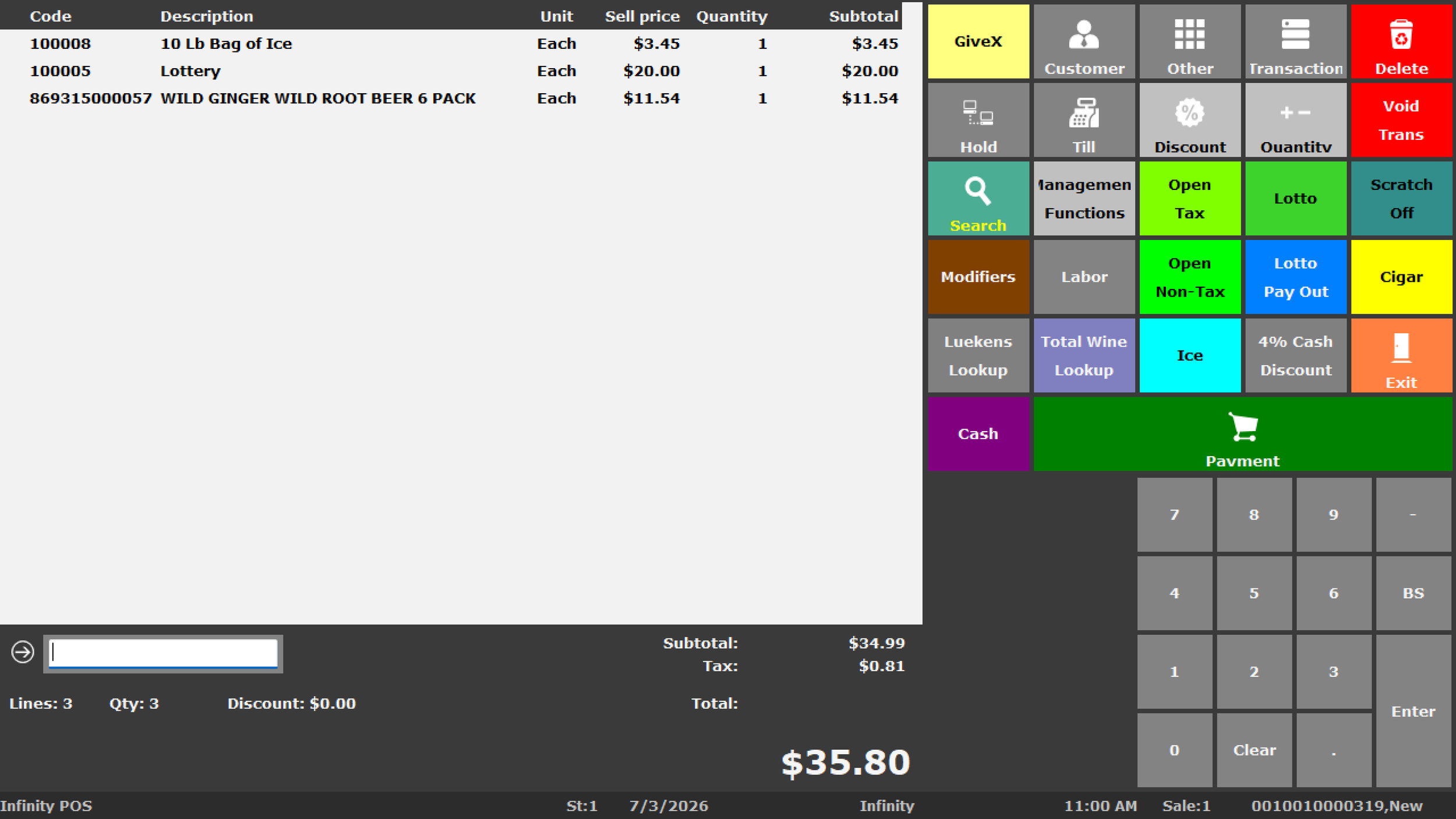
Payment processing does not operate in isolation. The checkout system may also need to manage products, taxes, discounts, returns, receipts, cash, employees, tips, EBT, customer records and reporting.
Before changing payment providers, determine whether the proposed terminal can connect to the current POS, whether a gateway is required, who supports the integration and how deposits will reconcile with POS reports.
The Recommendation May Be to Keep Your Current Setup
BizTracker will not claim that every business is overpaying. When the available information indicates that the current arrangement appears reasonable, we will say so.
Payment Guidance From a Company That Also Understands POS Operations
BizTracker provides POS software, cash registers, payment guidance, hardware planning, installation, training and support for retailers, restaurants and other businesses.
This broader operational experience matters because an apparent processing savings can be offset by equipment replacement, disconnected systems, duplicate data entry, difficult reconciliation, weak support or software that no longer fits the business.
- Retail and restaurant POS planning
- Payment terminal and hardware compatibility
- Integrated and standalone payment workflows
- Single-store and multi-store operations
- Local Tampa Bay showroom and service options
- Nationwide remote planning and support options

Payment decisions should support the checkout, inventory, reporting and service needs of the complete business.
Payment Processing and POS Planning Resources
Free Merchant Statement Review FAQ
What is a merchant-processing statement review?
A merchant-processing statement review is an evaluation of the rates, charges and account fees shown on a business's credit-card processing statement. BizTracker estimates the effective processing cost, identifies important recurring or unclear charges and explains the findings in plain English.
Is the BizTracker merchant statement review really free?
Yes. The initial statement review is offered without a review fee and without an obligation to change processors or purchase a POS system.
How many statements should I upload?
One complete recent monthly statement is generally enough for an initial review. Seasonal businesses, multi-location businesses or businesses with multiple merchant accounts may benefit from providing additional statements.
Can I redact sensitive information?
Yes. You may redact complete bank-account numbers, tax-identification numbers and unrelated sensitive information. Leave transaction volumes, processing charges and fee sections visible. Do not submit passwords, PINs or full cardholder account information.
What is an effective processing rate or effective processing cost?
An effective processing cost is an estimate calculated by dividing total processing-related charges by total card sales for the same period. It can provide a broader view than an advertised percentage because it considers multiple charges shown on the statement.
Does a lower quoted rate always mean lower processing costs?
No. A quote may not include every processor markup, monthly charge, gateway fee, equipment expense, authorization fee or contract cost. The proposed POS and terminal workflow may also create operational costs that are not reflected in the quoted rate.
What fees does BizTracker review?
The review may include interchange and assessment entries, processor charges, monthly account fees, PCI-related fees, gateway and software costs, authorization and batch charges, equipment rental or lease payments, monthly minimums, annual fees and duplicate or unclear charges visible on the statement.
Will the review show possible monthly or annual savings?
When the statement contains sufficient information and a realistic alternative can be compared, BizTracker may estimate a possible monthly and annual difference. Savings are not guaranteed and will not be claimed when the available information does not support the calculation.
Will BizTracker tell me if my current pricing is reasonable?
Yes. If the available information indicates that the current pricing and payment setup appear reasonable, BizTracker will say so instead of manufacturing a savings claim.
Do I have to change payment processors?
No. The review does not require you to switch. A recommendation may be to keep the current provider, question selected charges, renegotiate, compare alternatives or examine the wider POS and payment workflow.
Can BizTracker review equipment leases or contract charges?
BizTracker can identify equipment or contract-related charges that appear on the statement and flag items that deserve clarification. A complete legal interpretation of a contract may require review of the actual agreement by a qualified professional.
Can you review a separate terminal and POS setup?
Yes. The review can consider whether payments are integrated with the POS or entered manually on a separate terminal, and whether the arrangement may be creating extra checkout steps, keying errors or reconciliation work.
How long does the initial review take?
BizTracker targets an initial review within two business days after receiving a readable, complete statement. Complex accounts, multiple locations or missing information may require additional time or follow-up.
Is the review only for existing BizTracker customers?
No. The review is available to business owners who want help understanding their current merchant-processing statement, regardless of whether they currently use a BizTracker POS system.
Can I speak with someone before uploading a statement?
Yes. You may schedule a conversation with a BizTracker specialist or contact BizTracker before submitting a statement.
Get a Clearer Picture of Your Processing Costs
Upload one recent statement for a free written review, or speak with a BizTracker specialist before sharing your document.