
POS Item File Setup
POS Item File Setup for BizTracker Infinity POS
Your POS system is only as accurate as the stock item records behind it. If product codes, SKUs, descriptions, departments, pricing, tax settings, supplier information and inventory fields are not set up correctly, checkout, reporting and stock control become harder to manage.
BizTracker helps businesses set up BizTracker Infinity POS item files for sales, barcode scanning, inventory control, purchase orders, stock counts, label printing, reporting and long-term store management.

Quick answer: A clean Infinity POS item file should organize stock item records with product codes, SKUs, descriptions, departments, sub-departments, classes, prices, taxes, units, suppliers, inventory settings, alternate scan codes and reporting fields before the system goes live.
Stock Item Maintenance is the foundation of Infinity POS
In BizTracker Infinity POS, item setup is managed through Stock Item Maintenance. This is where the stock item records that drive checkout, inventory, purchasing, pricing, reporting and restrictions are created and maintained.
A stock item record is not just a product name and price. It can control how the item scans, how it is taxed, how it is grouped, how it is purchased, how it is counted, how it reports and how it can be sold at the point of sale.
What is a POS item file?
A POS item file is the product database inside the point of sale system. In Infinity POS, item records can include product code, SKU, description, item type, department, sub-department, class, tax, unit, prices, cost, markup, gross profit, supplier records, pack size, inventory quantities, alternate scan codes, age limits and stock count groups.
Checkout accuracy
Product codes, descriptions, prices, taxes and item types help products ring correctly at checkout and reduce manual lookup for cashiers.
Inventory control
Stock item records support stock on hand, saleable stock, on-order quantities, min and max levels, purchase orders, receiving and stock counts.
Reporting structure
Departments, sub-departments, classes, costs, prices and item movement help owners review sales, margins, product activity and inventory value.
Item file setup inside BizTracker Infinity POS
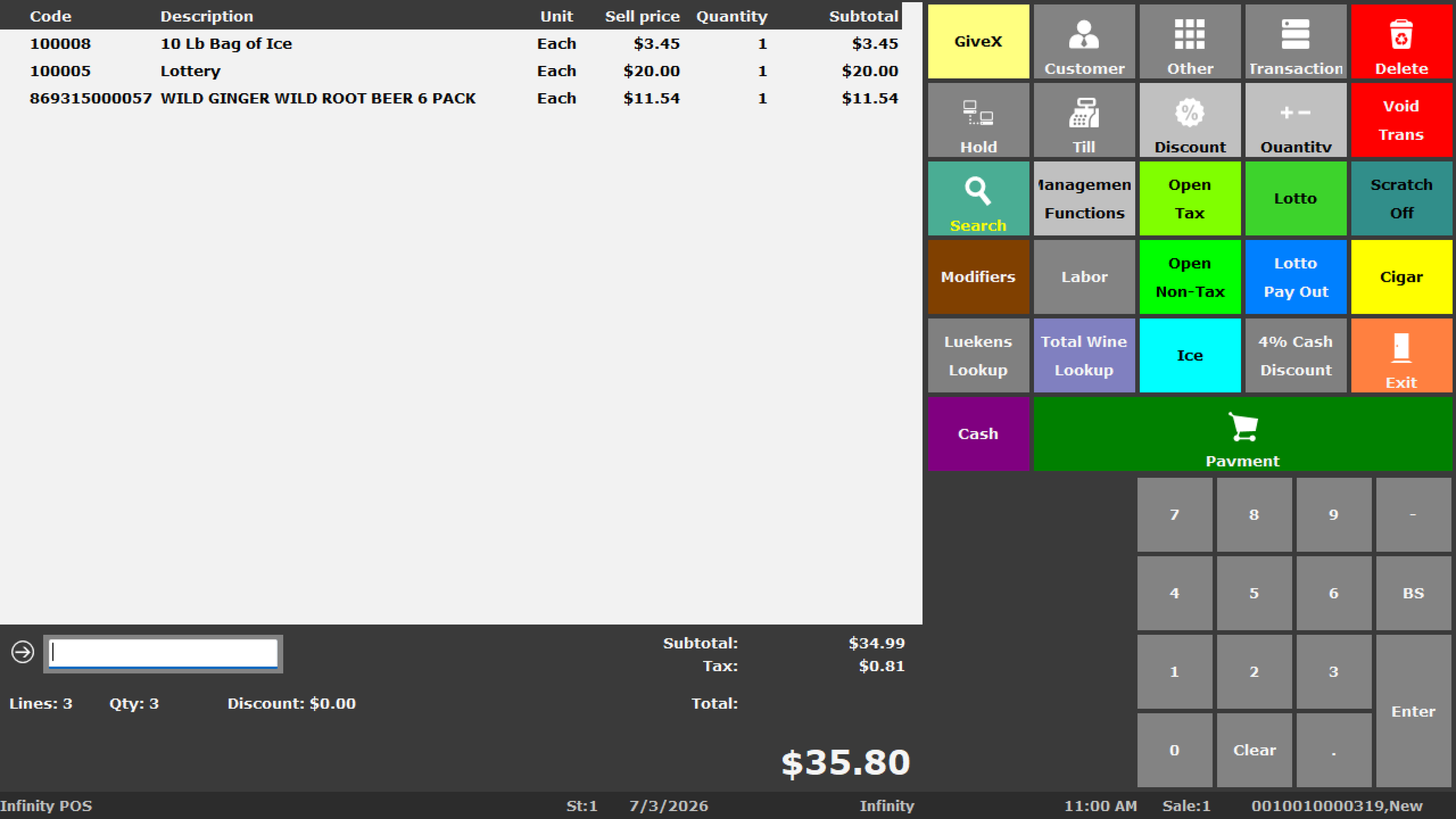
BizTracker Infinity POS gives businesses a powerful software foundation for managing item records, but the setup still needs to match how the business operates. A grocery store, liquor store, convenience store, retail shop and restaurant will not all use the same item structure.
Build the system around real store data
Infinity POS can support item records, product hierarchy, pricing, inventory workflows, purchasing, stock counts, reporting and back-office review. Good item file setup makes those tools easier to use after go-live.
Important Infinity item setup areas
- Inventory > Maintain Stock > Items
- Main tab, Browse tab and Details tab
- General, Inventory and Other sub-tabs
- Product code, UPC, barcode and SKU structure
- Department, sub-department and class hierarchy
- Price 1 through Price 8 where applicable
- Supplier, pack size, pack unit and pack cost
- Stock count groups, alternate scan codes and age limits
Core stock item fields to set up correctly
Infinity item records contain many options. Not every business uses every field, but the core fields should be planned carefully before the system goes live.
Product code, UPC and SKU setup
Product codes and SKUs are not the same thing. A product code is the unique identifier for an item, often used as the UPC or barcode. A SKU can group related items together for searching and management.
Product code and UPC planning
Product codes should be reviewed before go-live because they drive barcode scanning and item lookup. If product codes are wrong, employees may scan the wrong item, fail to find products or create duplicate records.
- Confirm UPCs before import or entry
- Avoid duplicate product codes
- Use consistent product code rules
- Review manually entered and generated codes
- Test common scans before go-live
SKU structure
SKUs can be useful when related products need to be grouped. For example, multiple sizes or variations can share a SKU while each sellable item still has its own product code or barcode.
- Use SKUs for product families where helpful
- Keep naming and numbering consistent
- Match SKU structure to reporting needs
- Review apparel-style or variant workflows if applicable
- Train staff on SKU versus barcode lookup
Departments, sub-departments and classes
Infinity supports a product hierarchy using departments, sub-departments and classes. This structure should be built around how you want to report on the business, not just how products happen to be listed today.
Departments
Departments group major areas of the business, such as grocery, beer, wine, tobacco, deli, household, apparel or service items.
Sub-departments
Sub-departments can break major departments into more useful groups for reporting, inventory review and item management.
Classes
Classes provide another level of organization so item movement, profitability and category performance can be reviewed in more detail.
Do not rush the product hierarchy
Many reporting problems start with poor department and category decisions. If everything is placed into broad generic groups, the POS may still ring sales, but the reports will not help the owner understand what is really happening in the business.
Supplier, pack size and ordering setup
For inventory-heavy businesses, item file setup should include supplier and purchasing information. This is especially important for stores that use purchase orders, receiving, vendor cost tracking or case-pack purchasing.
Supplier records
Assigning suppliers to stock items helps support ordering, receiving, vendor review and cost management.
Supplier product code
Supplier product codes can help connect your POS item record with the vendor’s item reference, especially when ordering or receiving.
Pack size and pack unit
Pack size and pack unit help define how items are purchased from a supplier versus how they are sold in the store.
Inventory fields that affect stock control
Infinity item records include inventory fields that help manage stock movement, purchasing, saleable quantities and stock counts. These fields should be set up and reviewed based on how the business actually manages inventory.
Barcode scanning, alternate scan codes and labels
Barcode scanning and label printing depend on clean item records. If product codes, alternate scan codes, descriptions, prices or label fields are wrong, the problem appears at checkout, on shelf labels and during inventory counts.

Alternate scan codes and RFID tags
Infinity can store alternate scan codes against a stock item. This is useful when the same product may be scanned using more than one barcode, supplier code or item reference.

Label type and item labels
Label workflows work best when item descriptions, product codes, prices and label fields are consistent. This is important for stores that print shelf labels, product labels or price-change labels.
Age-restricted items, prompts and special controls
Some item records need more than price and barcode setup. Liquor stores, convenience stores, grocery stores and specialty retailers may need item-level controls that affect how products are sold.
Age limits
Age limits can help prompt staff when age-restricted products such as alcohol or tobacco are added to a sale, depending on configuration and business setup.
Item prompts
Prompts can display item-related messages to staff when certain products are scanned. These can support reminders, sales instructions or operational notes.
Sale restrictions
Some items may need date, time, payment, discount or sale rules depending on the business type and local requirements.
Parent and child items for case breaks
Parent and child item relationships can be useful when a business buys products one way and sells them another way. For example, a store may buy wine by the case but sell individual bottles to customers.
Parent item
The parent item represents the larger unit, such as a case, pack, carton or box. It can be used to manage the whole purchased unit.
Child item
The child item represents the smaller sellable unit, such as a bottle, can or individual item. The selling ratio connects the child item to the parent.
Item file setup by business type
Different businesses need different item file structures. BizTracker helps set up BizTracker Infinity POS around the products, reporting needs and inventory workflows used by the business.
Retail stores
Retail stores need clean product names, UPCs, departments, classes, prices, costs, inventory quantities and reporting structure.

Liquor stores
Liquor stores may need age-restricted item controls, bottle sizes, case breaks, price changes, alternate scan codes and inventory reporting.

Grocery stores
Grocery stores may need departments, scale-related items, frequent price changes, vendor records, label printing and stock count groups.

Convenience stores
Convenience stores need fast scanning, age-restricted item controls, frequent price changes, cash control, item reporting and product group visibility.

Restaurants and food service
Restaurants may need menu items, modifiers, departments, tax settings, employee permissions, kitchen printer routing and reporting structure.
Multi-store businesses
Multi-store businesses need consistent item structure, clean reporting, inventory visibility and setup that can support multiple locations.
Our practical POS item file setup process
Item file setup should be planned before the POS system goes live. BizTracker can help organize the setup process so Infinity POS is easier to use from the start.
Review current product data
We review product lists, UPCs, SKUs, descriptions, prices, departments, classes, costs, suppliers, pack sizes and inventory data.
Plan the item structure
Departments, sub-departments, classes, item types, tax settings, pricing fields and reporting groups should be organized around how the owner wants to manage the business.
Prepare the Infinity POS item file
Product data can be organized for BizTracker Infinity POS so checkout, scanning, inventory, purchasing and reporting work together.
Test scanning, pricing and reports
Before go-live, it helps to test common items, receipts, barcode scanning, labels, taxes, departments, price fields and reports.
Train employees and managers
Employees should understand item lookup, scanning and price checks. Managers should understand reporting, inventory tasks and item maintenance.
Common item file mistakes to avoid
Many POS problems come from rushed or messy product setup. Cleaning up the item file early can save time after the system is live.
Mistakes to avoid
- Using unclear product descriptions.
- Creating duplicate product codes or UPCs.
- Confusing SKU structure with barcode structure.
- Putting too many products into generic departments.
- Skipping sub-departments and classes when reporting needs them.
- Not reviewing tax settings before go-live.
- Ignoring supplier, pack size and cost fields.
- Waiting to test labels and barcode scanners until opening day.
Better setup practices
- Use consistent item naming rules.
- Confirm product codes and alternate scan codes.
- Build departments around reporting needs.
- Set tax, unit, price and cost fields carefully.
- Use supplier and pack information where inventory matters.
- Review min and max quantities before relying on reordering.
- Test scanning, pricing, labels and reports before go-live.
- Train managers on ongoing item maintenance.
Local POS item file help in Tampa Bay
BizTracker is a local POS software and support company serving businesses throughout the Tampa Bay area. We help businesses set up BizTracker Infinity POS software, matching hardware, inventory workflows, item files, barcode scanning, label printing, reporting and employee training.
Showroom demos
Business owners can review practical POS software, item setup and hardware options before making a decision.
Onsite and remote support
BizTracker can help with setup, training, troubleshooting and follow-up support depending on the business need.
Software and hardware experience
We help connect BizTracker Infinity POS with scanners, printers, cash drawers, scales, labels and related equipment.
Helpful related pages
Use these pages to learn more about BizTracker Infinity POS, inventory workflows, label printing, reporting and local support.
Frequently Asked Questions
What is a POS item file?
A POS item file is the product database inside the point of sale system. In Infinity POS, stock item records can include product code, SKU, description, type, department, sub-department, class, tax, unit, prices, cost, supplier information, inventory fields and sales controls.
What is Stock Item Maintenance in Infinity POS?
Stock Item Maintenance is the Infinity Back Office area where stock item records are created, searched, edited and maintained. It is central to checkout, inventory, purchasing, reporting and item-level controls.
What is the difference between SKU and product code?
The product code is the unique product identifier, often used as the UPC or barcode. The SKU can group related items together so similar products can be searched, reviewed or managed as a group.
Can BizTracker help organize departments and classes?
Yes. BizTracker can help plan departments, sub-departments and classes so Infinity POS reports are more useful for sales review, inventory management and store operations.
Does item file setup help with inventory management?
Yes. A clean item file supports stock on hand, saleable quantity, on-order quantity, receiving, purchase orders, min and max stock levels, stock count groups, item movement and inventory reporting.
Can BizTracker help with barcode scanning and labels?
Yes. BizTracker can help with product codes, alternate scan codes, barcode scanner setup, label printing workflows and item data needed for cleaner scanning and labeling.
Can BizTracker help train employees on item lookup and inventory tasks?
Yes. BizTracker can help train employees and managers on item lookup, barcode scanning, price checks, stock item maintenance, reports and inventory tasks inside BizTracker Infinity POS.
Build a cleaner Infinity POS item file before go-live
BizTracker helps businesses set up BizTracker Infinity POS item files for checkout, barcode scanning, label printing, inventory, purchase orders, stock counts, reporting, employee training and long-term store management.