Grocery Store POS Software for eWIC, Inventory, Labels, Scales and Reporting
BizTracker provides grocery store POS systems that help independent grocers manage checkout, inventory, eWIC workflows, shelf labels, scale items, purchase orders, stock counts, reporting, cash management, and multi-store operations.
For neighborhood markets, ethnic grocery stores, specialty food stores, produce markets, convenience-grocery operators, and multi-location grocery retailers, the right POS system should move checkout quickly while giving owners better control over the back office.
Grocery Stores Need More Than Basic Checkout
A grocery store is not a simple retail checkout environment. A store may sell packaged goods with UPCs, produce, meat, dairy, frozen foods, beverages, deli items, prepared foods, bulk goods, tobacco where applicable, age-restricted items, house account items, vendor-delivered products, and eWIC-eligible products where approved.
That means the POS system needs to support fast scanning, item file management, department reporting, shelf labels, price changes, weighted items, purchasing, receiving, stock counts, cashier controls, payment workflows, and local support.
BizTracker helps grocery retailers configure Infinity POS around the way the store actually operates, including software, hardware, installation, training, and ongoing service.
Grocery Store POS Needs
- Fast barcode scanning at checkout
- Large grocery item file management
- Departments, sub-departments, and product classes
- Open department items such as selected produce
- Scale and weighted item workflows where configured
- eWIC workflows where approved and supported
- Shelf labels and price change labels
- Purchase orders and vendor receiving
- Stock takes and inventory counts
- Reporting, cash management, and local support
BizTracker Infinity for Grocery Store Operations
BizTracker Infinity POS is a strong fit for grocery stores that need deeper control than a cash register or light retail POS. Grocery item files can be large, prices change often, suppliers deliver frequently, labels need to match the shelf, and stock records need to stay accurate enough for purchasing and reporting.
Infinity can help grocery stores manage detailed stock item records with product codes, descriptions, departments, prices, costs, suppliers, pack sizes, stock-on-hand, minimum and maximum quantities, alternate scan codes, prompts, restrictions, and other item information depending on configuration.
BizTracker can help design the system around your store layout, item file, departments, checkout lanes, scanners, receipt printers, label printers, scales, payment workflow, eWIC requirements, and staff training needs.
Core Grocery Store POS Features
Fast Grocery Checkout
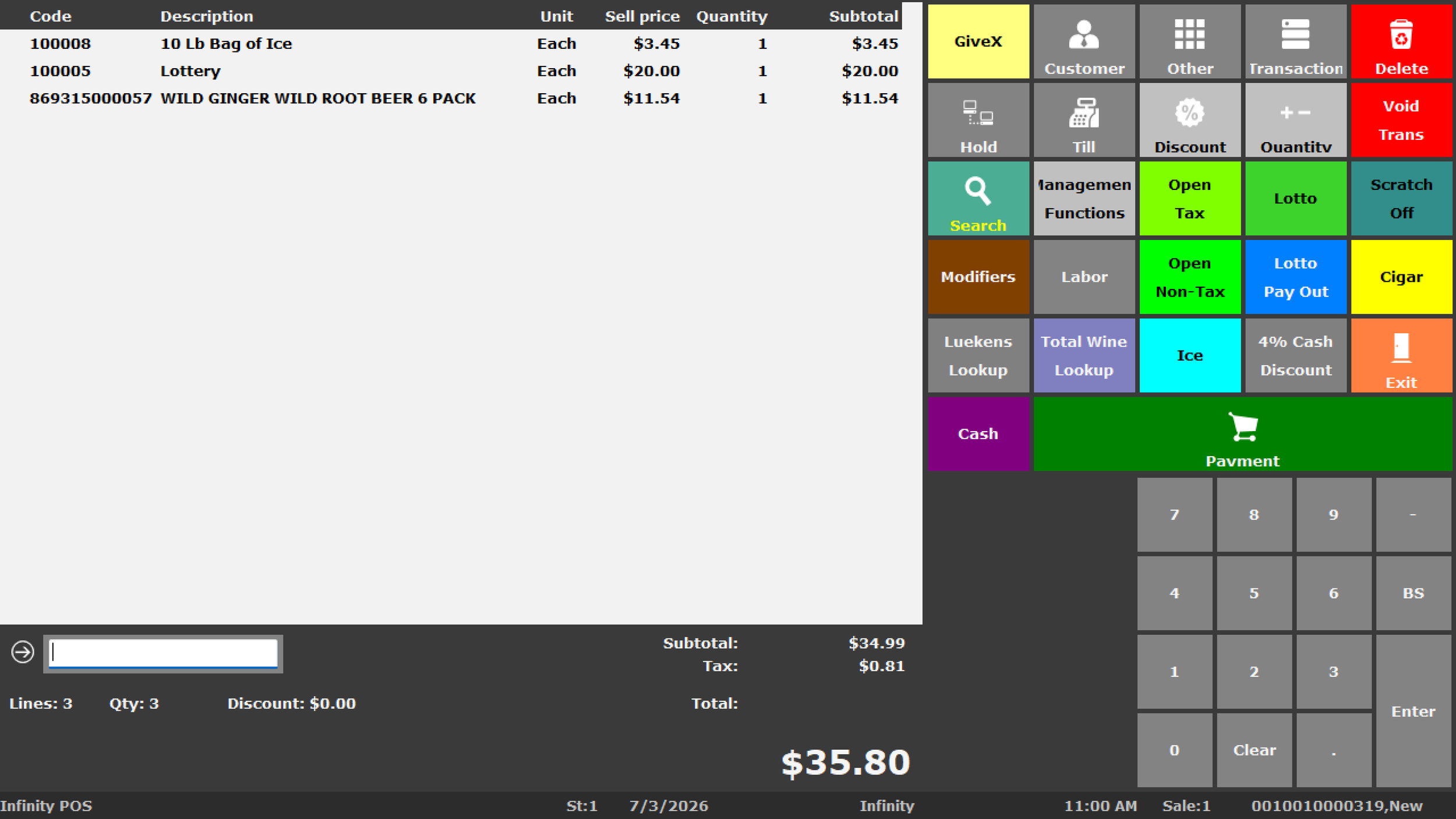
Scan UPCs quickly, search items, use department buttons where configured, and keep lanes moving during busy periods.
Department Reporting
Organize items by grocery, produce, dairy, frozen, meat, beverages, household, tobacco where applicable, and other store categories.
eWIC Workflows
Support eWIC workflows through approved processing and agency requirements where available and configured.
Open Department Items
Use open department workflows for selected items that may not have a traditional UPC, such as produce or miscellaneous grocery items.
Scale and Weighted Items
Support weighted item workflows where compatible scales, item setup, tares, labels, and configuration are confirmed.
Shelf and Barcode Labels
Print barcode labels, shelf labels, price labels, and receiving labels so products, shelves, and checkout pricing stay aligned.
Purchase Orders
Use purchase order and receiving workflows to manage supplier deliveries, costs, quantities, and stock-on-hand updates.
Stock Takes
Perform full store counts or cycle counts by department, product group, shelf area, or other criteria depending on setup.
Reporting and Dashboard
Review sales, department performance, inventory value, stock turn, gross profit, in-stock percentage, and other retail KPIs where configured.
Grocery POS Success Starts With the Item File
Grocery stores often have thousands of items. If product codes, descriptions, costs, prices, departments, suppliers, pack sizes, and labels are not maintained properly, checkout, reporting, ordering, and inventory can all suffer.
BizTracker can help review your grocery item file before launch so the system supports daily operations instead of becoming another messy database.
Grocery Inventory Management
Inventory management is one of the biggest reasons a grocery store moves beyond a basic cash register. A full POS system can help track what was sold, what was received, what is on hand, what should be ordered, and which departments are performing.
Stock Item Records
Maintain product codes, descriptions, departments, prices, costs, suppliers, pack sizes, taxes, prompts, restrictions, and other item details.
Stock-on-Hand
Track inventory quantities based on sales, receiving, adjustments, transfers, and stock takes.
Min/Max Levels
Use minimum and maximum stock levels to support reorder planning for selected products where maintained properly.
Alternate Scan Codes
Support alternate barcodes where a product may have multiple package codes, supplier codes, or changing UPCs.
Supplier Details
Track supplier product codes, primary suppliers, alternate suppliers, unit cost, pack size, and vendor-related information.
Inventory Reports
Review stock value, stock movement, reorder reports, zero sales, department activity, and product performance.
eWIC POS Support for Grocery Stores
BizTracker Infinity POS supports eWIC workflows through CDP processing for many WIC agencies, states, territories, and tribal programs. eWIC availability, certification, setup, and approval requirements can vary by agency, state, retailer type, processor, and store configuration.
For grocery stores that accept WIC benefits, eWIC support can be a major requirement when choosing a POS system. The POS setup needs to be reviewed with the processor, agency requirements, approved product file needs, store workflow, payment configuration, and hardware compatibility.
BizTracker can help grocery retailers evaluate Infinity for eWIC workflows, but final availability depends on the state or agency, processor, certification, and store approval process.
Processor Review
Confirm eWIC processing requirements, certification status, and store approval requirements before changing systems.
Approved Item Setup
Review how eligible products, item files, departments, and approved product lists need to be handled.
Checkout Workflow
Plan cashier training, payment flow, receipts, eligible item handling, and customer service procedures.
eWIC support must be confirmed for the specific state or agency, processor, store type, software version, configuration, and approval process before relying on it for live operations.
Open Department Items and Produce Workflows
Not every grocery item has a normal barcode. Produce, small counter items, local goods, samples, and miscellaneous items may need a different workflow. Infinity can support open department items and drill-down style POS access where configured.
This can help cashiers ring items that do not have a scannable UPC while still giving management a way to track sales by department or category.
Produce Buttons
Create POS buttons or drill-down menus for selected produce items or product groups where appropriate.
Open Departments
Ring selected items without traditional product codes while still tracking sales through a managed department structure.
Not Found Review
Review items scanned or entered without a matching stock record where not-found logging is enabled.
Open department items should be used carefully. Too much open department selling can reduce item-level reporting accuracy and inventory visibility.
Open Department Selling Should Not Replace Good Item Setup
Open department items are useful for selected grocery workflows, but they should not become a shortcut for products that should have proper item records. Packaged goods, high-volume items, eWIC items, taxable items, age-restricted products, and margin-sensitive products should usually be set up with accurate item records.
BizTracker can help decide which products should have item records and which items can be handled through department or drill-down workflows.
Scale, Weighted Item and Tare Workflows
Grocery stores may sell products by weight, including produce, bulk foods, deli items, prepared foods, or specialty items. Infinity can support grocery workflows involving weighted products, tares, item setup, labels, and compatible hardware where configured.
Scale workflows should be reviewed carefully because legal-for-trade requirements, label formats, scanner behavior, item records, price-per-unit, and hardware compatibility all matter.
| Workflow Area | What to Review |
|---|---|
| Weighted Items | Review which products are sold by weight and how they should be represented in the item file. |
| Tares | Confirm whether container, bag, tray, or package weight needs to be deducted from the total weight. |
| Scale Labels | Confirm barcode format, price encoding, item code, label size, and scanner readability. |
| Legal-for-Trade Requirements | Confirm scale certification, calibration, state requirements, and legal-for-trade setup where applicable. |
| Hardware Compatibility | Confirm scale model, connection type, label printer, POS station, and software compatibility before purchase or installation. |
Scale and weighted item support depends on hardware, software version, legal-for-trade requirements, barcode format, configuration, and store workflow. Confirm compatibility with BizTracker before purchasing hardware or changing scale procedures.
BizTracker Also Supports Grocery Scales
BizTracker sells, services, repairs, and calibrates CAS and Ishida scales for local Tampa Bay businesses. For grocery stores that use label printing scales or legal-for-trade weighing, this can be important because the POS, scale, labels, and item setup need to work together.
Scale hardware, label formats, calibration requirements, and POS compatibility should always be confirmed before installation.
Shelf Labels, Barcode Labels and Price Changes
Grocery stores change prices often. When shelf labels do not match the POS, customers get frustrated and cashiers get pulled into avoidable price checks. Infinity label workflows can help print shelf labels, barcode labels, item labels, price labels, and receiving labels where configured.
Shelf Labels
Print shelf tags with product description, price, barcode, SKU, or other fields depending on the label template.
Receiving Labels
Print labels as products are received so items can move to the shelf or stock room with scannable identification.
Price Change Labels
Print labels after price updates so shelf pricing stays aligned with the item file and checkout lane.
Purchase Orders and Grocery Receiving
Grocery stores deal with frequent supplier deliveries and changing costs. A structured purchase order and receiving process can help track what was ordered, what arrived, what changed in cost, and how stock-on-hand should be updated.
Infinity can support purchase order workflows, supplier product codes, pack sizes, receiving, on-order quantities, automatic ordering options, and reorder reporting depending on configuration.
Vendor Orders
Create and manage purchase orders for grocery suppliers, distributors, and selected vendor categories.
Goods Receiving
Receive products against purchase orders and review delivered quantities, costs, and supplier references.
Cost Review
Review supplier cost changes during receiving so gross profit reporting remains more reliable.
Stock Takes and Grocery Inventory Counts
Grocery inventory changes quickly. Stock takes and cycle counts help management compare the physical store to the POS inventory record. Counts can be performed by department, category, item group, location, or selected products depending on setup.
Full Store Counts
Perform complete physical inventory counts for major inventory reviews, year-end, or operational reset projects.
Cycle Counts
Count selected categories more often, such as dairy, frozen, meat, beverages, high-value items, eWIC-related categories, or shrink-sensitive departments.
Variance Review
Review differences between counted quantities and system stock-on-hand before accepting final stock take results.
Grocery Inventory Accuracy Depends on Daily Discipline
A POS system can help track grocery inventory, but it cannot fix poor store procedures by itself. Accurate inventory depends on clean item records, proper receiving, correct scale workflows, price updates, label accuracy, cashier training, stock adjustments, and regular counts.
BizTracker can help configure the system and train staff, but the store still needs a consistent daily process.
Reporting for Grocery Store Owners
Grocery reporting should help owners understand department performance, gross profit, inventory value, stock movement, cash activity, product sales, purchase order activity, and stock turn. Reporting becomes more useful when item data, costs, receiving, labels, and stock takes are maintained properly.
| Reporting Area | Why It Matters for Grocery Stores |
|---|---|
| Department Sales | Review grocery, produce, dairy, frozen, meat, beverages, household, tobacco where applicable, and other store categories. |
| Gross Profit | Review margin where item costs and receiving workflows are maintained correctly. |
| Stock Valuation | Understand how much money is tied up in inventory across departments and products. |
| Zero Sales | Identify products that have not sold during a selected period and may need pricing, placement, or ordering review. |
| Stock Turn | Review whether grocery inventory is moving quickly enough or sitting too long. |
| Purchase Order Review | Review supplier ordering, receiving activity, on-order quantities, and vendor cost changes. |
| Cash and Settlement | Review cash drawer, station, media, banking, and settlement workflows where configured. |
Cash Management for Grocery Stores
Grocery stores may operate multiple lanes, multiple cashiers, multiple shifts, and cash-heavy transactions. Infinity Advanced Cash Management can support drawer, user, station, float, transfer, banking, blind balancing, and settlement workflows depending on configuration.
For grocery stores, the goal is to reduce drawer confusion and make end-of-shift or end-of-day review easier for managers.
Drawer Accountability
Decide whether cash should be tracked by user, station, or drawer depending on store workflow.
Shift Review
Support multiple cashier shifts, drawer counts, over and short review, and manager approval procedures.
Banking Workflow
Support transfer, settlement, depositor, and banking procedures where advanced cash management is configured.
Age-Restricted and Controlled Item Workflows
Some grocery stores sell products that require cashier reminders or selling controls, such as alcohol, tobacco where applicable, selected medicines where permitted, or other controlled products. Infinity can support item-level prompts, age limits, restricted sale rules, payment restrictions, discount limits, and manager permissions depending on configuration.
Age Prompts
Prompt cashiers to check ID when selected age-restricted products are added to the sale.
Item Prompts
Display cashier reminders for product handling, store policy, customer service, or manager approval workflows.
Restricted Sale Rules
Review date, time, payment, and discount rules for selected grocery categories where appropriate.
Customer Accounts and Grocery Store Orders
Some grocery stores need customer account workflows for business customers, tax-exempt customers, house accounts, customer orders, special requests, or selected delivery and pickup workflows. Infinity can support customer account tools depending on configuration and store policy.
House Accounts
Support approved customer charge accounts where debtor account workflows are configured and managed carefully.
Customer Orders
Track special customer requests, deposits, outstanding orders, and fulfillment status where configured.
Tax-Exempt Customers
Support selected customer records and financial settings where tax-exempt workflows are needed and reviewed properly.
Multi-Store Grocery POS
Multi-location grocery retailers need branch visibility. Owners may need to compare stores, move inventory, centralize item data, manage price changes, review purchasing, control user permissions, and maintain consistent reporting across locations.
Branch Inventory
Review stock by location where multi-store workflows are configured and inventory data is maintained properly.
Stock Transfers
Move selected products between stores when one location has stock and another needs it.
Central Reporting
Review branch performance, department sales, stock movement, cash activity, and inventory value across locations.
Grocery Store Hardware and Peripherals
The right grocery hardware depends on lane count, item volume, eWIC requirements, scanner needs, receipt printing, label printing, scale workflows, counter layout, cash drawer procedures, and payment requirements.
POS Terminals
Countertop POS stations for grocery checkout lanes, service counters, and back office areas.
Barcode Scanners
Handheld or presentation scanners for high-volume grocery checkout and item lookup workflows.
Receipt Printers
Thermal receipt printers for customer receipts, transaction records, and checkout lane workflows.
Cash Drawers
Drawer selection depends on checkout lane layout, cashier accountability, shift procedures, and store volume.
Label Printers
Label printers can support barcode labels, shelf labels, price changes, receiving labels, and stock room workflows.
Scales
Scale support depends on legal-for-trade requirements, label formats, model compatibility, calibration, and store workflow.
Hardware compatibility, eWIC support, payment support, scale support, label printing, cash drawer behavior, and peripheral support depend on software version, processor, agency approval, hardware model, installation, and store configuration. Confirm compatibility before purchase.
Local Tampa Bay Grocery POS Support
Grocery POS projects need planning, installation, hardware setup, item file work, label setup, scale review, eWIC review, cashier training, manager training, and ongoing support.
BizTracker is local to the Tampa Bay area and supports businesses with onsite service, installation, training, hardware support, and ongoing POS help. Availability may vary by location, schedule, and service requirements.
BizTracker Can Help With
- Grocery POS workflow planning
- Item file and department setup
- eWIC review and processing workflow planning
- POS terminal, scanner, printer, and drawer setup
- Scale and label printer planning
- Purchase orders and receiving workflows
- Inventory, stock take, and reporting setup
- Owner, manager, and cashier training
- Ongoing support and onsite service
Grocery POS Buyer Checklist
| Area to Review | Questions to Ask |
|---|---|
| Item File | Can the system manage UPCs, SKUs, descriptions, departments, costs, prices, suppliers, alternate scan codes, and tax settings? |
| eWIC | Is eWIC supported for the store’s state or agency, processor, approval process, and configuration? |
| Produce and Open Departments | Can the POS handle selected non-barcoded items, department buttons, drill-down menus, and produce workflows? |
| Scales | Are scales, label formats, legal-for-trade requirements, calibration, and POS compatibility confirmed? |
| Labels | Can the store print shelf labels, barcode labels, receiving labels, and price change labels? |
| Purchasing | Can the POS help create purchase orders, receive stock, track supplier product codes, and review vendor cost changes? |
| Stock Counts | Can the system support physical inventory counts, cycle counts, variance review, and inventory adjustments? |
| Reporting | Can the owner review sales, departments, gross profit, inventory value, stock movement, and cash settlement? |
| Support | Will the provider help with setup, training, hardware, eWIC review, labels, scales, and ongoing service? |
Related BizTracker Infinity Pages
Use these pages to learn more about how Infinity supports grocery inventory, eWIC, purchasing, labels, stock counts, reporting, and store control.
Related Store-Type Pages
Frequently Asked Questions
What is the best POS system for a grocery store?
The best grocery store POS system depends on item count, lane count, eWIC needs, scanner requirements, scale workflows, label printing, inventory control, payment processing, reporting, and support expectations. BizTracker can help review whether Infinity POS is a good fit for your store.
Can BizTracker Infinity POS support grocery inventory?
Yes. Infinity can help grocery stores manage stock item records, departments, suppliers, costs, prices, stock-on-hand, purchase orders, stock takes, labels, and reports depending on configuration.
Can Infinity POS support eWIC?
BizTracker Infinity POS supports eWIC workflows through CDP processing for many WIC agencies, states, territories, and tribal programs. Availability, certification, setup, and approval requirements vary by agency, state, processor, retailer type, and store configuration.
Can Infinity handle produce items without barcodes?
Infinity can support open department items, drill-down menus, and POS buttons for selected items that do not have normal UPC barcodes. This should be used carefully so reporting and inventory remain useful.
Can Infinity support scale items?
Infinity can support selected weighted item workflows where compatible scales, label formats, tares, item setup, software version, and legal-for-trade requirements are confirmed. BizTracker can help review compatibility before installation.
Can BizTracker help with grocery scales?
Yes. BizTracker sells, services, repairs, and calibrates CAS and Ishida scales for local Tampa Bay businesses. Scale compatibility, legal-for-trade requirements, and POS workflows should be confirmed before installation.
Can Infinity print grocery shelf labels?
Yes. Infinity can support shelf label, barcode label, price label, and receiving label workflows where configured with compatible label printers, label templates, and item data.
Can Infinity help with grocery price changes?
Infinity can support price change and label printing workflows depending on configuration. This can help keep shelf labels and POS prices aligned when prices change.
Can Infinity support grocery purchase orders?
Yes. Infinity can support purchase orders, supplier product codes, pack sizes, receiving, on-order quantities, automatic ordering options, and reorder reports depending on setup.
Can Infinity help grocery stores with stock takes?
Yes. Infinity can support physical inventory counts, stock takes, cycle counts, variance review, and barcode scanning workflows depending on configuration and hardware compatibility.
Can Infinity show grocery department sales?
Yes. Infinity reporting can help review sales by department, sub-department, class, product, branch, and other criteria where the product hierarchy and reports are configured properly.
Can Infinity help identify slow-moving grocery inventory?
Yes. Infinity reporting can support zero sales, stock performance, stock valuation, stock turn, and stock movement reports that help identify slow-moving or overstocked products.
Can Infinity support age prompts for alcohol or tobacco?
Yes. Infinity can support item-level prompts, age limits, restricted sale rules, and permissions for age-restricted products depending on configuration. These tools support store policy but do not replace employee training or compliance responsibility.
Can Infinity support customer accounts for grocery stores?
Yes. Infinity can support selected customer account workflows, including house accounts, customer records, tax-exempt customers, customer orders, and debtor-style accounts depending on configuration and store policy.
Can Infinity support multiple grocery stores?
Yes. Infinity can support multi-store and head office workflows depending on setup. This can include branch stock visibility, transfers, purchase orders, users, permissions, and reporting.
Can grocery stores use cash management in Infinity?
Yes. Infinity Advanced Cash Management can support drawer, user, station, float, transfer, banking, blind balancing, and settlement workflows depending on configuration.
Can BizTracker help choose grocery POS hardware?
Yes. BizTracker can help review POS terminals, barcode scanners, receipt printers, cash drawers, label printers, scales, customer displays, and other hardware based on the store layout and requirements. Compatibility should be confirmed before purchase.
Does BizTracker provide local grocery POS support?
Yes. BizTracker is local to the Tampa Bay area and can provide POS setup, training, hardware support, scale support, label printer support, eWIC workflow review, and onsite service where available. Availability may vary by location, schedule, hardware, software version, and service requirements.
Can BizTracker replace a grocery cash register with a full POS system?
Yes. BizTracker can help grocery stores evaluate whether it makes sense to move from a cash register to a full POS system. The right decision depends on item count, eWIC needs, inventory requirements, hardware, payment workflow, labels, scales, and support expectations.
How do I know if Infinity POS is right for my grocery store?
If your grocery store needs inventory control, eWIC workflows, scale item workflows, shelf labels, purchase orders, stock counts, reporting, cash management, multi-store support, or local service, Infinity may be a strong fit. The best next step is to talk with BizTracker about your store layout, lanes, item count, hardware, payment needs, and support expectations.
Talk to BizTracker About Grocery Store POS
BizTracker can help you evaluate the right POS system for your grocery store, including Infinity POS software, checkout hardware, eWIC workflow review, label printing, scales, inventory, purchasing, reporting, and local support.